Miro vs FigJam: Which Whiteboard Fits Your Team?

Miro and FigJam look like the same product from a distance: an infinite canvas, sticky notes, cursors flying around, a timer for the workshop. The buying decision is completely different, though. Miro sells you a whiteboard directly — every person gets a seat, priced per member, on a plan built around the whiteboard itself. FigJam has no standalone plan at all: it comes as a Collab seat bundled inside a Figma subscription, priced at $3 to $5 a month depending on which Figma tier you are on. That single fact shapes the whole comparison, including the price, which is why this guide starts with the money and works outward to the features.
The short answer: If your company already pays for Figma, give non-designers a $3 Collab seat and use FigJam — it is the cheapest decent whiteboard you can buy, at $360 a year for a 10-person team. Pay for Miro when the whiteboard is a core tool for teams outside design — big workshops, process mapping, program planning — or when you need its Enterprise controls. For a 10-person team, Miro Starter costs $960 a year and Miro Business $1,920; FigJam costs $360 for the same ten people, and $672 if two of them also need Figma Design. The gap narrows as soon as designers enter the picture, and it disappears entirely if your team runs serious workshops every week.
What Are Miro and FigJam?
Miro is a standalone visual collaboration platform built around an infinite canvas. It started life as RealtimeBoard and has grown into the default whiteboard for product teams, agile coaches, consultants, and operations groups — the tool you buy when whiteboarding is a job in itself, not an add-on to something else. Miro says it has passed 100 million users across 250,000 companies, a figure it announced at its Canvas 25 event in October 2025. The product covers the full arc from a quick brainstorm to structured planning: workshops, retrospectives, user story mapping, journey maps, diagrams, docs, and kanban-style planning, all on the same board.
FigJam is Figma’s whiteboard, launched in 2021 as a lighter, more playful companion to Figma Design. It covers the same basics — sticky notes, diagrams, voting, timers, stamps, templates — but it lives inside Figma: the same account, the same admin console, the same contract, and the same seat model. Designers can drop real components and frames from Figma Design straight into a FigJam board, which is the feature no standalone whiteboard can copy. Figma itself is growing fast: the company reported $370.1 million in revenue in the second quarter of 2026, up 48% year over year, with 15,964 paid customers spending more than $10,000 a year, up 34%. FigJam rides that growth — every new Figma customer is a potential FigJam user who never has to buy a whiteboard at all.
The market they share is expanding quickly. The collaborative whiteboard software market was valued at $3.81 billion in 2026 and is forecast to reach $9.59 billion by 2031, a compound annual growth rate of 20.28%, according to Mordor Intelligence. That growth is why both tools keep adding AI features and why the pricing keeps shifting — and why a comparison written a year ago is already wrong on the numbers that matter most.
Miro vs FigJam at a Glance
Here is the whole comparison on one screen. The sections below it work through the rows that actually change the decision — price, facilitation, AI, and integrations.
| Feature | Miro | FigJam |
|---|---|---|
| What it is | Standalone visual collaboration platform, sold as its own product | Figma’s whiteboard, sold as a Collab seat inside a Figma plan |
| Entry paid price | Starter $8/member/month billed annually ($10 monthly) | Collab seat $3/month on Professional, $5 on Organization/Enterprise |
| Free tier | 3 editable boards, unlimited members, 10 AI credits/month | Included in Figma Starter: 3 FigJam files, one page each |
| 10-person team, per year | Starter $960; Business $1,920 | $360 (Collab only); $672 mixed with 2 Full seats |
| Templates | 300+ official plus 7,000+ community templates | Around 100, design-focused |
| Facilitation | Private mode, voting, timer, presenter mode, native estimation app, Talktracks | Voting, timer, stamps and emotes; no private mode, no native estimation |
| Integrations | 250+ apps; two-way Jira and Azure DevOps sync on Business | Native Figma Design embedding; third-party widgets for Jira and the rest |
| AI | Miro AI, credit-based: 10 credits/month on Free, 25/member on Starter, 50/member on Business; MCP server | Figma AI, credit-based: 500 credits/month per Collab seat; 150/day up to 500/month on Starter |
| Best for | Cross-functional teams, big workshops, process and program work | Design-first teams already paying for Figma |
| G2 rating | 4.6/5 from about 13,500 reviews | 4.5/5 from about 465 reviews |
How Much Do Miro and FigJam Cost?
Pricing is where the two tools stop looking alike, because they are not priced on the same axis at all. All prices below are US list prices from the vendors’ own pricing pages, checked November 26, 2026, on annual billing unless stated otherwise.
Miro pricing: four plans, priced per member
Miro charges per member, and annual billing saves 20% over monthly. The Miro pricing page lists four tiers. Free costs $0 and includes unlimited team members but only 3 editable boards, plus 10 AI credits a month to try the AI features. Starter is $8 per member per month billed annually ($10 on monthly billing) and adds unlimited boards, private boards, and 25 AI credits per member per month. Business is $16 per member per month billed annually ($20 monthly) and adds single sign-on, guest access, multiple private workspaces, advanced diagramming, and the two-way Jira and Azure DevOps sync, with 50 AI credits per member per month. Enterprise is custom pricing with data residency options, audit logs, SIEM integrations, and granular AI controls. A 14-day trial of Business is available before you commit.
The free plan has a catch that matters more than the 3-board cap. On Free, every board you create is visible to all team members by default, and there are no visitor or guest roles — anyone you invite to collaborate becomes a member. Private boards and controlled sharing start at Starter. For a team that whiteboards anything sensitive — hiring panels, strategy, unreleased product work — that alone pushes you to a paid plan.
FigJam pricing: there is no FigJam price
FigJam cannot be bought on its own. You buy a Figma seat, and the seat decides what you can open. On Figma’s pricing page, the Collab seat is the one that unlocks FigJam: $3 a month on the Professional plan, $5 a month on Organization and Enterprise, with 500 AI credits a month included. The Full seat, which adds Figma Design and everything else, is $16 a month on Professional. The Dev seat is $12. Figma’s free Starter plan includes FigJam too, capped at 3 FigJam files with one page each, plus 150 AI credits a day up to 500 a month. Organization and Enterprise are billed annually only. I worked through the full seat restructure in my Figma vs Canva comparison — the short version is that Figma now charges by seat type, not by editor, and the Collab seat is the cheapest way into the whole Figma ecosystem.
What a team actually pays
The chart below shows the annual bill for a 10-person team that only needs a whiteboard. The math is simple, and the gap is large: FigJam costs $360 a year for ten Collab seats, Miro Starter costs $960, and Miro Business costs $1,920. The realistic middle case — two designers who also need Figma Design on $16 Full seats, plus eight collaborators on $3 Collab seats — comes to $672 a year, still $288 cheaper than Miro Starter.
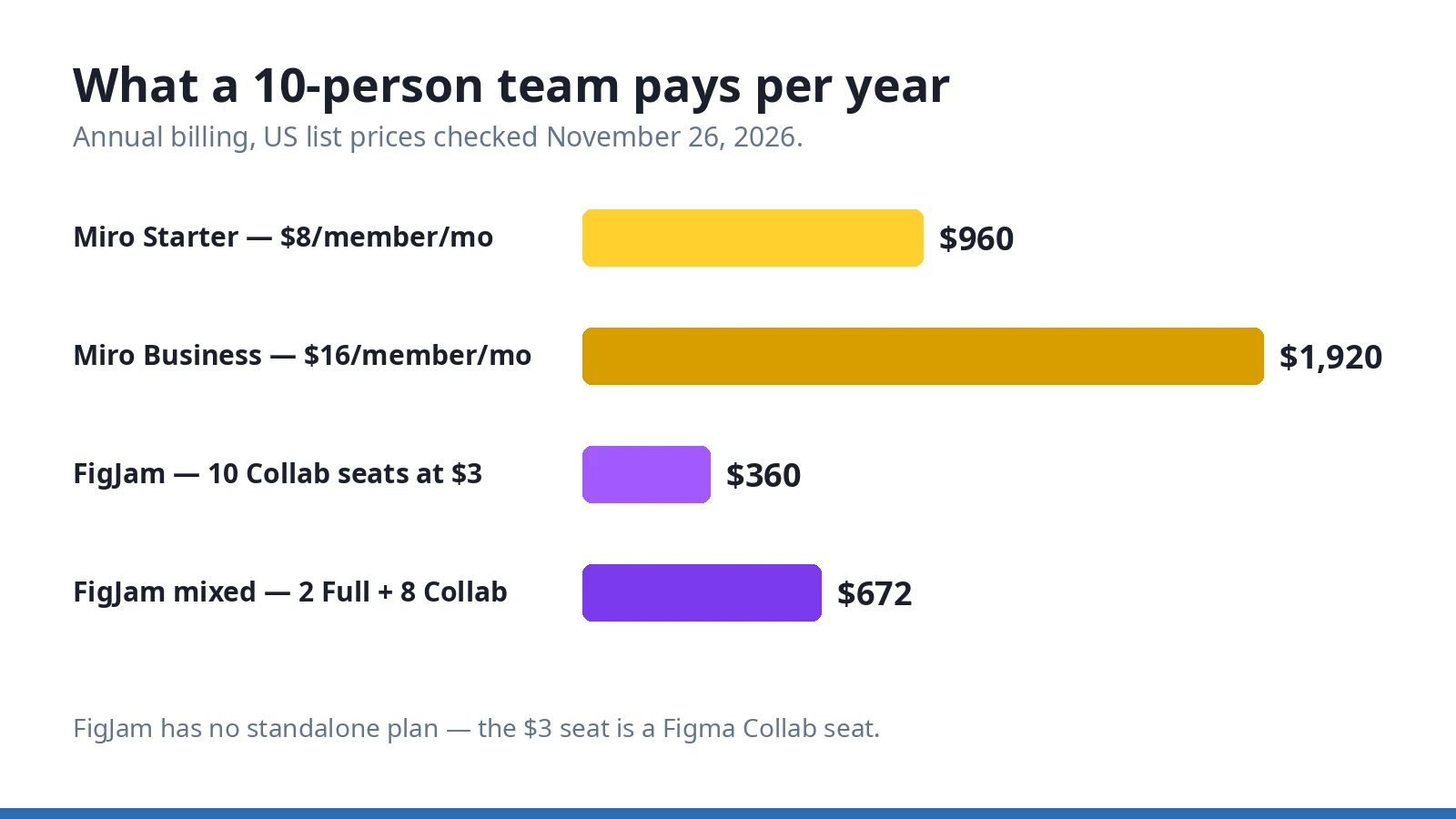
At 25 people the pattern holds but the numbers get serious. Miro Starter is $2,400 a year (25 x $8 x 12) and Miro Business is $4,800. Twenty-five FigJam Collab seats cost $900 a year. A mixed 25-person team — five designers on Full seats and twenty collaborators on Collab seats — costs $1,680 a year, which undercuts Miro Starter by $720 while also giving the designers full Figma Design. The one scenario where Miro wins on price is the team with no designers at all that also needs nothing beyond a whiteboard and picks Starter — and even then it pays nearly three times FigJam’s Collab-only price.
Monthly billing widens the gap in Miro’s disfavor and narrows it in FigJam’s. Miro Starter jumps to $10 per member ($1,200 a year for ten people) and Business to $20 ($2,400). Figma’s monthly Collab seat is $5, so ten people cost $600 a year — still cheaper than Miro Starter on annual billing. If cash flow forces you onto monthly billing, FigJam’s advantage actually grows.
The trap to watch is the one the $3 price hides. If your company does not already pay for Figma, buying FigJam means buying into Figma’s entire seat model to get one product — a new vendor relationship, a new admin console, a new renewal to track. And the moment anyone on the team needs Figma Design itself, that person needs a $16 Full seat, not a $3 Collab seat. The $3 figure is real, but it only stays $3 for people who never touch the design canvas.
What Can You Actually Do on Each Board?
Start with what is identical: infinite canvas, sticky notes, shapes and connectors, frames, dot voting, timers, emoji reactions, comments, and AI that groups stickies. Both tools run a perfectly good retrospective. The differences show up at the edges of the meeting, and they are the reason the two products exist separately.
Templates: Miro has a library, FigJam has a shelf
Miro claims 300+ official templates plus 7,000+ community-made ones, covering retrospectives, sprint planning, user story mapping, OKR planning, customer journey maps, and dozens of workshop formats. FigJam has around 100 templates, focused on design-adjacent work. For a team that runs a different workshop every week, Miro’s library means starting from a proven structure instead of a blank canvas. For a design team that runs the same two or three rituals, FigJam’s smaller shelf is enough — and Miro’s scale is also a source of clutter: the template library is one of the reasons new users call Miro heavy. Miro also shows up in my tested roundup of the best mind-mapping software, where its diagramming depth is the point — the same depth that makes it the stronger choice here for structured planning work.
Running the session: Miro is built for facilitation
This is the clearest functional gap in the whole comparison. Miro’s private mode lets participants write stickies that stay hidden until the facilitator reveals them, which kills anchoring bias and gets closer to honest input. FigJam hides votes during a voting session but never hides the stickies themselves, and its author-name toggle is reversible rather than anonymous. Miro has a native Estimation app for planning poker; FigJam needs a third-party widget. Miro converts stickies to cards with owners and due dates, then syncs them two-way to Jira or Azure DevOps in real time — on the Business plan, that sync is the feature that turns a retro into actual tickets. FigJam has none of that: action items are stickies someone has to remember to transcribe. Miro adds presenter mode, attention management, Talktracks, and Engage activities for up to 50 participants. FigJam counters with vibe, not process: stamps, animated emotes, washi tape, cursor chat, and a built-in music player that Miro has no answer for.
Scale matters too. Miro is built to handle sessions of 50 to 100 concurrent users reliably, with a minimap for navigating boards that hold hundreds of objects. FigJam can struggle at that size — reviewers consistently note lag and navigation friction once a board gets big and the headcount climbs. If your all-hands retro has eighty people on one board, that is a Miro board, not a FigJam board.
The canvas itself: playful vs structured
FigJam’s canvas is intentionally playful. Friendly colors, large sticky notes, stamps, emojis, cursor chat, and highlighting pens make collaboration feel accessible rather than corporate, and new participants can join and start contributing without any onboarding. Miro’s canvas is more capable and more complex: the infinite canvas handles hundreds of objects without lag, the tool set is comprehensive — tables, timeline and kanban views, docs, slides, diagramming shape packs, Visio and Lucidchart import — and board history, manual backups, and board statuses are built in. The tradeoff is real: Miro can feel heavy for simple ideation, and its toolbar sprawl is the most common complaint from casual users. FigJam is the faster tool for a thirty-minute brainstorm; Miro is the better tool for a three-hour workshop that has to produce a plan.
How Does AI Compare on Each Board?
Both tools now meter AI with credits, and both changed their AI packaging in the last year — so check the credit numbers, not the marketing. Miro AI runs on credits pooled across your organization: the Free plan gets a 10-credit monthly trial, Starter gets 25 credits per member per month, Business gets 50 per member per month, and Enterprise is custom. The credits power content generation, diagramming, summarization, and AI workflows and agents, and they reset monthly without rolling over. Miro also ships an MCP server that connects the board directly to Claude, Cursor, GitHub Copilot, and Gemini CLI, with 100 MCP calls a day on Free rising to 10,000 on Enterprise — context flows both ways, so board content can generate code in your AI tools and your AI tools can create diagrams on the board. Miro states that your data is not used to train its AI models.
FigJam’s AI runs on Figma’s shared credit system. Every Collab seat includes 500 AI credits a month, and the free Starter plan gets 150 credits a day up to 500 a month. Figma AI inside FigJam auto-organizes stickies, generates layouts, and summarizes boards, drawing on the same credit pool as the rest of Figma’s products. The headline difference is volume: a FigJam Collab seat’s 500 credits a month is ten times Miro Business’s 50 per member. But the credits buy different things — FigJam’s AI is narrower (organize, summarize, generate) while Miro’s spans full AI workflows and agents — so the raw count flatters FigJam. If your team burns through AI credits clustering retros every week, Miro’s 25 to 50 credits per member can run out fast, and extra credit packages are a paid add-on. If your AI use is occasional, FigJam’s 500 credits are effectively unlimited.
Which Integrates Better With the Rest of Your Stack?
Miro has the broader integration story: 250+ apps, plus the two-way Jira and Azure DevOps sync on Business that turns board output into tracked work, and two-way sync with Asana as well. For a product or engineering org, that sync is the difference between a workshop artifact and a work item — the board and the tracker stay in step without anyone retyping. Miro also connects to Slack, Teams, Confluence, Google Calendar, and the rest of the standard stack, and its Enterprise plan adds SCIM provisioning, audit logs, and SIEM integrations for regulated environments. If your team plans in Asana, the Miro-Asana connection is worth weighing alongside the project-management side itself — I priced Asana against its closest rival in my Asana vs Monday comparison.
FigJam’s integration story is narrower and deeper in exactly one direction: Figma. Designers drop live Figma components and frames into a FigJam board, stakeholders comment on real designs instead of screenshots, and everything sits under one admin console and one contract. Outside Figma, FigJam leans on community widgets and embeds, which work but are not the same as native two-way sync. The rule of thumb is simple: if the tools around the whiteboard are Jira, Azure DevOps, and Asana, Miro integrates better; if the tool around the whiteboard is Figma Design, FigJam integrates better, because it is Figma.
What Do Real Users Say?
Reviewer sentiment is close enough that it should not decide the purchase — but the sample sizes tell their own story. On G2’s head-to-head comparison page, checked November 26, 2026, Miro scores 4.6 out of 5 from about 13,500 reviews, and FigJam scores 4.5 out of 5 from about 465 reviews. Both score 9.0 out of 10 for ease of use and 8.7 out of 10 for quality of support. Miro’s top reviewer-cited strength is flexible collaboration and extensive templates; FigJam’s is ease of use and Figma integration. G2’s own summary flags Miro’s pricing as a concern for small teams that do not use it regularly, and FigJam’s pricing as a concern outside the Figma ecosystem — which is the same conclusion this guide reaches from the numbers.
Capterra tells a similar story with a caveat worth stating plainly: Miro sits at 4.7 out of 5 from more than 1,600 reviews, while FigJam scores 4.8 out of 5 from a far smaller pool — only a few dozen reviews. A 4.8 from 37 reviewers is not the same evidence as a 4.7 from 1,600, so do not let the higher number carry more weight than it deserves. The consistent themes across both platforms are the ones this comparison already covers: reviewers praise Miro’s breadth and template depth and complain about its learning curve and the free plan’s 3-board limit; they praise FigJam’s simplicity and Figma connection and complain that it feels limited the moment a session gets serious.
Which Whiteboard Should You Pick?
There is no single winner — there is a right tool for the job your team actually does. Pick by the job, not by the brand.
- Pick FigJam if your company already pays for Figma. Ten Collab seats cost $360 a year against $960 for Miro Starter, the board sits next to your design files, and non-designers get a tool they can use with zero onboarding. This is the best-value whiteboard in the market for a design-led org.
- Pick FigJam if your whiteboarding is mostly quick brainstorms. Thirty-minute sessions, small groups, design-adjacent work — FigJam is faster to open, friendlier to newcomers, and the playful canvas keeps energy up.
- Pick Miro if the whiteboard is a core tool for teams outside design. Product, engineering, ops, consulting — any group that runs workshops as a regular practice needs private mode, estimation, presenter controls, and a template library that covers real ceremonies.
- Pick Miro if workshops have to produce tracked work. The two-way Jira and Azure DevOps sync on Business is the feature that justifies the $16 seat: retro action items become tickets without retyping, and the board stays in sync with the tracker.
- Pick Miro if sessions are big. Fifty to a hundred concurrent users, hundreds of objects, multi-quarter planning — Miro is built for that scale and FigJam is not.
- Pick Miro Business, not Starter, if you run paid workshops for clients. Guest access, private workspaces, SSO, and 50 AI credits per member are Business features, and client work is exactly where private boards and controlled sharing stop being optional.
One last practical note: both free tiers cap you at 3 — three editable boards on Miro, three FigJam files on Figma Starter — and neither free plan survives a quarter of regular team use. Treat the free tier as a trial, not a plan. Start there, run two real sessions on each, and let the team vote with its usage: the tool people open without being asked is the tool you should pay for.
How this comparison was made: pricing, plan limits, and AI credit allowances were read from Miro’s and Figma’s official pricing pages on November 26, 2026; ratings were read from G2’s head-to-head comparison page the same day. I did not run a live session inside either tool for this comparison — both require an account for full editing, and no disposable sign-up was available — so behavior claims come from the vendors’ own documentation and reviewer consensus, not from a hands-on session. Prices are US list prices and change often; check the official pricing pages before you commit.
Frequently Asked Questions
Yes, with limits. FigJam is included in Figma’s free Starter plan, which gives you 3 FigJam files with one page each and 150 AI credits a day up to 500 a month. For regular team use you need a paid Collab seat: $3 a month on the Professional plan or $5 a month on Organization and Enterprise. There is no way to buy FigJam on its own — it always comes as part of a Figma subscription.
Yes, with limits. Miro’s free plan costs $0, includes unlimited team members, and gives you 3 editable boards plus 10 AI credits a month to try the AI features. The limits that push teams to pay are the 3-board cap, no private boards, and no guest or visitor roles — every board on the free plan is visible to all team members by default. Starter is $8 per member per month billed annually and removes those limits.
FigJam, by a wide margin. Ten FigJam Collab seats cost $30 a month, or $360 a year, on Figma Professional. Ten Miro Starter seats cost $80 a month, or $960 a year, and Miro Business costs $160 a month, or $1,920 a year. The gap narrows if your team also needs Figma Design: two designers on $16 Full seats plus eight collaborators on $3 Collab seats costs $672 a year — still $288 cheaper than Miro Starter. Miro only wins on price if you compare against Figma Organization, where Collab seats cost $5.
Not as a paid product. FigJam has no standalone plan and no standalone price — the only way to pay for it is a Figma Collab seat at $3 a month on Professional or $5 on Organization and Enterprise. The free Starter plan includes FigJam with 3 files, so you can use it without paying anything, but the moment you need more than 3 files or unlimited boards, you are buying Figma seats. If your company does not already pay for Figma, that means a new vendor relationship for a single product.
Miro, for anything structured. Its private mode hides stickies until the facilitator reveals them, its native Estimation app handles planning poker, and its two-way Jira and Azure DevOps sync turns retro action items into tracked tickets on the Business plan. It also handles 50 to 100 concurrent users reliably. FigJam is better for quick, informal sessions — especially for design teams that already live in Figma — because it opens faster and needs no onboarding, but it has no private mode, no native estimation, and no two-way ticket sync.
FigJam is easier for a non-designer to open and use — big sticky notes, stamps, and a friendly canvas with almost no learning curve — and the $3 Collab seat was built for exactly that audience: product managers, marketers, and stakeholders who run sessions but never touch the design canvas. Miro is the better tool for non-designers who run serious workshops, because its facilitation features (private mode, voting, timer, presenter mode) are designed for the facilitator, not the designer. If your non-designers only brainstorm, pick FigJam; if they facilitate, pick Miro.