Asana vs monday.com: Which Project Management Tool Should Your Team Pick?

The short answer: pick Asana if your work is structured projects with owners, deadlines, and goals — pick monday.com if your team thinks in boards and wants to shape its own workflows without a project manager setting them up. Both are excellent, both have a genuinely usable $0 plan for two people, and both will run a small team well. The real differences are the data model underneath (Asana is built around tasks, monday.com around boards and columns), how the bill scales (Asana charges per seat, monday.com sells seats in fixed buckets, while a third model charges one flat price for the whole account — our guide to how to use Basecamp explains when that flat bill wins), and how each one charges for AI in 2026. I read both official pricing pages on November 25, 2026, and the prices and limits below are what the vendors list right now — not what older comparisons still quote. One honest limit: both tools require an account to try, and I did not sign up for test accounts for this comparison, so hands-on claims here come from the vendors’ own plan documentation and from independent reviews, not from inside the apps.
Asana vs monday.com at a glance
| Asana | monday.com | |
|---|---|---|
| Built for | Structured project and work management: tasks with owners, due dates, dependencies, and goals | Visual work management: boards built from typed columns, shaped per team, plus CRM, dev, and service products |
| Core model | Task-centric hierarchy: Organization, Team, Project, Task, Subtask; one task can live in several projects (multi-homing) | Board-centric: items on boards, each column a different data type (status, person, date, formula, timeline) |
| Founded | 2008, by Facebook co-founder Dustin Moskovitz; used by 85% of the Fortune 100, per Asana | 2012, as dapulse, rebranded monday.com in 2017; trusted by over 60% of the Fortune 500, per monday.com |
| Free plan | Personal, $0 — 2 users, unlimited tasks and projects, list/board/calendar views, 100+ integrations | Free, $0 — up to 2 seats, 3 boards, 200+ templates, 8 column types, 500 MB storage |
| Cheapest paid plan | Starter $10.99 per user per month, billed annually ($13.49 month to month) | Basic $9 per seat per month, billed annually ($12 month to month); minimum 3 seats |
| Mid tier | Advanced $24.99 per user per month, billed annually ($30.49 month to month) | Standard $12 per seat per month, billed annually ($14 month to month); adds timeline, Gantt, and automations |
| Top tier | Enterprise, custom pricing | Pro $19 per seat per month, billed annually ($24 month to month); Enterprise custom |
| AI | AI Teammates, AI Studio, and Asana Dash included on paid plans; usage billed per AI request ($0.50 prepaid, $0.60 pay as you go) | AI credits bundled per plan: 1,000 a month on Basic, 2,000 on Standard, 3,000 on Pro; AI Workspace agents included |
| Automations | Unlimited rules on paid plans, with a visual workflow builder and AI Studio | None on Basic; 250 automation and 250 integration actions a month on Standard; 25,000 each on Pro |
| Rating | 4.4 out of 5 on G2 (about 14,000 reviews); 4.5 on Capterra (about 13,600 reviews) | 4.7 out of 5 on G2 (about 15,400–19,300 reviews); 4.6 on Capterra (about 5,700–6,000 reviews) |
| Ease of use | 8.6 out of 10 on G2 | 9.1 out of 10 on G2 |
How much do Asana and monday.com cost?
Price is where most older comparisons go stale first, so here are the numbers exactly as each vendor lists them now — I read Asana’s pricing page and monday.com’s pricing page on November 25, 2026. Both vendors discount annual billing: Asana by up to 18%, monday.com by 18% on work management. All prices below are US list prices, before tax.
| Plan | Asana (annual billing) | monday.com (annual billing) |
|---|---|---|
| Free | Personal, $0 — 2 users, unlimited tasks and projects, 100 MB per file | Free, $0 — up to 2 seats, 3 boards, 3 docs, 500 MB storage |
| Entry paid | Starter $10.99 per user per month — timeline and Gantt, dashboards, unlimited automations, forms, custom fields, unlimited free guests | Basic $9 per seat per month — unlimited items and free viewers, 1,000 AI credits a month; no automations, no timeline |
| Mid tier | Advanced $24.99 per user per month — goals, portfolios, resource management, approvals and proofing, native time tracking | Standard $12 per seat per month — timeline and Gantt, calendar view, guest access, 250 automation and 250 integration actions a month, 2,000 AI credits |
| Top tier | Enterprise, custom — SAML, SCIM, capacity planning, view-only licenses | Pro $19 per seat per month — private boards, time tracking, 25,000 automation and 25,000 integration actions a month, 3,000 AI credits |
| Monthly billing | Starter $13.49; Advanced $30.49 per user per month | Basic $12; Standard $14; Pro $24 per seat per month |
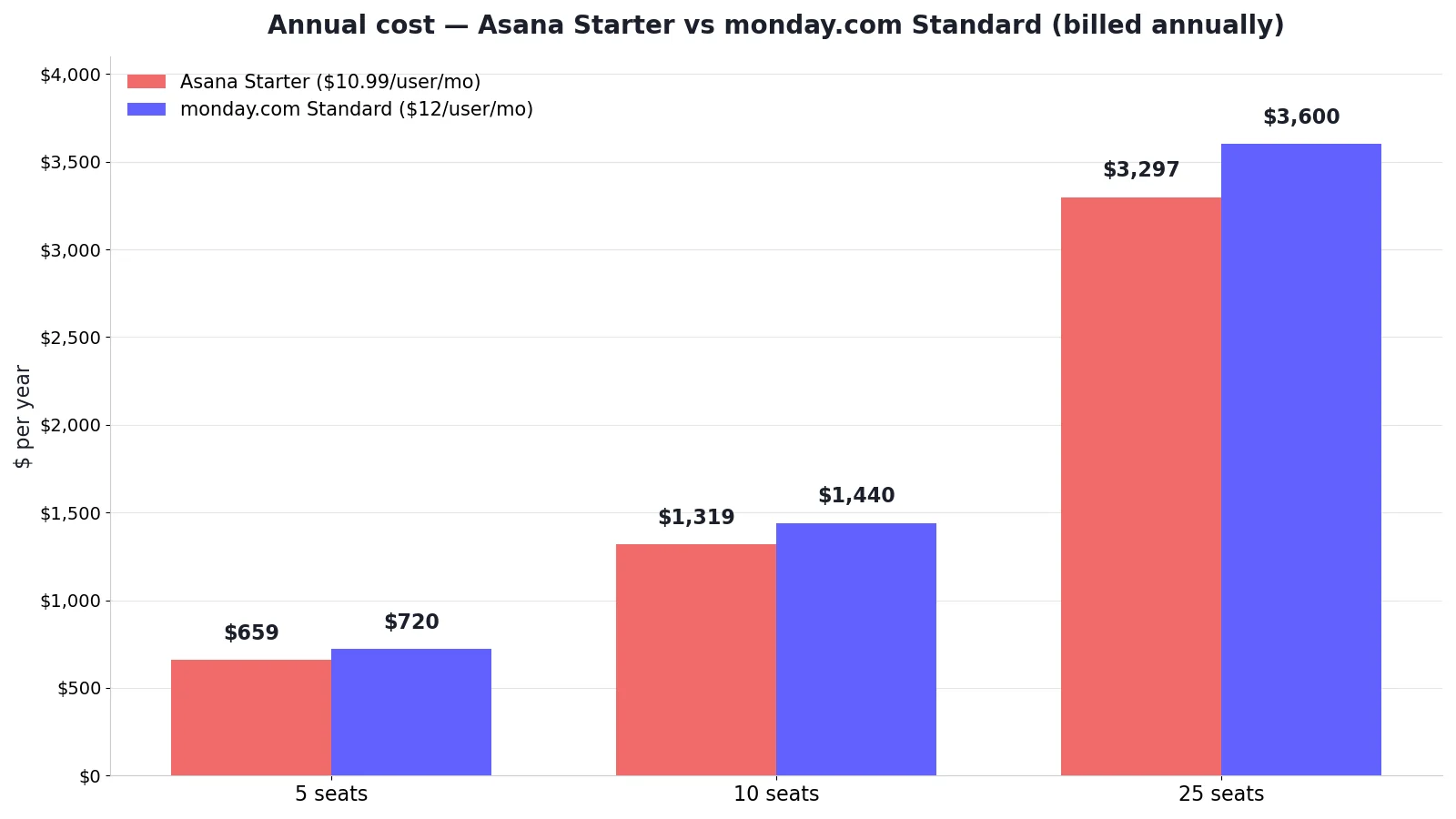
The honest comparison is Starter against Standard, not Starter against Basic. monday.com’s $9 Basic plan has no timeline view and no automations, so a team that needs a timeline — the feature most buyers compare first — must pay at least Standard at $12 a seat. Asana’s Starter includes timeline and Gantt views at $10.99 a user. At the entry level with timelines, Asana is the cheaper seat. At the top of the ladder the order flips: monday.com Pro at $19 a seat undercuts Asana Advanced at $24.99, and Pro includes native time tracking that Asana only bundles at the Advanced tier.
A worked example makes the difference concrete. Take a five-person team that wants timelines and automations. On Asana Starter that is 5 × $10.99 × 12, or $659 a year. On monday.com Standard it is 5 × $12 × 12, or $720 a year. Asana saves about $61 a year at this size. Scale to ten people and the gap stays proportional: Asana Starter $1,319 a year against monday.com Standard $1,440. But step up a tier and monday.com wins: ten people on Asana Advanced cost $2,999 a year, while ten on monday.com Pro cost $2,280 — a $719-a-year saving for monday.com. At 25 seats the same pattern holds: Starter $3,297 against Standard $3,600, and Advanced $7,497 against Pro $5,700.
The seat-bucket trap: what a team actually pays
monday.com does not sell single seats. Paid plans start at a 3-seat minimum and are sold in fixed buckets — 3, 5, 10, 15, 20, 25, 30, and 40 seats — and a team over 40 users is sent to a quote. A 7-person team on monday.com Standard pays for 10 seats: $120 a month, or $1,440 a year, exactly what a 10-person team pays. The same 7 people on Asana Starter pay for 7 seats: $76.93 a month, or about $923 a year. That is a $517-a-year difference created entirely by the bucket, not by the per-seat price. The gap narrows as teams grow into their bucket — a team of exactly 10 pays the same per head either way — but any team sitting between bucket sizes should do this math before signing. Asana charges per actual seat on every plan, and its Starter plan has no seat minimum beyond the 2-user free Personal plan.
Two smaller pricing traps catch buyers. First, Asana’s free Personal plan sounds generous — unlimited tasks and projects — but it stops at 2 users, so a third teammate forces a paid plan. Second, monday.com’s free plan stops at 2 seats and 3 boards, and its Basic plan has no automations at all, so the $9 headline price buys a tracker, not a workflow tool. Neither free plan is a real team plan; both are a trial with no expiry date. If you run a small team and want a second opinion on the free-tier landscape, our TickTick vs Todoist head-to-head covers two task apps where the free plans stretch further.
What are Asana and monday.com, really?
Asana is a work-management platform built around the task. Founded in 2008 by Facebook co-founder Dustin Moskovitz, it organizes work as Organization, Team, Project, Task, Subtask — a rigid hierarchy that turns out to be exactly what cross-functional teams need when twenty people share one launch plan. Its signature idea is multi-homing: one task can live in several projects at once without duplicate copies, so a launch task appears in the marketing project, the product project, and the executive portfolio simultaneously. Asana says 85% of the Fortune 100 use it, and more than 100,000 organizations run on the platform.
monday.com is a flexible Work OS built around the board. Founded in 2012 as dapulse and rebranded in 2017, it starts from the opposite assumption: instead of a fixed task schema, you get a board where every column is a different data type — status, person, date, number, formula, timeline — and you assemble the workflow your team actually runs. That makes it the easier tool for non-technical teams: a sales team, an HR team, and an IT team can each build a completely different board inside the same account. monday.com says it is trusted by over 60% of the Fortune 500. The same platform also sells monday CRM, monday dev, and monday service as separate products, each with its own pricing — a breadth Asana does not try to match.
The philosophy gap shows up in the first hour of use. In Asana, you open a project and see a list of tasks with owners and due dates; the structure is given to you, and your job is to fill it in. In monday.com, you open a board and see a colorful grid you are expected to shape; the freedom is the point, and the setup is the work. Teams that want the tool to decide the process will be happier in Asana. Teams that want to decide the process themselves will be happier in monday.com.
Which is easier to learn and use?
monday.com is easier, and reviewers agree. On G2, monday.com scores 9.1 out of 10 for ease of use against Asana’s 8.6, and its overall G2 rating is 4.7 out of 5 (from about 15,400–19,300 reviews) against Asana’s 4.4 (from about 14,000 reviews). On Capterra the gap is smaller: monday.com 4.6 out of 5 from about 5,700–6,000 reviews, Asana 4.5 from about 13,600. Reviewers praise monday.com’s colorful, visual boards and its 200+ templates, which let a new team start from a finished structure instead of a blank page. Asana’s reviewers praise the clean task view once it is set up — but several thousand note the learning curve, the volume of notifications, and subtasks that do not behave the way they expect.
In practice, the ease gap is largest in the first week and smallest after a month. monday.com’s boards are intuitive on day one because they look like a spreadsheet with superpowers: anyone who has used Excel understands a monday.com board in minutes. Asana takes longer because its power is structural — portfolios, goals, workload views, and custom fields only pay off once the team has agreed on how work is organized. A team that needs to be productive this week should weight monday.com’s lead heavily. A team with a project manager who will own the setup can afford Asana’s slower start.
How do Asana AI and monday.com AI compare?
Both vendors rebuilt their AI story in 2026, but they charge for it in opposite ways — and the difference matters more than the feature lists. Asana’s AI is included on every paid plan, then metered by use. AI Teammates are pre-built agents (more than 30 ready to go, such as a Campaign Brief Writer and a Competitive Market Researcher) that work inside real workflows with shared memory, scoped permissions, and an audit trail. AI Studio lets teams build their own agents, and Asana Dash prioritizes the day and analyzes the Work Graph. The meter is the AI request: each paid plan includes 5 requests per user per month (up to 50 per account on Starter, 250 on Advanced), AI Studio credits run 50,000 a month on Starter, 75,000 on Advanced, and 200,000 on Enterprise, and extra requests cost $0.50 each prepaid or $0.60 pay as you go. A team that uses AI lightly pays nothing extra; a team that leans on agents hard will see a second line on the bill. Read the details on Asana’s pricing page before budgeting — the request model is the part most comparisons get wrong.
monday.com’s AI is bundled by plan, not metered by the request. Each work management plan includes a monthly allowance of AI credits — 1,000 on Basic, 2,000 on Standard, 3,000 on Pro — which power the AI features, from AI Agents to meeting notetakers. On top of the credits sits the AI Workspace: monday sidekick, monday vibe, monday agents, monday MCP, and AI Blocks, which let teams build agents for a specific mission, connect them to Claude, ChatGPT, Copilot, or Gemini, and track every agent action in a real-time log with human-in-the-loop approval. monday.com puts AI on every paid tier; Asana does the same. The honest difference is budgeting: monday.com’s credit allowance is fixed and predictable, while Asana’s request model is flexible and can grow with use. Heavy AI users should compare 3,000 monday.com credits a month against Asana’s included requests plus $0.50 top-ups for their actual workload, not for a hypothetical one.
One vendor claim worth correcting: monday.com’s own comparison page says Asana reserves AI for Enterprise customers. That is out of date. Asana’s current pricing page lists AI Teammates, AI Studio, and Asana Dash as included on Starter, Advanced, and Enterprise alike. If you read a comparison that still says Asana’s AI is Enterprise-only, it was written before the 2026 restructure.
Automations and integrations: where the tiers really split
Asana is the more generous automator at the entry level. Unlimited rules come with Starter: section-level triggers, task-move rules, and a visual workflow builder, plus AI Studio on every paid plan. monday.com’s Basic plan has no automations at all — the automation engine starts at Standard, capped at 250 automation actions and 250 integration actions a month for the whole account, and only Pro lifts the cap to 25,000 of each. For a team that automates status changes, assignments, and notifications, that 250-action ceiling on Standard is a real constraint: a 10-person team burns through 250 actions in days, not months.
Integrations are closer to a draw. Asana lists more than 100 free integrations, including Microsoft 365, Google Workspace, and Slack, with two-way Jira Cloud sync on Advanced. monday.com lists more than 200 native apps plus thousands more through Zapier, and its API and MCP options draw some criticism from reviewers on G2. Both connect to the tools a normal team already uses; neither has a decisive edge here. The practical test is narrower: check that your specific stack — your CRM, your code repo, your support desk — has a native connector on the tier you would actually buy, because both vendors reserve some integrations for higher plans.
Which is better for reporting and managing work at scale?
Asana is built for the executive view. Portfolios roll dozens of projects into one status screen, Goals connect daily tasks to company objectives with automatic progress tracking, and Workload (Advanced and up) shows who is over capacity before a deadline slips. Universal reporting and formula fields let a team build the same dashboard every stakeholder sees. This is the layer monday.com has to assemble from parts: its dashboards are powerful — more than 50 drag-and-drop widgets, formula columns that do real financial math on a board — but they are built board by board, and there is no native equivalent of Asana’s goals tree tying tasks to strategy.
monday.com is built for the team view. Its strength is that every department can run its own boards, dashboards, and automations inside one account, and the same platform stretches into CRM, software development, and IT service management without a second vendor. Asana’s answer to that breadth is depth: it goes deeper on project structure and reporting, and it leaves CRM and service management to integrations. A company that wants one platform for every department’s workflows will find monday.com’s breadth more useful. A company that wants one source of truth for project delivery will find Asana’s portfolios and goals more useful. For a related question — how to protect the focus time that all this planning is supposed to create — our roundup of time blocking apps covers the tools that sit alongside either platform.
Asana vs monday.com: the verdict
Choose Asana if your work is structured projects with clear owners and deadlines, if leadership needs portfolios and goals rather than board-level dashboards, if you want unlimited automations from the first paid tier, if guests and external collaborators need controlled access to specific projects, or if your team size sits between monday.com’s seat buckets. The trade-offs are a real learning curve, a lower ease-of-use score, AI billed per request on top of the seat price, and a top tier that costs more than monday.com’s. The bill for five people with timelines is $659 a year on Starter; for ten people on Advanced it is $2,999 a year.
Choose monday.com if your team thinks visually, if non-technical people will build their own workflows, if you need CRM, dev, or service management in the same platform, if ease of use in the first week matters more than reporting depth, or if you want AI on a fixed monthly credit allowance. The trade-offs are the seat buckets (a 7-person team pays for 10 seats), no automations on Basic, a 250-action monthly cap on Standard, and dashboards you assemble yourself rather than portfolios that come ready-made. The bill for five people with timelines is $720 a year on Standard; for ten people on Pro it is $2,280 a year.
If you are still deciding, use both free plans for one real job before paying: run the same small project — the same ten tasks, the same deadlines, the same status meeting — in each tool for a week. The one your team actually opens every morning is the one your work fits, and the price difference at five seats is $61 a year, which is not the reason to pick either. Plenty of teams run both: Asana for delivery, monday.com for everything else, with the same tasks mirrored between them. And if the price still feels steep, remember both free plans are free forever for two people — the cheapest way to compare them is to stop reading comparisons and start a project.
Frequently asked questions
Neither is better in general — they are better at different jobs. Asana is better for structured project work with owners, dependencies, goals, and executive reporting. monday.com is better for visual, flexible boards that non-technical teams shape themselves, and for running CRM, dev, and service workflows on one platform. Choose by how your team actually works, not by the feature checklist.
At the entry level with timeline views, yes: Asana Starter costs $10.99 per user per month billed annually, against $12 per seat per month for monday.com Standard. At the top tier the order flips: monday.com Pro costs $19 per seat per month billed annually, against $24.99 for Asana Advanced. The seat buckets change the math further — monday.com sells seats in fixed buckets of 3, 5, 10, 15, and more, so a 7-person team pays for 10 seats, while Asana charges per actual seat.
Yes. monday.com’s free plan covers up to 2 seats and 3 boards, with 200+ templates, 8 column types, and 500 MB of storage, and it has no time limit. Asana’s free Personal plan is also $0 for up to 2 users, with unlimited tasks and projects. Neither free plan is a real team plan — both are a trial with no expiry date, and a third teammate forces a paid plan on either tool.
monday.com, by the reviewers’ verdict: it scores 9.1 out of 10 for ease of use on G2, against 8.6 for Asana, and 4.7 out of 5 overall against Asana’s 4.4. Its boards look like a spreadsheet with superpowers, so new users are productive on day one. Asana takes longer to learn because its power is structural — portfolios, goals, and workload views only pay off once the team has agreed on how work is organized.
Yes, both do, and both include AI on every paid plan. Asana offers AI Teammates, AI Studio, and Asana Dash, with usage billed per AI request at $0.50 prepaid or $0.60 pay as you go, plus a small included allowance per plan. monday.com bundles AI credits per plan — 1,000 a month on Basic, 2,000 on Standard, 3,000 on Pro — and its AI Workspace adds agents, sidekick, and MCP connections to Claude, ChatGPT, Copilot, and Gemini.
Start with both free plans and run one real project in each for a week — the price difference at five seats is about $61 a year, so fit matters more than cost. Pick Asana if the business runs structured projects with deadlines and reporting; pick monday.com if the team is non-technical, thinks visually, or also needs a CRM or service desk on the same platform. Many small teams end up using both, with Asana for delivery and monday.com for everything else.