Gamma Review: Fast AI Slides, Real Trade-Offs

Gamma is an AI presentation maker that turns one prompt, a rough outline, or an uploaded file into a polished deck, document, or one-page website in under a minute. It is also one of the most used AI tools in its category: the company says more than 100 million people have used it, and it passed $100 million in annual recurring revenue with a team of about 50 people. The short version of this review: Gamma is the fastest way I have found to get from a blank page to a presentable first draft — and the metered credit system, the shaky PowerPoint export, and a 1.7-star Trustpilot score are real reasons to pause before paying. Prices and features below were checked against Gamma’s own pricing page on 21 November 2026; where a claim rests on a vendor page, a review site, or a third-party test rather than my own signed-in session, I say so.
Gamma review verdict
Best for: Anyone who needs a polished first draft fast — founders, marketers, teachers, and teams who present from a web link or PDF and iterate in the browser.
Watch out for: Credits meter every AI action, including edits; PowerPoint exports can scramble layouts and fonts; Trustpilot reviewers report billing and refund problems.
Starting price: $0 for 400 one-time credits; paid plans from $9 per seat a month billed annually ($12 month to month).
Gamma at a glance
| What | Detail |
|---|---|
| What it is | AI platform that generates presentations, documents, websites, and social posts from a prompt, outline, or uploaded file |
| Maker | Gamma Tech, Inc., San Francisco; founded 2020 by Grant Lee, James Fox, and Jon Noronha |
| Platforms | Web app at gamma.app; iOS and Android apps (US and Canada); API on every plan including the free plan |
| Price | Free $0 (400 one-time credits); Plus $12/month or $9/month billed annually; Pro $25/month or $18/month billed annually; Ultra $100/month or $90/month billed annually; Business $40/seat/month billed annually |
| Best for | Fast first drafts, internal updates, pitch decks shared as links, and turning documents into decks |
| Watch out for | Metered AI credits on every plan; PowerPoint export can shift layouts and substitute fonts; no offline editing; a 3-day refund window |
| User ratings | G2 3.9/5 (39 reviews); Capterra about 3.7–3.8/5 (only a handful of reviews); Trustpilot 1.7/5 (about 120 reviews) — all checked 21 November 2026 unless noted |
How we reviewed Gamma
An honest note before the detail: I did not test Gamma in a signed-in account for this review, so nothing below claims a hands-on session that did not happen. What I did do is read Gamma’s own pricing page live on 21 November 2026 (both billing toggles), read the Gamma 5 launch announcement and Gamma’s changelog, and cross-checked features, prices, and user sentiment against G2, Capterra, Trustpilot, and independent reviews that did test the product hands-on — including a 50-presentation test and a stress test run on a free account. Where prices in older reviews disagree with the live pricing page, the live page wins and the disagreement is flagged. Ratings are quoted with the date I checked them, because Gamma changes fast enough that a 2025 score describes a different product.
What is Gamma?
Gamma is a web-based AI tool that turns written input into visual output. You type a topic, paste an outline, or upload a PDF or an old PowerPoint file, and Gamma builds a structured presentation, document, or one-page website — text, layout, and images included — in about 30 to 60 seconds. Instead of fixed slides, Gamma builds “cards” that expand and reflow like a web page, which is why decks look good on any screen and why exporting them to PowerPoint is the product’s weakest point.
The scale is hard to ignore. Gamma says more than 100 million people have used the platform and that over a million pieces of content are generated on it every day, according to the company’s Gamma 5 launch announcement in October 2026. Trade press reporting on that launch puts Gamma past $100 million in annual recurring revenue, profitable for more than two years, with a team of about 50 people — and notes that more than 80% of its users are outside the United States. The company raised a $68 million Series B at a $2.1 billion valuation in November 2025, led by Andreessen Horowitz. Those numbers do not make the product good, but they explain why it keeps showing up in “best AI presentation maker” lists — including our own roundup of the best AI presentation makers, where Gamma is one of the tools we compare.
What is new in Gamma 5?
Gamma 5 launched on 6 October 2026, and Gamma calls it the biggest rebuild in the company’s history. The target is what the company itself calls the “AI smell” of AI-generated content — decks that all look the same. Four changes matter for a buyer:
- A rebuilt agent that plans before it builds. Creating a deck now starts as a conversation: the agent asks clarifying questions, proposes a plan, researches the web with citations, and keeps context while you edit — instead of generating a finished deck from a single prompt and leaving you to fix it.
- A freeform canvas. You can switch between prompting the agent and moving, resizing, and arranging individual elements yourself. This is the direct answer to the most common complaint about Gamma 3 — that precise edits were hard.
- A much wider style palette. Gamma 5 adds styles from bold and playful to dark and moody and mid-century modern, and carries brand preferences, custom instructions, and workspace templates from one project to the next.
- Connectors and better import. Gamma 5 connects Slack, Notion, Granola, and more than 20 other tools so the agent can build from your actual context, and its PowerPoint and PDF import is rebuilt to keep the original design intact.
Two other 2026 releases frame the review. Gamma Imagine, launched in March 2026, is a separate mode for generating single graphics — charts, infographics, social images — which pushes Gamma into Canva territory. And on 22 October 2026 Gamma put its Generate API on every plan, including the free plan, so tools like Zapier and Make can generate content automatically. Most independent reviews still describe Gamma 3, because they predate the October rebuild; this review treats Gamma 5 as the current product and says where a claim comes from the older version.
What does Gamma do well?
Speed is the real product. The consistent finding across every hands-on test I read is the same: a usable first draft in 30 to 60 seconds from a single prompt. One reviewer built more than 50 presentations with Gamma and found the topic-to-deck generation “consistently produces usable first drafts.” For the most common professional job — turning a document, a set of notes, or a rough outline into something presentable — that speed is the whole pitch, and it works. Gamma also imports PDFs and PowerPoint files and turns them into editable decks, which makes it a genuine workflow tool rather than a novelty: our guide to summarizing PDFs with AI covers the same starting point from the other direction.
The agent is the upgrade that matters. In Gamma 5, the agent researches a topic on the web and pulls in facts with citations, restyles an entire deck from one instruction, restructures sections, and applies your brand preferences across projects. Independent reviewers who tested it say broad changes — restyling a deck, adding a section — work reliably, while precise, surgical edits still struggle. That matches Gamma’s own framing: the agent is a design partner for the big moves, and the new freeform canvas is there for the small ones.
Sharing is native, not bolted on. Gamma decks are web pages first: you share a link, publish to a custom domain on Pro and above, and track who viewed the deck and how long they spent on each card with the Pro plan’s analytics. Export to PDF, PowerPoint, PNG, and Google Slides is available on every plan, including the free plan — a real difference from tools that lock export behind a paywall. The 20-plus AI models behind generation (including Claude, GPT, Gemini, Flux, and Ideogram for images) and the 100-plus templates mean the first draft rarely looks broken, only familiar.
How much does Gamma cost?
Gamma charges per seat, in US dollars, and every paid plan is really two prices: the monthly rate and the annual rate. The pricing page defaults to annual billing and labels the saving “up to 28%”. All figures below are from Gamma’s pricing page, read live on 21 November 2026.
| Plan | Billed monthly | Billed annually | AI credits | What changes |
|---|---|---|---|---|
| Free | $0 | $0 | 400 once, never refills | Up to 10 slides per prompt; import PDF and PPTX; export PDF, PPTX, PNG, Google Slides; Gamma branding on output |
| Plus | $12/seat/month | $9/seat/month ($108/year) | 1,500/month | Up to 100 slides per prompt; Gamma branding removed; advanced AI image models |
| Pro | $25/seat/month | $18/seat/month ($216/year) | 4,000/month | Premium AI image models; custom branding; detailed analytics and advanced sharing; up to 10 custom domains |
| Ultra | $100/seat/month | $90/seat/month ($1,080/year) | 20,000/month | Most advanced text, image, and video models; up to 100 custom domains; early access to new features |
| Business | Annual billing only | $40/seat/month ($480/seat/year) | 10,000/seat/month + shared workspace credits | SSO; SOC 2 documentation on request; advanced data controls |
The prices moved, and older reviews have not caught up. Several reviews still quote Plus at $10 a month ($8 billed annually) and Pro at $20 ($15 annually). Those were the old prices. The current page charges Plus at $12 monthly ($9 annual) and Pro at $25 monthly ($18 annual) — a 20% rise on the monthly Plus rate and 25% on monthly Pro. If a review you are reading quotes $8 or $10 for Plus, it is describing the old pricing, not the current page. The Plus credit allowance also changed: the live page shows 1,500 monthly credits, where several pricing trackers still list 1,000.
Worked example: what the credits actually buy. Gamma does not publish a per-action credit price, so this is arithmetic on a third-party estimate that a simple presentation consumes 80–150 credits. At the midpoint of about 115 credits a deck, the free plan’s 400 one-time credits buy roughly three to five simple decks — and then they are gone, because free credits never refill. Plus at 1,500 credits a month buys roughly 10–18 decks a month; Pro at 4,000 buys roughly 27–50; Ultra at 20,000 buys roughly 130–250. In practical terms: a freelancer making two decks a week (eight or nine a month) fits inside Plus at $108 a year. A marketer making three decks a week, with edits, is right at the edge of Plus and should budget for Pro at $216 a year. Remember that every agent edit costs credits too, even on paid plans, so a deck you revise five times costs noticeably more than a deck you accept as generated.
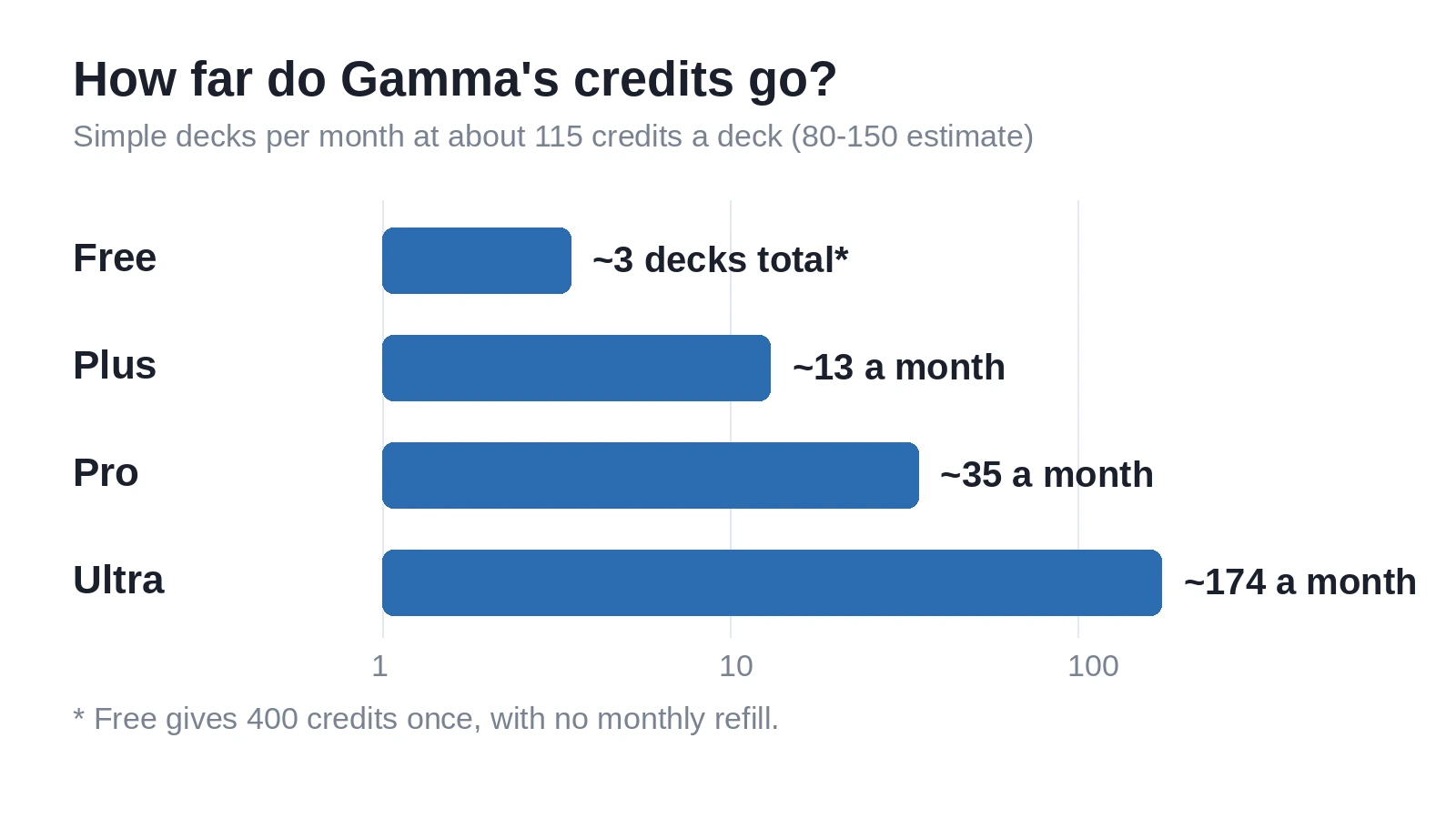
Two billing catches. First, annual billing saves real money — $36 a year on Plus, $84 on Pro, $120 on Ultra — so the monthly rate is a poor guide to the real price. Second, Gamma’s refund window is 3 days, and it applies to annual plans too, with a cap on credits used. Start with the free plan’s 400 credits before committing to a year; three days is not long enough to discover a billing problem.
Where does Gamma fall short?
PowerPoint export is the biggest functional gap. Gamma’s cards are not slides, and the conversion shows it. Fonts get substituted when the recipient’s machine lacks them, layouts shift, and animations are dropped. One G2 reviewer put it plainly in September 2026: when a slide holds more content, Gamma resizes it automatically, and “it’s very difficult when I export that into a Microsoft PPT, so the whole thing dislocates or scrambles.” A stress test by a design agency found broken PowerPoint exports that forced hours of manual cleanup, and another hands-on test found 19 of 25 exported decks needed manual repair before they were presentable. Gamma 5’s rebuilt import is supposed to keep PowerPoint and PDF designs intact on the way in; the way out is still the weak direction. If your deliverable must be a .pptx file, budget cleanup time or keep PowerPoint as the final step.
Everything is metered, including fixing your own deck. Credits are the real price of Gamma, not the seat fee. Generation, AI image creation, and every agent edit draw from the same monthly allowance, and there is no published per-action price list, so you discover the cost by watching the balance fall. Heavy image generation and repeated restyles burn credits fastest. The free plan is a genuine trial — 400 credits, no refill — not a free tier you can live on.
Decks can look generic, and control has limits. Gamma itself named the problem when launching Gamma 5: the “AI smell” of decks that all look machine-made. The rebuild’s wider styles and freeform canvas are the answer, but reviewers of the older version consistently note repetitive layouts, limited typography control, and generic AI-written text that needs a human pass. If you need pixel-perfect control over every element, Gamma will frustrate you; it is a drafting tool that trades control for speed. There is also no offline editing — Gamma is a web app, and a weak connection makes it lag.
What do users say about Gamma?
The review scores disagree with each other, and the disagreement is informative. On G2, Gamma App scores 3.9 out of 5 across 39 reviews (checked 21 November 2026). Reviewers praise the same things this review found — ease of use, speed, and how quickly a prompt becomes a polished deck — and complain about the same things: limited customization, generic content, and credit dependency. On Capterra the score is about 3.7–3.8 out of 5, but from only a handful of reviews, so it carries little weight. On Trustpilot, Gamma sits at 1.7 out of 5 across about 120 reviews, with 74% at one star — and the complaints cluster on billing: unexpected renewals, refused refunds, and slow support. That gap is not a rounding error: G2 reviewers are mostly rating the product, while Trustpilot reviewers are mostly rating the billing experience. Both are real. One more caveat: G2 announced the acquisition of Capterra, GetApp, and Software Advice in January 2026 and closed the deal in February, so the G2 and Capterra scores are no longer independent checks on each other. Treat the 3.9 on G2 as the product signal and the 1.7 on Trustpilot as the billing warning.
Gamma vs the alternatives
Gamma is the fastest first draft in this category, but it is not the only way to make a deck. Here is how it stacks up against the tools people actually cross-shop it with.
| Tool | Starting price | Best at | Trade-off |
|---|---|---|---|
| Gamma | $0; Plus $9/seat/month billed annually | Fastest prompt-to-deck draft; web-link sharing; documents and sites from the same tool | Metered credits; PowerPoint export can scramble layouts |
| Canva | Canva Pro $15/month | Broadest design control, templates, and asset library; social graphics and print in the same tool | AI generation is an add-on to a design tool, not the core; slower first drafts than Gamma |
| Pitch | $13/seat/month billed annually | Sales and executive decks; real slides with strong collaboration and analytics | Narrower than Gamma — decks only, no documents or websites |
| PowerPoint + Copilot | Bundled with Microsoft 365 | True slides, full offline control, and the format every enterprise already accepts | Slower to a first draft; Copilot’s design help is thinner than Gamma’s generation |
| Beautiful.ai | Paid plans (see vendor page) | Real slides with smart templates that keep layouts clean as you edit | Less flexible than Gamma for documents and web publishing |
The decision rule is simple. Choose Gamma when the deliverable is a first draft you will share as a link or PDF and speed matters most. Choose Canva when the same subscription must also cover social graphics, print, and brand assets. Choose Pitch when the deck is a sales asset that lives in a real slide format. Choose PowerPoint when the file itself is the deliverable and it must survive someone else’s machine untouched.
Who should use Gamma — and who should skip it?
Use Gamma if you turn documents into decks every week, you present from a link or a PDF, you want a credible first draft in a minute rather than a blank slide, or you need the same tool to produce a deck, a doc, and a one-page site. Founders, marketers, teachers, and internal communicators are the natural audience — and the free plan’s 400 credits are enough to test the output on a real deck before paying.
Skip Gamma (or keep it as a drafting tool only) if your deliverable must be a pixel-perfect .pptx, you need deep typography and layout control, you work offline, or you generate decks at a volume where metered credits become a second subscription. If you have been burned by a SaaS refund policy before, read the 3-day refund window and the Trustpilot billing complaints before entering a card — and start monthly, not annual, until you know your credit burn.
FAQs
Partly. Gamma’s free plan costs $0 and gives you 400 AI credits at signup, with no credit card required. The catch is that those 400 credits never refill, and output carries Gamma branding. At roughly 80–150 credits per simple presentation, the free plan covers about three to five decks — enough to test the product properly, not enough to use it every week. The paid plans start at $9 per seat a month billed annually ($12 month to month) for Plus.
Plus costs $12 per seat a month on monthly billing or $9 a month billed annually ($108 a year), with 1,500 AI credits a month. Pro costs $25 a month or $18 billed annually ($216 a year), with 4,000 credits a month. Ultra costs $100 a month or $90 billed annually ($1,080 a year), with 20,000 credits a month. Business is $40 per seat a month billed annually ($480 a year), with 10,000 credits per seat a month. All prices are from Gamma’s pricing page, read live on 21 November 2026, and exclude tax.
Yes, in both directions, with a caveat. Gamma imports PowerPoint and PDF files and turns them into editable decks, and it exports to PPTX, PDF, PNG, and Google Slides on every plan, including the free plan. The caveat is the export: because Gamma’s cards are not fixed slides, exported PowerPoint files can shift layouts, substitute fonts, and drop animations. Gamma 5’s rebuilt import keeps PowerPoint designs intact on the way in, but if your deliverable must be a .pptx, expect cleanup time after export.
Gamma 5 is the October 6, 2026 rebuild of Gamma, which the company calls the biggest release in its history. It adds an agent that asks questions and plans the story before building, a freeform canvas for moving individual elements by hand, a much wider range of visual styles, and connectors for Slack, Notion, Granola, and more than 20 other tools. The goal, in Gamma’s own words, is to remove the “AI smell” — the sameness — from AI-generated decks.
Gamma does not publish a per-action credit price, so there is no official number. A third-party pricing analysis estimates a simple presentation at 80–150 credits. At that rate, the free plan’s 400 credits cover about three to five simple decks, Plus at 1,500 credits a month covers about 10–18, and Pro at 4,000 covers about 27–50. Every agent edit costs credits too, so a deck you revise several times costs more than one you accept as generated.
It depends on the job. Gamma is faster at the first draft: one prompt becomes a structured deck in under a minute, and it also produces documents and one-page websites from the same input. Canva is the broader tool, with deeper design control, a much larger template and asset library, and social graphics and print in the same subscription — but its AI generation is slower to a first draft. Pick Gamma for speed and drafting; pick Canva when the subscription must cover all your design work. Our roundup of the best AI presentation makers compares both in more detail.
Final verdict
Gamma earns its reputation honestly: nothing else turns a prompt into a presentable deck as fast, and Gamma 5’s agent and freeform canvas fix the two complaints that mattered most — generic first drafts and rigid editing. The price is fair for what it does at Plus and Pro, provided you count credits, not just the seat fee. But go in with your eyes open: the free plan is a trial, not a tier; PowerPoint export still needs cleanup; and the Trustpilot billing record is the worst in this category. Start on the free plan, test it on a real deck, and pay monthly until you know your credit burn. Used that way — as the fastest first draft in your workflow rather than the final destination — Gamma is worth the money.