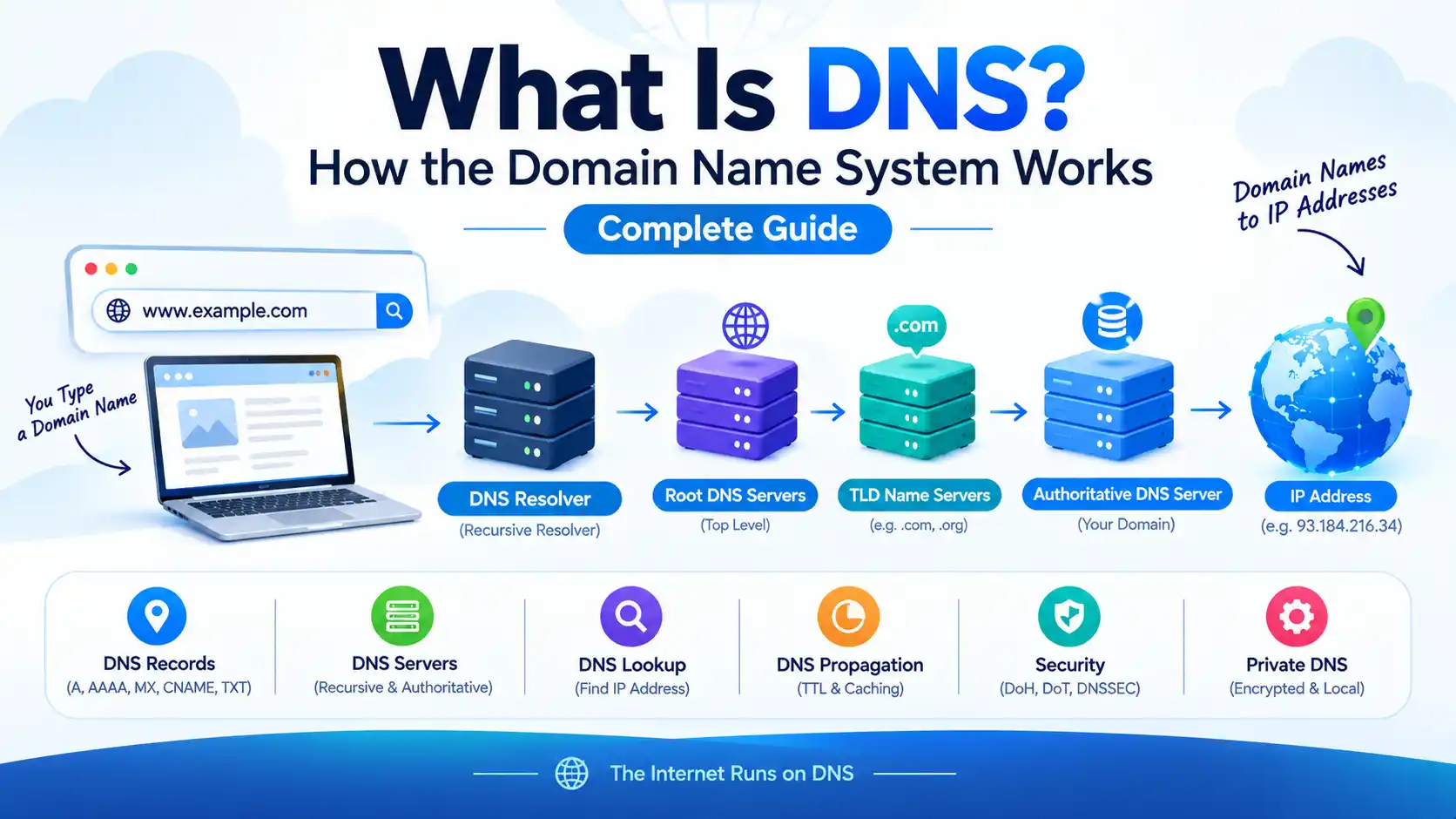
What Is DNS? How the Domain Name System Works

DNS stands for Domain Name System. It is the Internet’s distributed naming system that helps computers find services by translating human-readable domain names such as example.com into information such as IP addresses. Instead of remembering a numerical IP address, you can type a domain name into your browser and let DNS help locate the destination.
What Is DNS?
DNS, or the Domain Name System, is a hierarchical and distributed system used to store and retrieve information associated with domain names.
When you enter a website address such as example.com, your device typically needs DNS to find the appropriate IP address before it can connect to the website. A DNS lookup may be answered from a nearby cache, or a recursive resolver may query other DNS servers until it reaches the authoritative source for the domain.
In simple terms:
Domain name → DNS lookup → IP address → server connection → website
DNS is much broader than just converting names into IP addresses. DNS records can also tell other systems where to deliver email, which name servers are authoritative, provide verification data, create aliases, and more.
What Is a DNS Server?
A DNS server is a system that participates in answering DNS queries.
There are different roles within DNS. A recursive resolver searches for answers on behalf of clients, while an authoritative DNS server stores the authoritative records for a domain or DNS zone. The DNS hierarchy also includes root and top-level-domain infrastructure that helps resolvers locate the correct authoritative servers.
DNS server types
| DNS Component | Main Job | Example Role |
|---|---|---|
| Stub Resolver | Starts a DNS request from your device or application. | Your computer or phone asking for an IP address |
| Recursive Resolver | Finds the answer for the client and commonly caches DNS responses. | An ISP or public DNS resolver |
| Root DNS Servers | Help direct DNS queries toward the appropriate top-level domain. | Root-zone infrastructure |
| TLD Name Servers | Provide delegation information for domains under a top-level domain. | `.com`, `.org`, `.net`, country-code TLDs |
| Authoritative DNS Server | Publishes authoritative DNS records for a domain or zone. | The DNS provider hosting your domain’s zone |
The DNS hierarchy is intentionally distributed rather than stored in one central database. RFC 1034 describes DNS as a tree-structured name space with resource records, while IANA describes the root zone as the highest level of the DNS naming hierarchy.
How Does DNS Work?
A DNS lookup can involve several steps, although caching often means not every request has to go through the complete process.
For example, when you request www.example.com:
- Your browser or operating system needs the address associated with the hostname.
- Your device sends the request to a configured DNS resolver.
- If the resolver already has a valid cached answer, it may return it immediately.
- Otherwise, the resolver can follow the DNS hierarchy, starting at the root and moving toward the relevant top-level domain.
- The resolver reaches the authoritative name server responsible for the domain.
- The authoritative server returns the relevant DNS record.
- The resolver gives the answer back to your device and may cache it according to its TTL.
- Your browser can then connect to the returned IP address.
This caching mechanism is important because DNS does not need to perform a complete lookup every time a user visits a website.
What Is a DNS Lookup?
A DNS lookup is the process of querying DNS information for a domain or hostname.
For example, a lookup can ask:
- What IPv4 address does this hostname use?
- What IPv6 address does it use?
- Which mail servers handle email for this domain?
- Which name servers are authoritative?
- Does the domain have a particular TXT record?
You can perform a basic DNS lookup with tools such as nslookup or dig.
nslookup example.com
For an IPv6 address:
nslookup -type=AAAA example.com
With dig:
dig example.com
DNS lookup tools are useful when troubleshooting websites, email, domain changes, and DNS configuration.
What Are DNS Records?
DNS records are entries that describe how a domain should be handled by DNS.
| Record | Purpose | Example Use |
|---|---|---|
| A | Maps a hostname to an IPv4 address. | `example.com` → `192.0.2.1` |
| AAAA | Maps a hostname to an IPv6 address. | Website IPv6 address |
| CNAME | Creates an alias pointing a name to another canonical name. | `www` pointing to another hostname |
| MX | Specifies mail servers responsible for a domain. | Business email delivery |
| NS | Identifies authoritative name servers for a domain or zone. | Delegating DNS management |
| TXT | Stores text data used for verification and other purposes. | SPF and domain verification data |
| SOA | Contains core information about the DNS zone and its authority. | Zone administration |
The most common DNS record types include A, AAAA, CNAME, MX, NS, TXT, and SOA.
Cloudflare’s current DNS documentation confirms that A and AAAA records provide IPv4 and IPv6 address resolution, while DNS record types serve different purposes and include a TTL that controls how long resolvers can cache a response.
What Is DNS Propagation?
DNS propagation is the term commonly used for the period during which different users or DNS resolvers may still receive older cached DNS information after a change.
DNS does not broadcast every change instantly to every resolver. Recursive resolvers cache records according to their TTL values, so a previously cached answer can remain available until its cache lifetime expires.
That means there is no universal DNS propagation timer.
For a normal record change, the previous TTL is especially important. A nameserver change can involve additional delegation and caching layers, so it can behave differently from simply changing an A or CNAME record.
What Is TTL in DNS?
TTL means Time to Live.
A DNS record’s TTL tells recursive resolvers how long a response can remain cached before it should be queried again.
For example, if a record has a TTL of 3600 seconds, that represents one hour. It does not mean the DNS change is guaranteed to become visible everywhere after exactly one hour, because different resolvers may have cached data at different times and other DNS configuration can affect the result.
DNS vs Domain Name vs Web Hosting
These three concepts are often confused.
| Term | What It Means |
|---|---|
| Domain Name | The human-readable name, such as `example.com`. |
| DNS | The naming system that stores and resolves information associated with domain names. |
| Web Hosting | The service and infrastructure where your website files or application run. |
Your domain registrar, DNS provider, and web host can be three different services. Changing one does not automatically mean the others must change.
What Is a DNS Server Used For?
DNS supports much more than website addresses.
It can be used for:
- Website address resolution
- Email routing
- Domain verification
- Service discovery
- Delegation between DNS servers
- IPv4 and IPv6 address resolution
- Security-related DNS data
For example, an MX record can direct email to mail servers, while TXT records are frequently used for verification and email-related policies.
What Is Private DNS?
The phrase private DNS can refer to different things depending on context.
For consumer devices, Android’s Private DNS feature can use DNS-over-TLS to encrypt DNS communication between the device and a compatible resolver. Google documents Private DNS support for Android 9 and later.
In networking and cloud environments, “private DNS” can also refer to DNS zones or name resolution that are intended for private networks rather than the public Internet.
So private DNS does not always mean the same thing as simply using a different public DNS server.
Is DNS Secure?
Traditional DNS traffic is not inherently encrypted. Modern technologies such as DNS over HTTPS (DoH) and DNS over TLS (DoT) can encrypt the connection between a client and its DNS resolver.
DNSSEC is different.
DNSSEC does not encrypt DNS queries. Instead, it uses digital signatures to help resolvers authenticate DNS data and detect tampering with signed DNS information.
A useful distinction is:
DoH/DoT → encrypt DNS transport
DNSSEC → authenticate DNS data
These technologies address different security problems.
What Is the Difference Between DNS and DNS Server?
The distinction is simple:
DNS is the overall Domain Name System and its protocol, hierarchy, records, and related infrastructure.
A DNS server is a system that performs a particular DNS role, such as recursively finding an answer or authoritatively serving DNS records.
So DNS is the system; a DNS server is one of the systems that participates in it.
How to Change Your DNS Server
Most devices automatically receive DNS server settings from the network or router. You can often manually select another resolver through your operating system, router, or network configuration.
The exact steps depend on your device and operating system.
Common reasons to change a DNS resolver include:
- Troubleshooting DNS problems
- Using a different resolver
- Adding DNS filtering
- Using encrypted DNS
- Testing whether a DNS resolver is causing connection issues
Changing your DNS resolver does not change the authoritative DNS records for your domain.
Common DNS Problems
DNS issues can appear in several ways:
“This site can’t be reached”
The hostname may fail to resolve, or another networking issue may exist.
Website works on one network but not another
Different networks may use different recursive resolvers or have different cached responses.
Website migration is showing the old server
A resolver may still have a previous record cached.
Email stopped working after changing DNS
An MX, TXT, nameserver, or related DNS configuration may be incorrect.
Subdomain is not working
The required A, AAAA, CNAME, or other record may be missing or incorrect.
Useful diagnostic commands include:
nslookup example.com
nslookup -type=MX example.com
nslookup -type=AAAA example.com
dig example.com
Why DNS Matters for Website Owners
If you own a website, understanding DNS is extremely useful.
When you connect a domain to hosting, configure email, use a CDN, verify a service, create subdomains, or migrate servers, DNS is usually part of the process.
For example, a website owner may need to manage:
CNAME → hostname aliases
MX → email delivery
TXT → verification and policy information
NS → authoritative DNS delegation
Understanding these records can prevent many common domain and hosting mistakes.
DNS and WordPress
For a WordPress website, DNS is normally configured outside the WordPress dashboard.
A typical setup involves:
Domain registrar → Nameservers → DNS records → Hosting/server → WordPress website
WordPress controls the website application and content, while DNS determines how domain names and related services are directed.
So if your WordPress website suddenly stops resolving, the problem may be at the DNS level rather than inside WordPress itself.
Frequently Asked Questions About DNS
DNS stands for Domain Name System. It provides the Internet’s distributed naming system for locating services and retrieving information associated with domain names.
DNS is a system that helps turn easy-to-remember domain names into information computers can use to locate Internet services, commonly including IP addresses.
A DNS server is a system that answers DNS queries or provides authoritative DNS information. Recursive resolvers and authoritative servers perform different roles.
A DNS lookup is a query for DNS information associated with a hostname or domain, such as an A, AAAA, MX, or TXT record.
DNS records are entries that define information and instructions associated with a domain, including IP addresses, mail servers, aliases, nameservers, and verification data.
There is no single fixed time. DNS resolvers cache records according to TTL values, and nameserver changes can involve additional delegation caching.
DNS resolution is one part of the process of connecting to a website, so resolver performance and caching can influence how quickly a hostname is resolved. However, DNS is only one component of overall page-loading performance.
No. DNS helps direct users and services to the appropriate destinations, while hosting provides the infrastructure where a website or application runs.
Traditional DNS is not inherently encrypted. DNS-over-HTTPS and DNS-over-TLS can encrypt DNS communication between a client and resolver. DNSSEC provides authentication and integrity protection for signed DNS data rather than encryption.
Final Takeaway
DNS is one of the fundamental systems behind the Internet.
When you enter a domain name, DNS helps your device discover where that service can be found. Under the hood, recursive resolvers, authoritative servers, DNS records, caching, TTLs, and the DNS hierarchy work together to make that process practical at Internet scale.
For beginners, the most important concepts to understand are DNS servers, DNS lookups, DNS records, TTL, DNS propagation, recursive resolvers, and authoritative DNS.
Once those concepts make sense, managing domains, WordPress websites, email, hosting migrations, and other Internet services becomes much easier.


