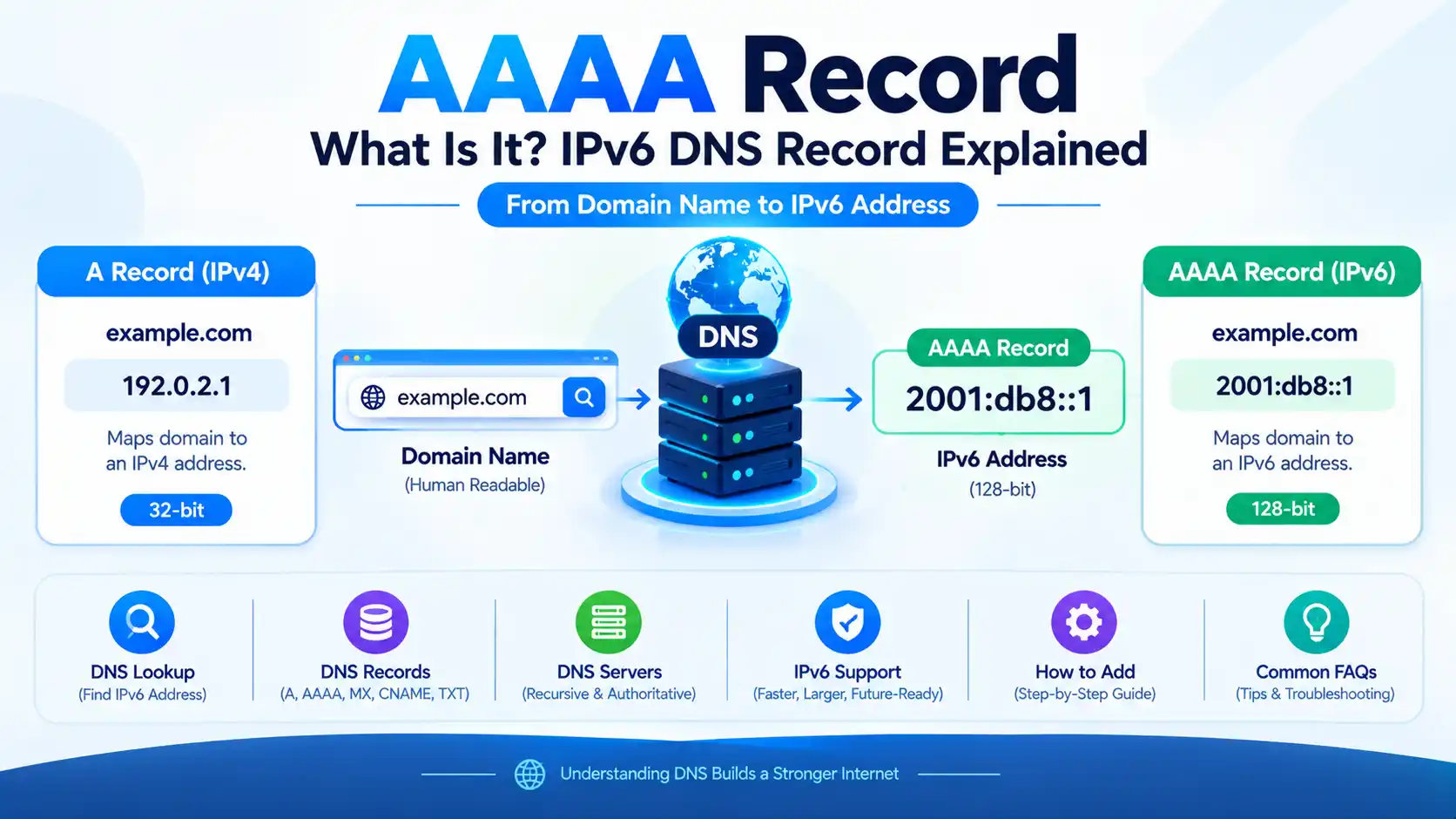
AAAA Record: What Is It? IPv6 DNS Record Explained

An AAAA record is a type of DNS record that maps a domain name or hostname to an IPv6 address.
If an A record tells DNS where a website or service is located using an IPv4 address, an AAAA record does the same thing using an IPv6 address.
For example:
example.com → 2001:db8::1
The 2001:db8::1 address is an IPv6 address, and an AAAA record can associate that address with example.com.
The AAAA record was standardized specifically to allow DNS to store and return IPv6 addresses. Its DNS record type number is 28, and it stores a 128-bit IPv6 address.
What Is an AAAA Record?
An AAAA record is a DNS resource record used to associate a domain name with an IPv6 address.
In simple terms:
A record → IPv4 address
AAAA record → IPv6 address
For example:
A
example.com → 192.0.2.1
AAAA
example.com → 2001:db8::1
The IETF defines the AAAA resource record as a DNS record that stores an IPv6 address. The record type is assigned the value 28.
ICANN similarly defines an AAAA record as a DNS record containing an Internet Protocol version 6 address for a domain name.
What Does AAAA Stand For?
AAAA is commonly associated with IPv6 address records.
The name comes from the relationship between:
- A record → IPv4
- AAAA record → IPv6
An IPv4 address contains 32 bits, while an IPv6 address contains 128 bits.
The AAAA record was introduced because the existing A record was designed around IPv4 addresses and needed a corresponding DNS record type for IPv6.
How Does an AAAA Record Work?
Suppose you enter:
www.example.com
into a browser.
Your device needs to determine where that hostname can be reached. A DNS resolver can query DNS for different record types.
An AAAA query asks:
Does this hostname have an IPv6 address?
If an AAAA record exists, DNS can return an IPv6 address such as:
2001:db8:1234::10
The application or operating system can then consider that address when establishing the network connection.
The important point is that DNS does not itself establish the website connection. DNS provides the address information; the networking stack then uses the available address to connect to the destination.
The DNS query can travel over IPv4 or IPv6 independently of the type of address contained in the answer. RFC 3596 explicitly notes that the IP version used to transport a DNS query is independent of the IP version represented by the DNS record.
AAAA Record Example
A simple AAAA record could look like this:
| Field | Example |
|---|---|
| Type | AAAA |
| Name | @ |
| IPv6 Address | 2001:db8::1 |
| TTL | 3600 |
Here, @ generally represents the root/apex of the DNS zone, while the IPv6 address is the destination associated with the domain.
A real DNS provider will normally require an actual globally usable IPv6 address rather than the documentation-only address used in examples.
AAAA Record vs A Record
The most important comparison is straightforward:
| Feature | A Record | AAAA Record |
|---|---|---|
| Protocol | IPv4 | IPv6 |
| Address size | 32-bit | 128-bit |
| Example | 192.0.2.1 | 2001:db8::1 |
| DNS record type | A | AAAA |
| Primary purpose | Maps a hostname to IPv4 | Maps a hostname to IPv6 |
Current DNS documentation from Cloudflare describes A and AAAA records as the records used to map a domain name to IPv4 and IPv6 addresses respectively.
Can a Domain Have Both A and AAAA Records?
Yes.
A domain can have both an A record and one or more AAAA records.
For example:
example.com
A     → 192.0.2.1
AAAA  → 2001:db8::1
This is common in dual-stack deployments, where a service supports both IPv4 and IPv6.
The DNS resolver can return both types of records, and the client networking stack can determine which available address to use according to its address-selection behavior and connectivity.
RFC 4213 explicitly describes IPv4/IPv6 nodes as needing to handle both A and AAAA records during the transition and coexistence of IPv4 and IPv6.
What Is an IPv6 DNS Record?
An IPv6 DNS record generally refers to an AAAA record when discussing forward DNS resolution.
For example:
www.example.com
AAAA
2001:db8:abcd::10
This tells DNS that the hostname has an IPv6 address.
The AAAA record stores a 128-bit IPv6 address.
How to Add an AAAA Record
The exact interface depends on your DNS provider, but the process is generally similar.
You normally need:
- Your domain name
- Access to your DNS management panel
- The correct IPv6 address of your server
- The hostname you want to configure
- An appropriate TTL
For example, in a DNS management panel you might enter:
Type: AAAA
Name: @
IPv6 address: 2001:db8::1
TTL: 3600
For a subdomain:
Type: AAAA
Name: blog
IPv6 address: 2001:db8::1
TTL: 3600
The resulting hostname would be:
blog.example.com
Cloudflare’s documentation confirms that an AAAA record is used when pointing a subdomain to an IPv6 address.
Important
Do not copy an example IPv6 address from an article and use it for your website.
You need the actual IPv6 address assigned to your server or service.
You should also make sure that:
- IPv6 routing is configured correctly.
- The server is listening on IPv6.
- Firewall rules permit the required traffic.
- Your hosting provider supports IPv6.
- The IPv6 address belongs to the intended destination.
Adding an AAAA record alone does not automatically make a server reachable over IPv6.
How to Add an AAAA Record in Cloudflare
If your DNS is managed by Cloudflare, the general process is:
- Log in to Cloudflare.
- Select your domain.
- Open DNS.
- Choose Add record.
- Select AAAA as the record type.
- Enter the hostname.
- Enter the IPv6 address.
- Choose the appropriate TTL.
- Configure the proxy setting if appropriate.
- Save the record.
Cloudflare documents AAAA records as IPv6 address records and allows the record content to contain a valid IPv6 address.
Cloudflare proxy consideration
If you use Cloudflare’s proxy, the DNS response presented to users can differ from the origin server’s direct address because Cloudflare acts as the intermediary.
Therefore, do not assume that the AAAA record visible to a public DNS lookup will necessarily expose your origin server’s IPv6 address when a record is proxied.
How to Check an AAAA Record
You can check whether a domain has an AAAA record using command-line DNS tools.
Using nslookup
nslookup -type=AAAA example.com
A response containing an IPv6 address indicates that the queried DNS system returned an AAAA record.
Using dig
dig AAAA example.com
To display a shorter answer:
dig AAAA example.com +short
You might see:
2001:db8::1
Using online DNS lookup tools
Online DNS lookup services can also query AAAA records.
When troubleshooting, it is useful to check the domain using more than one recursive resolver because cached DNS responses can differ during changes.
What Happens If There Is No AAAA Record?
If a hostname has an A record but no AAAA record, it can still be reachable over IPv4.
For example:
A → 192.0.2.1
AAAA → no record
A client with IPv6 connectivity cannot use an AAAA address for that hostname because none was published.
However, this does not mean that DNS itself is broken.
The domain can function perfectly over IPv4.
Google Public DNS documentation also describes situations where domains have A records but no AAAA records, and notes that DNS64 can synthesize AAAA responses for IPv6-only environments in appropriate circumstances.
Does an AAAA Record Mean My Website Supports IPv6?
Not necessarily.
An AAAA record is an important part of publishing IPv6 connectivity, but several components must work together.
A simplified IPv6 website setup looks like:
Domain
   ↓
AAAA record
   ↓
IPv6 address
   ↓
IPv6 routing
   ↓
Server/network interface
   ↓
Firewall
   ↓
Web server
If any important part is incorrectly configured, the website may not work correctly over IPv6.
For example, a DNS provider can successfully publish:
AAAA → 2001:db8::1
while the web server is not actually listening on that address.
Does an AAAA Record Improve Website Speed?
Not automatically.
Adding an AAAA record does not inherently make a website faster.
IPv6 can provide architectural and connectivity advantages, but actual website performance depends on many factors, including:
- Network routing
- ISP connectivity
- DNS resolution
- Latency
- Server response time
- CDN configuration
- TLS negotiation
- Network congestion
- Website performance
Therefore, you should not add an AAAA record solely because you expect an immediate speed improvement.
The primary purpose of an AAAA record is IPv6 address resolution.
AAAA Record and DNS Propagation
After adding or changing an AAAA record, users may not immediately see the new answer everywhere.
This is because DNS resolvers cache responses according to their TTL.
For example:
AAAA → old IPv6 address
may remain cached until the relevant cache period expires.
Cloudflare documents TTL as the mechanism controlling how long DNS resolvers cache a response before revalidating it.
So if you change:
AAAA → 2001:db8::1
to:
AAAA → 2001:db8::2
different DNS resolvers may temporarily return different results depending on their cache state.
AAAA Record vs CNAME
An AAAA record contains an IPv6 address.
A CNAME record points a hostname to another hostname.
For example:
AAAA
blog.example.com → 2001:db8::1
versus:
CNAME
blog.example.com → hosting.example.net
A CNAME does not directly contain the IPv6 address.
The target hostname can have its own A and/or AAAA records.
Cloudflare similarly distinguishes an AAAA record, which points to an IPv6 address, from a CNAME, which points to a fully qualified domain name.
AAAA Record vs IPv6 Address
These terms are related but not identical.
An IPv6 address is the numerical network address.
An AAAA record is the DNS record that associates a hostname with that IPv6 address.
For example:
IPv6 address:
2001:db8::1
DNS record:
example.com
AAAA
2001:db8::1
Think of the IPv6 address as the destination and the AAAA record as the DNS information that associates a hostname with that destination.
Can You Have Multiple AAAA Records?
Yes.
A hostname can have multiple AAAA records.
For example:
example.com
AAAA → 2001:db8::1
AAAA → 2001:db8::2
Multiple addresses can be useful in various network architectures, such as providing multiple endpoints.
RFC 3596 specifies that an AAAA query can return all associated AAAA records in the answer section.
However, simply adding multiple IPv6 addresses does not by itself guarantee load balancing, failover, or improved performance. Those behaviors depend on the overall network and application architecture.
What Is the Difference Between AAAA and A Record?
The simplest answer is:
A records store IPv4 addresses, while AAAA records store IPv6 addresses.
For example:
A:
example.com → 192.0.2.1
AAAA:
example.com → 2001:db8::1
Both are DNS address records, but they represent different Internet Protocol versions.
Common AAAA Record Problems
1. Incorrect IPv6 address
If the AAAA record contains the wrong IPv6 address, users may be directed to the wrong destination.
2. IPv6 firewall blocking traffic
DNS can return the correct address while the server firewall prevents IPv6 connections.
3. Server does not support IPv6
Publishing an AAAA record does not configure IPv6 on the server.
4. Incorrect DNS record
A typo in the hostname, record type, or IPv6 address can prevent correct resolution.
5. Cached DNS response
A resolver may still return an older AAAA record until its cached response expires.
6. Broken IPv6 routing
The address may be valid but unreachable because the network routing configuration is incorrect.
How to Troubleshoot an AAAA Record
A practical troubleshooting sequence is:
Step 1: Check the AAAA record.
dig AAAA example.com +short
Step 2: Verify that the returned IPv6 address is correct.
Step 3: Check whether the server is listening on IPv6.
Step 4: Check IPv6 firewall rules.
Step 5: Test IPv6 connectivity.
Step 6: Compare results from multiple DNS resolvers.
Step 7: Check whether the DNS change is still affected by caching.
This helps distinguish a DNS problem from an IPv6 networking problem.
AAAA Records and IPv6
AAAA records are an important part of the transition from an IPv4-only Internet toward networks that support both IPv4 and IPv6.
IPv6 uses 128-bit addresses, creating a vastly larger address space than IPv4. DNS needed a corresponding record type so domain names could resolve to IPv6 addresses, which is why the AAAA record was standardized.
Modern DNS infrastructure can therefore return:
A
IPv4 address
and:
AAAA
IPv6 address
for the same hostname.
Frequently Asked Questions
An AAAA record is a DNS record that maps a domain name or hostname to an IPv6 address. It is the IPv6 counterpart to an A record.
AAAA is the DNS record type used for IPv6 address mapping. It is commonly described as the IPv6 counterpart to the A record.
It is used to associate a hostname with an IPv6 address so DNS clients can discover an IPv6 destination for that hostname.
An A record contains an IPv4 address, while an AAAA record contains an IPv6 address.
Yes. A domain can publish both IPv4 and IPv6 addresses and therefore have both A and AAAA records.
No. A website does not necessarily need an AAAA record to work over IPv4. An AAAA record is needed when you want that hostname to publish an IPv6 destination.
Not by itself. The DNS record, IPv6 routing, server configuration, firewall, and web server all need to support IPv6 correctly.
Use a DNS lookup tool such as:
dig AAAA example.com
or:
nslookup -type=AAAA example.comThe visible change depends largely on DNS caching and TTL, so there is no universal fixed propagation time.
No. An AAAA record is designed to contain an IPv6 address. An IPv4 address belongs in an A record.
Yes. A hostname can have multiple AAAA records, and an AAAA query can return multiple associated IPv6 records.
Final Thoughts
The AAAA record is the DNS record type responsible for associating hostnames with IPv6 addresses.
The easiest way to remember it is:
A     → IPv4
AAAA  → IPv6
For website owners, the important point is that publishing an AAAA record is only one part of enabling IPv6. The IPv6 address, routing, firewall, server, and application configuration must also work correctly.
If you understand the difference between A records, AAAA records, CNAME records, DNS lookups, and DNS propagation, you have the foundation needed to troubleshoot most basic DNS and IPv6 configuration issues.