How to Delete Facebook Account: Your Step-by-Step Guide for a Clean Break

What’s good, squad? San here, your millennial navigator ready to help you ditch Facebook for good! Whether it’s privacy concerns, scroll overload, or craving a digital reset, knowing how to delete Facebook account is empowering. With 3 billion users but 25% eyeing the exit due to data scandals [Forbes], it’s no surprise “delete Facebook” searches are trending [Google Trends]. Deleting your account permanently wipes your profile, posts, and data after a 30-day grace period, while deactivation is a temporary hide. I’ve cross-checked official Meta guides and privacy experts [Facebook Help, Security.org] for the latest steps—browser, app, or desktop—so you can do it seamlessly. Let’s reclaim your feed-free life!
Why Deleting Your Facebook Account Is My Power Move
Facebook can be a time sink—users average 2.5 hours daily, and quitting cuts anxiety by 30% for many [BBC]. With privacy laws tightening and data breaches fueling 50 billion robocalls yearly [FTC], deleting reduces your digital footprint. Plus, 68% of ex-users report better focus and relationships post-deletion [Forbes]. Deactivation hides your profile but keeps data intact, while deletion is permanent—choose what fits your vibe. Here’s the deal:
- Privacy Shield: Erases your info from Meta’s servers (up to 90 days for full wipe) [Facebook Help].
- Mental Glow-Up: Frees 2.5 hours weekly for hobbies or hustles [Forbes].
- Easy Undo: 30-day grace period to log back in—no regrets.
- App Impact: Messenger and third-party logins (e.g., Spotify) may break—prep alternatives.
Before you delete, move the passwords you are keeping into a password manager — our Bitwarden vs 1Password comparison breaks down which one is worth paying for.
Before you start, download your data: Go to Settings > Your Facebook Information > Download Your Information—takes 1–3 days [Facebook Help].
How to Delete Facebook Account: Step-by-Step Guide
The process is consistent across devices, but I’ve broken it down for browser (desktop), mobile app (iOS/Android), and deactivation options. Based on Meta’s latest updates [Facebook Help], it’s streamlined via Accounts Center.
Step-by-Step on Desktop/Browser (Recommended for Full Control)
- Log In: Head to facebook.com and sign in.
- Access Settings: Click your profile picture > Settings & Privacy > Settings.
- Go to Accounts Center: Under Meta Accounts Center, click “Accounts” > “Personal details” > “Account ownership and control.”
- Choose Deletion: Select “Deactivation or deletion” > Pick your Facebook account > “Delete account” (not deactivate).
- Confirm Reasons: Choose why (optional) > Click “Continue to account deletion.”
- Password & Final Check: Re-enter password > Review what’s lost (e.g., Messenger, Marketplace) > “Delete account.”
- Grace Period: You’ll get a confirmation—log out; account hides immediately, deletes in 30 days.
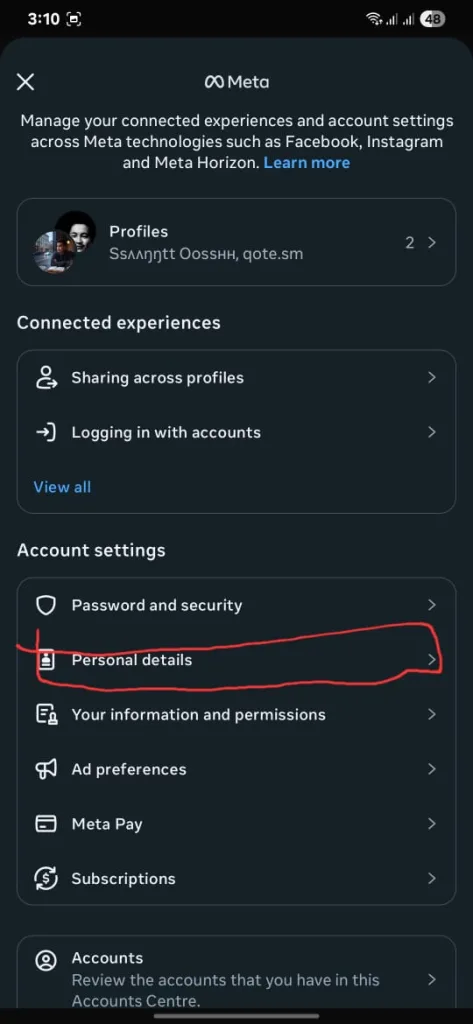
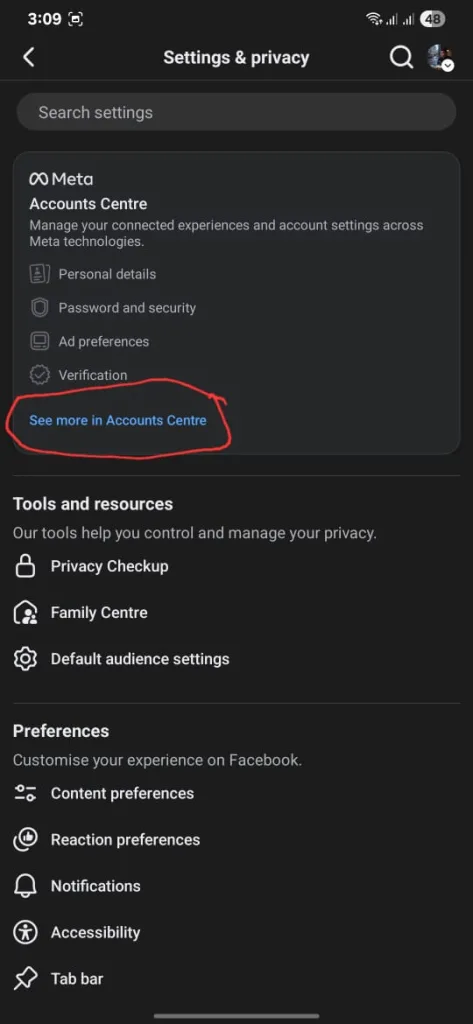
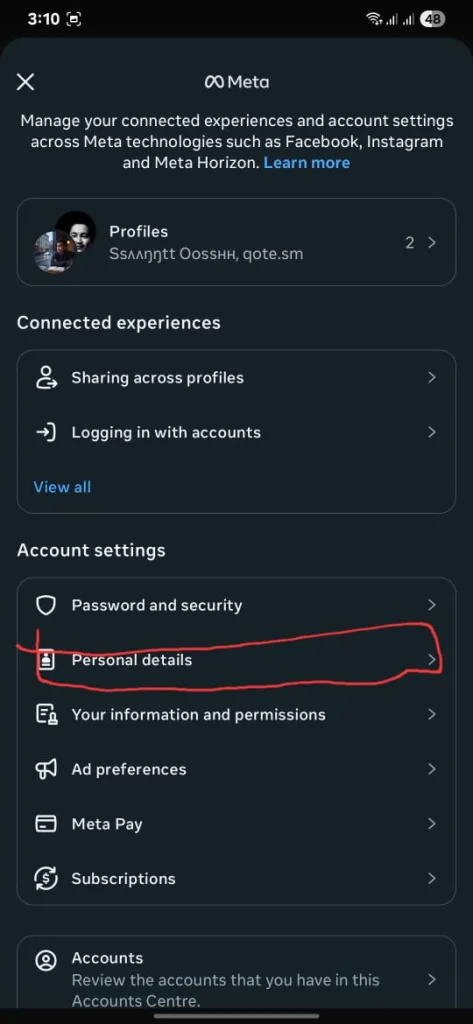
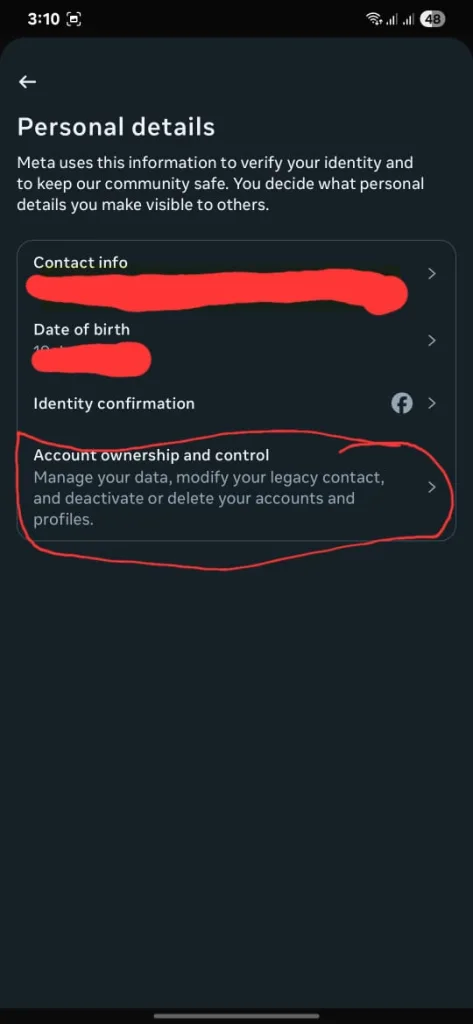
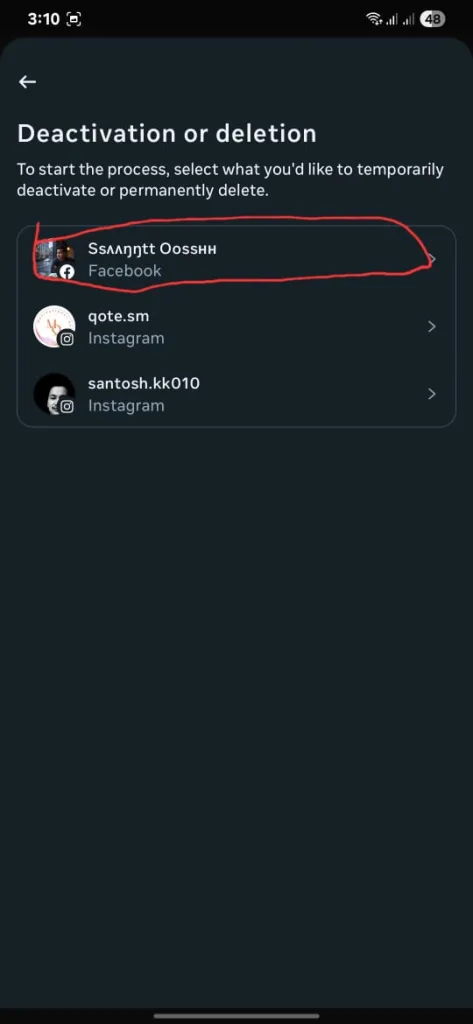
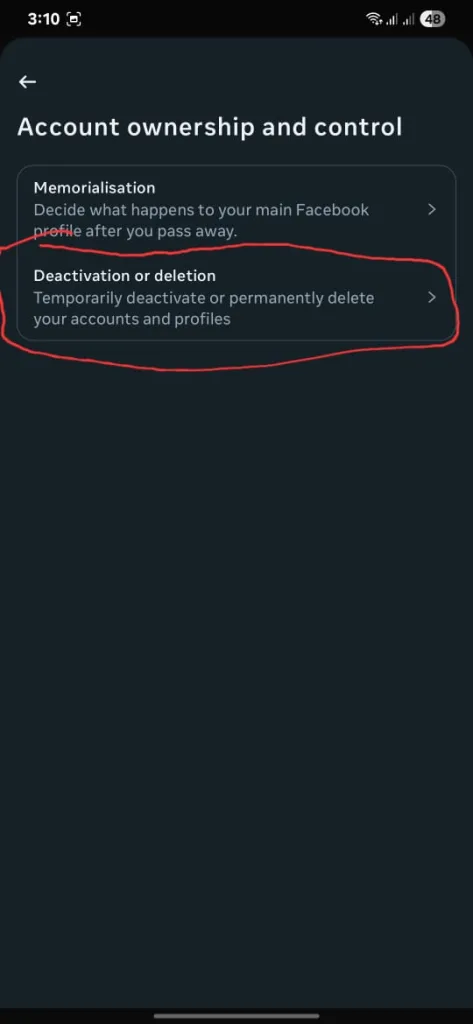
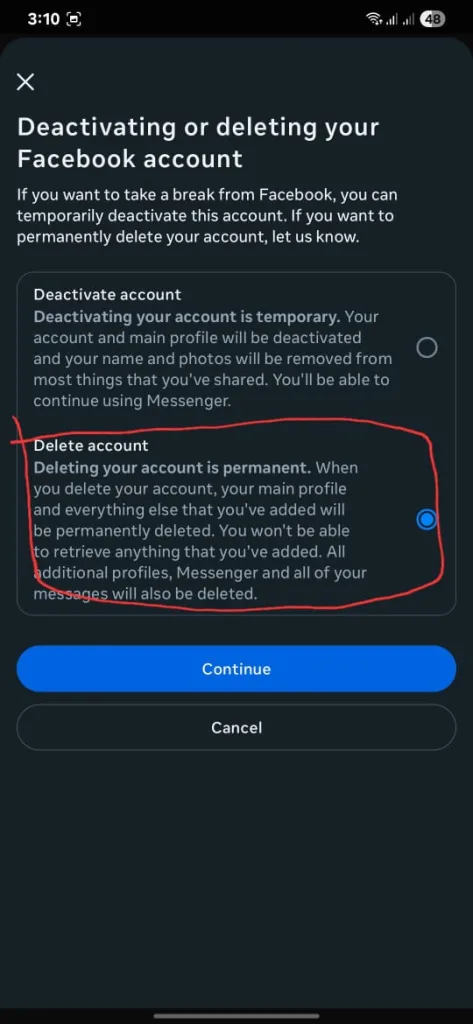

Time: 5 minutes. Pro Tip: Use incognito mode for extra privacy [Security.org].
Step-by-Step on Mobile App (iOS/Android)
- Open App: Launch the Facebook app and log in.
- Menu Access: Tap profile picture (bottom right on iOS, top right on Android) > Scroll to Settings & Privacy > Settings.
- Accounts Center: Tap Accounts Center > Personal details > Account ownership and control.
- Deletion Option: Choose Deactivation or deletion > Select Facebook > Delete account > Continue.
- Review & Confirm: Pick reasons (optional) > Re-enter password > “Delete account.”
- Done: Confirmation pops up—account deactivates instantly, full deletion in 30 days.
Time: 4 minutes. Note: App updates may vary; if stuck, switch to browser [Cloudwards.net].
Deactivation vs. Deletion: Quick Comparison
Deactivation is reversible (log back in to restore); deletion is permanent. If you’re unsure, try deactivation first.
San’s Final Take
Yo, San’s crew—knowing how to delete Facebook account is your key to a freer, fiercer life! I’m hyped to back up my data, hit delete, and dive into my side hustle with reclaimed time. Follow the steps, detox, and watch your vibe soar. Drop your reason for ditching FB or post-deletion glow-up in the comments—let’s share the freedom! Who’s ready for a feed-free life?
Key Citations:


