
SynthID Detector: How to Check AI Images, Videos & Audio

Want to know whether an image, video, or audio clip was created using artificial intelligence? SynthID Detector is Google’s public verification tool for checking media for invisible digital watermarks associated with supported AI systems.
Google opened the tool to everyone globally in English on October 7, 2026, after previously testing it with journalists and media professionals. It can check images, videos and audio for SynthID watermarks, helping people investigate the origin of suspicious or unfamiliar media. Google’s official announcement explains the public launch and supported use cases.
However, there is an important limitation: SynthID Detector does not identify every form of AI-generated content. It looks for a particular watermark technology, so a negative result cannot establish that an image, video or audio clip is authentic.
In this guide, you’ll learn what SynthID Detector is, how it works, how to use it, which file formats it supports, how to interpret results, and what to know before relying on it.
What Is SynthID Detector?
SynthID Detector is an online media-verification tool developed around Google DeepMind’s SynthID watermarking technology. It helps users check whether supported AI-generated media contains an invisible SynthID watermark.
Unlike a traditional visible watermark, which places text or a logo over an image, SynthID embeds an imperceptible signal into AI-generated content. Specialized detection technology can then look for that signal.
According to Google DeepMind, the underlying SynthID technology supports watermarking for images, audio, text and video. The public SynthID Detector’s October 2026 announcement specifically describes checking images, videos and audio files. These are related capabilities, but they should not be confused with a universal AI text detector. Learn more about SynthID.
SynthID Detector at a glance
| Feature | Details |
|---|---|
| Tool name | SynthID Detector |
| Developer | Google DeepMind |
| Main purpose | Check supported media for SynthID watermarks |
| Media types | Images, videos and audio |
| Availability | Public access globally, in English, announced October 7, 2026 |
| Technology | Invisible digital watermark detection |
| Partner ecosystem | Google and announced partners, including OpenAI, NVIDIA and Kakao |
| Apple support | Announced as coming soon by Google |
| Does it detect every AI-generated file? | No |
| Official website | synthid.com |
Google says SynthID has been used to watermark more than 180 billion images and videos and 240,000 years of audio content. These figures are from Google’s own announcement, not an independent measurement of all AI-generated media. Source: Google DeepMind.
How to Use SynthID Detector
Checking a media file is straightforward. Use the official website and follow the upload and verification options shown there.
Step 1: Open the official SynthID Detector website
Visit https://synthid.com/.
Make sure you are using the official website rather than an unrelated service using a similar name.
Step 2: Choose the media file
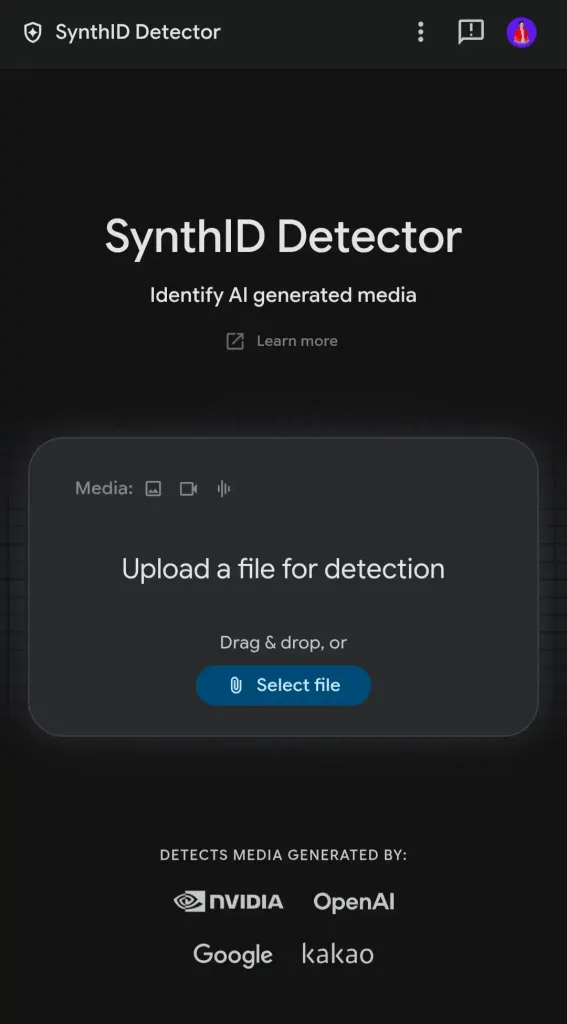
Select the image, video or audio file you want to investigate. Use a copy of the original file when available.
The public tool’s announced use cases include checking media created or edited with supported AI systems.
Step 3: Run the check

Upload the file and follow the site’s instructions to start verification. The detector examines the media for a recognizable SynthID watermark.
Step 4: Review the result
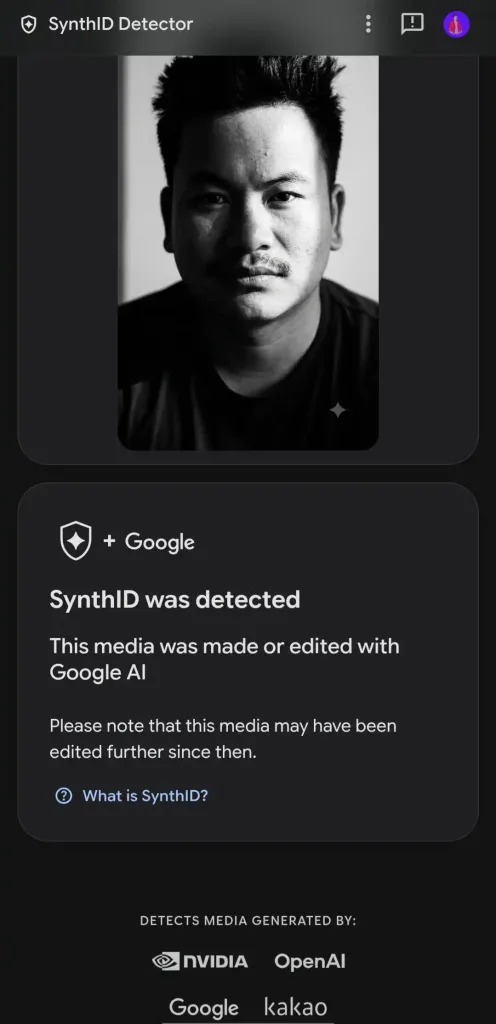
Read the result in context. Depending on the media and detection result, the tool can help identify whether a SynthID watermark is present and may highlight relevant parts or segments.
Step 5: Interpret the finding carefully
A detected watermark is useful evidence that the corresponding content was generated or edited with a system using the recognized watermark. A result that finds no watermark is not proof of human creation.
This distinction is essential when checking viral images, news clips, social media videos, music or material being considered for publication.
Which File Formats Does SynthID Detector Support?
TechCrunch reported the following accepted file types when covering the public launch on October 7, 2026. The live website remains the best place to confirm current upload requirements, because supported formats and restrictions can change.
| Media type | Reported supported formats |
|---|---|
| Images | JPG, JPEG, PNG, BMP, WEBP, AVIF, HEIC, HEIF, TIFF, TIF, GIF |
| Videos | MP4, MOV, WEBM |
| Audio | WAV, MP3, OGG, FLAC, AAC, M4A |
Source: TechCrunch’s SynthID Detector report.
A file being in a supported format does not guarantee that the detector will identify its origin. The media must contain a watermark the system recognizes, and the watermark must remain detectable.
If an upload fails, check the official site’s current instructions rather than simply renaming the file extension.
How Does SynthID Work?
SynthID embeds a digital watermark into AI-generated media during generation. The watermark is designed to be imperceptible to ordinary users while remaining detectable through the corresponding technology.
The implementation differs by content type.
SynthID for images
For images, the watermark is embedded into the image itself rather than relying only on ordinary file metadata. This is useful because metadata may be removed when an image is edited, exported or shared.
SynthID for videos
For video, the watermarking approach can incorporate information into video frames. Google’s technology is designed to remain detectable after common transformations, although that does not mean every edited file will always be recognized.
SynthID for audio
For audio, the watermark is embedded into the audio signal and is designed to be inaudible. SynthID is used in Google’s AI audio and music workflows, including content generated by Lyria.
What about AI-generated text?
Google also has a separate SynthID text-watermarking technology. It changes token-selection probabilities during text generation in a way intended to create a detectable statistical pattern.
However, SynthID text watermarking is not the same as uploading any paragraph to the public SynthID Detector and receiving a universal AI-authorship verdict. The technology and developer resources for text have their own capabilities and limitations. Google’s SynthID text documentation explains how the text watermark operates and why extensive rewriting or translation can reduce detection confidence.
Can SynthID Detector Identify AI-Generated Images?
Yes, when an image contains a SynthID watermark that the detector can recognize.
This can be helpful when checking an image that might have been generated or edited by a supported AI system. The detector looks for the watermark rather than judging only whether the image looks artificial.
For example, an image may have realistic lighting, detailed textures and convincing human faces. Visual inspection alone may not settle whether AI was involved. A watermark check can provide another piece of evidence.
But remember:
- A detected watermark can indicate AI involvement in all or part of an image.
- No detected watermark does not prove that the image is real.
- An image created with an unsupported AI system may not contain a recognizable SynthID watermark.
- A watermark result does not establish whether the image’s caption, context or claims are truthful.
Use the result as part of a verification process, not as a substitute for it.
Can SynthID Detector Check AI-Generated Videos?
Yes. Video is one of the media types included in the public detector’s announced capabilities.
This matters because AI-generated videos can depict realistic events, people or situations that never happened. SynthID can provide evidence of AI involvement when a recognized watermark is detected.
Video verification is particularly useful for investigating:
- Viral social media clips
- Suspected synthetic footage
- AI-generated advertisements
- Videos shared without clear source information
- Media being considered for news or educational use
However, a watermark detector is not a complete fact-checking tool. It cannot independently prove where a video was filmed, whether an event occurred, or whether a video caption is accurate. Those questions require separate source and context checks.
Can SynthID Detector Identify AI-Generated Audio?
Yes. The public tool is designed to check audio for detectable SynthID watermarks.
This may help when examining synthetic music, generated narration, audio clips or other recordings produced by supported AI systems.
Audio verification is useful because a recording can sound natural even when the voice or music was generated by a model. A successful watermark check can supply provenance information that listening alone cannot provide.
A negative result, however, does not prove that a recording is an authentic human performance. Other AI systems may use different watermarking technologies, and some files may not contain a detectable SynthID signal.
Does SynthID Detector Work With ChatGPT, NVIDIA and Other AI Tools?
Google’s October 7, 2026 announcement says the expanded detector can check supported content made with Google AI and participating partners, including OpenAI, NVIDIA and Kakao. Google also said Apple support was coming soon.
That announcement does not mean every image, video or audio file generated by every product from those companies will necessarily be detected. Coverage depends on whether the relevant system and content use a watermark that the detector recognizes.
| AI ecosystem | What to know |
|---|---|
| Google AI | SynthID is used across supported Google AI media workflows |
| OpenAI | Named by Google as a partner in the expanded detector ecosystem |
| NVIDIA | Named by Google as a partner |
| Kakao | Named by Google as a partner |
| Apple | Google announced support as coming soon |
| Other AI generators | Detection depends on watermark support and compatibility |
For current support details, consult Google’s launch announcement and the official SynthID website.
The important distinction is between a company being named as a partner and every product, model, version and output being covered. Do not treat the partnership list as a guarantee that all media produced by those companies will be detected.
SynthID Detector vs. Traditional AI Detectors
Although both are used to investigate AI-generated content, SynthID and conventional AI detectors take different approaches.
| Comparison | SynthID Detector | Conventional AI detector |
|---|---|---|
| Main method | Looks for a specific digital watermark | Often analyzes patterns in content |
| Image verification | Yes, for detectable supported watermarks | Some tools offer image classification |
| Video verification | Yes, for detectable supported watermarks | Depends on the tool |
| Audio verification | Yes, for detectable supported watermarks | Depends on the tool |
| Text checking | Separate SynthID text technology exists; the public media tool should not be treated as a general text checker | Commonly offered by text-focused services |
| Detects every AI system? | No | No |
| Can a negative result prove human creation? | No | No |
| Best use | Checking for known watermark signals | Additional probabilistic evidence, depending on the detector |
A watermark detector can be more direct when the relevant watermark exists, but it has a narrower scope. A general AI detector may assess content without a known watermark, yet its prediction can be uncertain or incorrect.
For important decisions, use more than one kind of evidence. No single detector should be treated as a universal test of authenticity.
Is SynthID Detector Free?
Google opened public access to SynthID Detector globally in English on October 7, 2026. Its launch announcement describes access for everyone and does not announce a subscription tier.
For the current access requirements, upload conditions or any restrictions, check the official SynthID website. Do not assume that unlimited uploads, a specific file-size allowance or unrestricted API access is included unless the service explicitly confirms it.
What Are the Limitations of SynthID Detector?
SynthID is a useful verification technology, but it has important limitations.
1. It is not a universal AI detector
The detector looks for a specific watermark technology. AI systems that do not embed a compatible SynthID watermark can fall outside its coverage.
2. No watermark does not mean human-made
A negative result means that the detector did not identify a recognizable SynthID watermark. It does not prove the media was captured by a camera, recorded by a person or created without AI.
3. Editing can affect detection
SynthID is designed to withstand common transformations, but robustness is not the same as guaranteed detection under every possible editing process.
Heavy processing, substantial transformations or other technical factors may affect whether a watermark can be recognized.
4. A watermark cannot validate the whole story
Even if AI involvement is detected, that does not establish whether a caption is truthful, whether a person gave consent, whether a news event actually happened or whether the media is being shown in its original context.
5. Public text verification is a separate issue
Google’s text watermarking technology has its own implementation and detection approach. Do not assume that the public media-verification website can determine whether any arbitrary article, essay or message was written by AI.
6. It is not a replacement for forensic analysis
If a decision has legal, journalistic, academic or financial consequences, a single detector result is not sufficient proof. Preserve the original file, investigate the source, review available metadata and corroborate important claims independently.
SynthID Detector vs. Gemini Verification
Google also offers verification capabilities inside Gemini and related products, but the distinction matters.
Google’s current Gemini verification help describes SynthID watermark checks and Content Credentials provenance information. It also notes that Gemini’s SynthID recognition currently focuses on content generated by Google AI tools.
The separate public SynthID Detector was announced with an expanded partner ecosystem that includes OpenAI, NVIDIA and Kakao. The tools should not be assumed to have identical detection coverage.
| Feature | Public SynthID Detector | Gemini verification |
|---|---|---|
| Access point | synthid.com | Gemini app or website |
| Main use | Check supported media for SynthID watermarks | Ask Gemini to help verify media |
| Announced coverage | Google plus named partners | Google AI SynthID checks; Content Credentials may provide additional provenance information |
| Detects every AI model? | No | No |
| Best practice | Interpret the result alongside other evidence | Interpret the answer alongside other evidence |
Because supported capabilities can change, check the current product instructions before relying on either tool for a particular file.
How to Verify AI-Generated Media More Reliably
If you’re investigating a suspicious image, video or audio clip, use SynthID Detector as one part of a broader workflow.
Step 1: Preserve the original. Keep the highest-quality source file you can obtain instead of relying only on a screenshot or a heavily compressed repost.
Step 2: Run the watermark check. Upload the file to the official SynthID Detector and record what the result actually says.
Step 3: Trace the source. Find the original account, publisher, upload date or known source, rather than relying on reposts.
Step 4: Look for independent evidence. For an image, investigate whether it appeared earlier elsewhere. For a video, compare locations, dates and credible reports. For audio, look for original recordings or authoritative attribution.
Step 5: Treat uncertainty honestly. If there is not enough evidence to verify the content, describe it as unverified rather than declaring it real or AI-generated.
This process is more reliable than assuming a single tool can settle every authenticity question.
Is SynthID Detector Safe to Use?
Use the official website and avoid uploading sensitive material without first reviewing the service’s current terms and privacy information.
This is especially important for confidential business recordings, private images, unpublished media, client material or content covered by an organization’s data-handling rules.
A tool can be legitimate while still requiring users to consider what they are sharing, what information a file contains and whether they have permission to upload it.
Should You Trust SynthID Detector Results?
You should treat a result as useful evidence, not an absolute verdict.
If a watermark is detected, that supports the conclusion that the checked content contains a recognizable SynthID signal. Depending on the file, only part of the media may have been generated or edited using a supported system.
If no watermark is detected, the result is inconclusive about human authorship. The media could have been created by a system that uses another watermark, processed in a way that affects recognition, or produced without a watermark in the first place.
The appropriate conclusion depends on the exact result, the file’s origin and the evidence available from other sources.
Final Verdict: Is SynthID Detector Worth Using?
Yes. SynthID Detector is a useful option for people who need to investigate the origin of images, videos and audio, particularly when a supported AI system may have generated or edited the media.
Its main strength is that it checks for an invisible watermark rather than relying solely on whether content looks or sounds artificial. Its main limitation is that it can only identify signals within its coverage.
Use the official tool at synthid.com, understand the scope of the result, and confirm important claims through independent evidence.
The key takeaway: SynthID Detector can help identify supported AI-generated media, but a missing watermark does not prove authenticity—and a watermark does not tell the entire story.
Frequently Asked Questions About SynthID Detector
SynthID Detector is Google’s public tool for checking images, videos and audio for detectable SynthID watermarks associated with supported AI systems.
Visit synthid.com, upload a supported media file and follow the verification instructions. Interpret the result as evidence about watermark detection, not a universal authenticity verdict.
Google’s October 2026 public-launch announcement opened the tool to everyone and did not announce a subscription tier. Check the official site for current access conditions.
Yes, when an image contains a recognizable SynthID watermark. It cannot identify every AI-generated image from every generator.
Yes. Google’s public launch announcement includes both video and audio verification, in addition to images.
Google named OpenAI as a partner in the expanded SynthID Detector ecosystem. Detection still depends on the relevant content carrying a watermark that the tool recognizes; not every output should be assumed detectable.
No. It is not a universal AI detector. Its coverage depends on supported watermark technology and participating systems.
It means the detector did not identify a recognizable SynthID watermark. It does not prove that the media was created by a human or that the content is authentic.
SynthID technology includes a separate text-watermarking method, but the public SynthID Detector announcement focuses on images, videos and audio. Do not treat the media tool as a universal AI writing detector.
It depends on the task. SynthID is useful when the relevant watermark exists; other detectors may analyze content patterns without relying on that watermark. Neither approach can guarantee accurate identification of every AI-generated item.
It is designed to remain detectable after some common transformations, but detection is not guaranteed after every edit or processing operation.
No. A detected watermark can indicate AI involvement, but it does not by itself establish that the depicted event is false. Context and independent evidence are still necessary.
Use the official website: https://synthid.com/.
Sources and Further Reading
- Google DeepMind — Public launch of SynthID Detector, October 7, 2026
- Google DeepMind — SynthID technology overview
- Google AI for Developers — SynthID text watermarking documentation
- Google Gemini Help — Verify AI-generated images, videos and audio
- TechCrunch — Supported file formats and public launch coverage