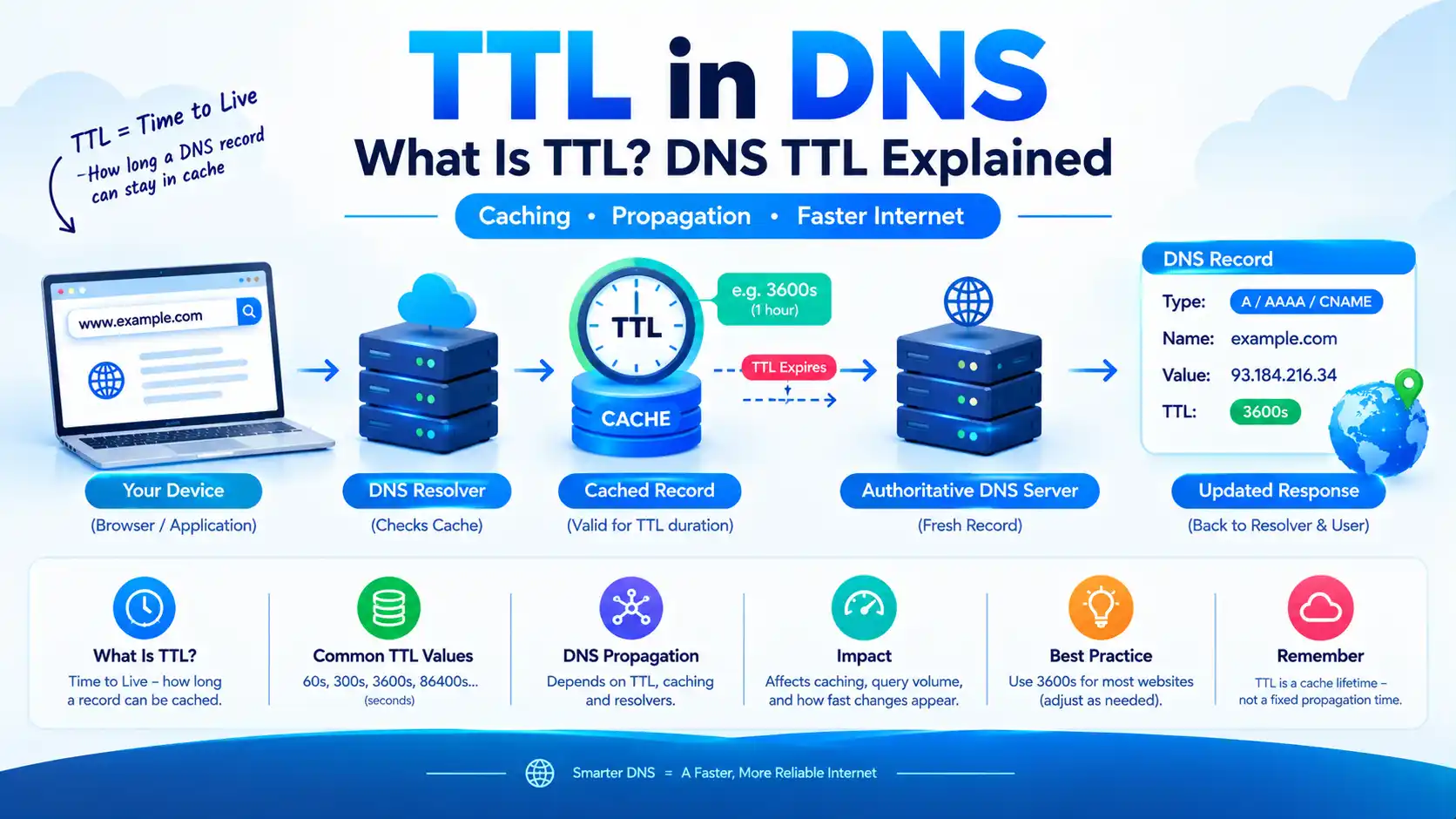
TTL in DNS: What Is TTL? DNS TTL Explained

TTL in DNS stands for Time to Live. In DNS, TTL is the amount of time a DNS record can remain in a resolver’s cache before the resolver should obtain fresh information from an authoritative DNS server.
For example, if a DNS record has a TTL of 3600 seconds, a recursive DNS resolver can cache that record for up to 1 hour before it needs to query for updated information.
TTL is important because it affects DNS caching, website changes, DNS propagation, lookup performance, server load, and how quickly visitors see updated DNS records.
Quick Answer: What Is TTL?
DNS TTL is a value, measured in seconds, that tells DNS resolvers how long they may cache a DNS record.
A shorter TTL allows DNS changes to be detected sooner, but can result in more DNS queries. A longer TTL can improve caching efficiency and reduce repeated DNS queries, but changes can remain cached for longer.
For example:
| TTL | Time | Typical interpretation |
|---|---|---|
| 60 seconds | 1 minute | Very short |
| 300 seconds | 5 minutes | Short |
| 600 seconds | 10 minutes | Short |
| 1800 seconds | 30 minutes | Moderate |
| 3600 seconds | 1 hour | Common |
| 14400 seconds | 4 hours | Longer |
| 86400 seconds | 24 hours | Long |
The exact TTL you should use depends on how frequently your DNS records change and how important rapid changes are.
What Does TTL Mean?
TTL means Time to Live.
The term is used in several areas of networking, so its meaning depends on context.
In DNS, TTL controls how long a DNS record can be cached.
In IP networking, the IP header also contains a field commonly called TTL for IPv4. That value is related to packet forwarding and is different from DNS TTL.
This article focuses specifically on DNS TTL.
DNS TTL vs IP TTL
| Feature | DNS TTL | IP TTL |
|---|---|---|
| Used by | DNS resolvers/caches | Network routers |
| Purpose | Controls DNS cache lifetime | Limits packet lifetime/hops |
| Measured as | Seconds | Router hops |
| Applies to | DNS records | IP packets |
| Example | 3600 seconds | Decremented at each hop |
Cloudflare also distinguishes these uses of TTL: DNS TTL controls caching, while networking TTL is associated with packet forwarding.
How Does DNS TTL Work?
Suppose your domain has this DNS record:
example.com A 203.0.113.10 TTL 3600
The TTL is 3600 seconds, or 1 hour.
When a recursive DNS resolver receives this record, it can store the result in its cache.
For subsequent requests, the resolver may answer from its cache instead of contacting the authoritative DNS server again.
The basic process looks like this:
User
  ↓
Recursive DNS Resolver
  ↓
DNS Cache
  ↓
Authoritative DNS Server
If the requested record is already cached and its TTL has not expired, the resolver can return the cached answer.
When the TTL reaches zero, the cached information can no longer be used as a fresh cached answer and the resolver needs to obtain current information.
The DNS specification defines TTL as the time interval, in seconds, for which a resource record may be cached before the source should be consulted again.
What Is a DNS TTL Example?
Consider this DNS record:
www.example.com
Type: A
Value: 203.0.113.10
TTL: 3600
Here:
- www.example.com = hostname
- A = DNS record type
- 203.0.113.10 = IPv4 address
- 3600 = TTL in seconds
- 3600 seconds = 1 hour
If a resolver caches the record, it can generally use the cached information for the TTL period.
If you later change the IP address, users whose resolvers still have the old answer cached may continue receiving the old address until that cached information expires.
Why Is DNS TTL Important?
DNS TTL affects several important parts of DNS management.
1. DNS propagation
TTL influences how long cached DNS information can remain available after a DNS record changes.
2. DNS lookup performance
Longer caching can reduce the number of times resolvers need to query authoritative DNS servers.
3. DNS server query volume
A shorter TTL can result in more frequent queries because cached records expire sooner.
4. Website migrations
A shorter TTL can be useful when preparing to change a website’s IP address or hosting provider.
5. Failover
Services that need DNS-based changes to be recognized relatively quickly may use shorter TTL values.
AWS describes TTL as a trade-off between responsiveness to DNS changes and caching efficiency.
What Is the Best DNS TTL?
There is no single best DNS TTL for every website.
The appropriate value depends on how frequently your DNS records change.
A practical starting point for many websites is 3600 seconds (1 hour).
However, different situations may justify different values.
| Situation | Possible TTL | Reason |
|---|---|---|
| Frequently changing DNS | 60–300 seconds | Faster recognition of changes |
| Website migration | 300 seconds | Shorter caching window |
| Normal website | 3600 seconds | Balanced caching and flexibility |
| Stable website | 3600–14400 seconds | Less frequent DNS queries |
| Very stable DNS | 86400 seconds | Long caching period |
| DNS-based failover | Often shorter | Faster response to changes |
These are practical starting points, not universal requirements. AWS currently documents a recommended TTL range of 60 to 172,800 seconds for Route 53 and emphasizes that the correct value depends on the desired balance between responsiveness and caching.
What TTL Should I Use?
For a typical website that rarely changes its DNS configuration, 3600 seconds (1 hour) is a reasonable general-purpose value.
If you’re about to move your website to another server, you might temporarily reduce the TTL before the migration.
For example:
Normal TTL:
3600 seconds

Before migration:
300 seconds

After migration is confirmed:
3600 seconds or higher
The important detail is timing.
Changing the TTL immediately before changing an IP address does not necessarily make existing cached records expire immediately.
If a resolver already cached the old record with a long TTL, that cached value can remain available until its existing TTL expires.
Google Cloud specifically notes that a newly shortened TTL takes effect for a resolver after the previous cached TTL has expired.
Does TTL Affect DNS Propagation?
Yes, but TTL is not the same thing as DNS propagation.
DNS propagation is commonly used to describe the period during which different DNS resolvers and caches begin returning updated DNS information.
TTL is one important factor because it determines how long cached DNS records can remain valid.
However, changing a DNS record does not mean every resolver on the Internet instantly refreshes its cache.
For example:
Old DNS record
      ↓
Resolver caches old answer
      ↓
You change DNS record
      ↓
Resolver still has old answer
      ↓
Old TTL expires
      ↓
Resolver queries again
      ↓
New DNS record is obtained
Therefore, “TTL = 1 hour” does not mean your DNS change is guaranteed to be visible everywhere exactly one hour later.
Resolvers, local DNS caches, provider behavior, and other DNS mechanisms can affect the observed timing. Google Cloud also notes that some resolvers may ignore TTL values or apply their own caching behavior.
Does Lowering TTL Make DNS Changes Instant?
No.
This is one of the most common DNS TTL misconceptions.
Suppose your record currently has:
TTL = 86400 seconds
and you immediately change it to:
TTL = 300 seconds
Resolvers that already cached the old record can still have the old answer cached under the previous TTL.
The shorter TTL generally becomes useful after those existing caches expire and retrieve the updated record.
Better approach for a planned DNS migration
If you know you will migrate a website:
- Reduce the TTL ahead of the migration.
- Wait for the previous cache period to expire.
- Make the DNS change.
- Verify the new DNS response.
- Keep the shorter TTL while monitoring the migration.
- Increase the TTL after everything is stable.
What Is a Normal DNS TTL?
Common DNS TTL values include:
| TTL in seconds | Equivalent time |
|---|---|
| 60 | 1 minute |
| 300 | 5 minutes |
| 600 | 10 minutes |
| 900 | 15 minutes |
| 1800 | 30 minutes |
| 3600 | 1 hour |
| 7200 | 2 hours |
| 14400 | 4 hours |
| 43200 | 12 hours |
| 86400 | 24 hours |
| 172800 | 48 hours |
There is nothing inherently wrong with using a long TTL. The right choice depends on your operational requirements.
What Is a Low TTL?
A low DNS TTL means a DNS record has a relatively short caching period.
For example:
TTL = 60
means the record has a one-minute TTL.
Advantages of a low TTL
- DNS changes can be recognized sooner after existing caches expire.
- Useful for planned migrations.
- Useful for some DNS-based failover configurations.
- Provides greater flexibility when changing infrastructure.
Disadvantages of a low TTL
- More DNS queries may be generated.
- Caching becomes less effective.
- DNS providers may process more queries.
- It does not guarantee instant global changes.
What Is a High TTL?
A high DNS TTL means DNS information can remain cached for a longer period.
For example:
TTL = 86400
means the record can be cached for 24 hours.
Advantages of a high TTL
- More caching.
- Fewer repeated DNS queries.
- Can reduce latency for cached responses.
- Can reduce DNS query volume.
Disadvantages of a high TTL
- DNS changes can take longer to become visible to users whose resolvers have cached the old value.
- Less convenient for frequently changing infrastructure.
Cloudflare states that longer TTLs can speed up DNS lookups by increasing the likelihood of cached results, while also making record changes take longer to take effect.
TTL for A, AAAA, CNAME, MX and TXT Records
TTL can be associated with many different DNS resource records.
| DNS record | Purpose | Can have TTL? |
|---|---|---|
| A | IPv4 address | Yes |
| AAAA | IPv6 address | Yes |
| CNAME | Canonical hostname | Yes |
| MX | Mail server | Yes |
| TXT | Text information | Yes |
| NS | Authoritative nameserver information | Yes |
| SRV | Service location | Yes |
| CAA | Certificate authority policy | Yes |
For example:
example.com       A       203.0.113.10       3600
example.com       AAAA    2001:db8::10       3600
www.example.com   CNAME   example.com        3600
example.com       MX      mail.example.com    3600
The TTL applies to the individual DNS record or record set as served.
How to Check DNS TTL
You can check DNS TTL using command-line tools such as dig and nslookup.
Using dig
For an A record:
dig example.com A
Look for the TTL value in the answer section.
For an AAAA record:
dig example.com AAAA
For a CNAME record:
dig www.example.com CNAME
Using nslookup
nslookup -type=A example.com
You can also query specific DNS record types with nslookup.
The exact output format depends on the operating system and DNS tool.
How to Check DNS TTL Online
You can use online DNS lookup tools to inspect a domain’s DNS records.
Search for:
DNS TTL checker
or
DNS lookup
A DNS lookup tool can show information such as:
- DNS record type
- IP address
- CNAME target
- TTL
- Nameserver
- DNS response
When troubleshooting, checking the result through multiple recursive resolvers can help identify whether different caches are returning different answers.
Cloudflare DNS TTL
Cloudflare provides configurable TTL values for DNS-only records.
According to Cloudflare’s current documentation, its Auto TTL is 300 seconds (5 minutes). For DNS-only records, available TTL values depend on the Cloudflare plan; Cloudflare documents a minimum of 60 seconds for non-Enterprise zones and 30 seconds for Enterprise zones. Proxied records use Auto at 300 seconds.
This means a Cloudflare dashboard showing:
TTL: Auto
does not necessarily mean there is no TTL.
It can represent a provider-defined TTL value.
DNS TTL and CNAME Records
A CNAME record can also have a TTL.
For example:
www.example.com
CNAME
example.com
TTL: 3600
The resolver can cache the CNAME response according to its TTL.
However, DNS resolution can involve multiple records.
For example:
www.example.com
       ↓
CNAME
       ↓
example.com
       ↓
A / AAAA
       ↓
IP address
Each relevant DNS response can have its own caching behavior.
This is why changing one DNS record does not necessarily mean every related cached response disappears at exactly the same time.
DNS TTL and Negative Caching
TTL isn’t limited to successful DNS answers.
DNS also supports negative caching, which allows resolvers to temporarily cache information indicating that a domain name or requested record does not exist.
For example, if you query:
missing.example.com
and receive an NXDOMAIN response, a resolver can cache that negative result for a defined period.
RFC 2308 specifies how negative DNS responses are cached and explains that the negative response TTL is derived from the relevant SOA information.
This matters when you create a DNS record and it still appears to be missing from some resolvers.
A previously cached negative response may be part of the reason.
Why Does My DNS Change Still Not Work After the TTL Expires?
If the expected DNS change isn’t visible after the TTL period, check the following:
1. Verify the authoritative nameservers
Make sure the DNS record was changed at the DNS provider that is actually authoritative for your domain.
2. Check the authoritative answer
Query the authoritative nameserver directly when troubleshooting.
3. Check recursive resolvers
Different resolvers can temporarily return different cached answers.
4. Check local DNS cache
Your operating system, browser, router, or local DNS service can have its own caching behavior.
5. Check the record type
Make sure you’re checking the correct record:
A
AAAA
CNAME
MX
TXT
6. Check for DNS configuration errors
A wrong hostname, nameserver, CNAME target, or DNS zone can make the problem look like a TTL issue.
Does DNS TTL Affect Website Speed?
Indirectly, yes.
A longer TTL can increase the chance that a DNS answer is already cached, which can reduce the need for another DNS lookup.
However, TTL is only one component of website performance.
Website speed also depends on:
- DNS resolver performance
- Network latency
- Hosting
- CDN
- TLS connection setup
- Server response time
- Browser caching
- Page size
- JavaScript
- Images
- Core Web Vitals
Therefore, increasing DNS TTL should not be treated as a general website-speed optimization.
Cloudflare and AWS both describe the caching and query-volume benefits of longer TTLs, but the actual performance impact depends on the broader DNS and network environment.
TTL vs DNS Propagation
These terms are related but not identical.
| Term | Meaning |
|---|---|
| TTL | How long a DNS response can remain cached |
| DNS propagation | Common term for the process of updated DNS information becoming visible through caches and resolvers |
| DNS cache | Stored DNS information |
| Authoritative DNS | Source that provides authoritative DNS records |
| Recursive resolver | DNS service that queries authoritative servers and caches responses |
A simple way to remember it:
TTL controls caching; propagation describes the practical visibility of DNS changes across the DNS ecosystem.
What TTL Should I Use for a Website?
For many normal websites, 3600 seconds (1 hour) is a practical starting point.
You might consider:
- 300 seconds for temporary changes or migrations
- 3600 seconds for a general-purpose website
- 14400 seconds for relatively stable infrastructure
- 86400 seconds for very stable records where slower changes are acceptable
Do not choose a very low TTL simply because it sounds faster.
The trade-off is important:
Lower TTL
   ↓
Faster cache expiration
   ↓
Potentially more DNS queries

Higher TTL
   ↓
Longer cache lifetime
   ↓
Potentially fewer DNS queries
AWS recommends choosing TTL based on how long you can afford to wait for a DNS change to take effect.
Common DNS TTL Mistakes
Mistake 1: Assuming TTL means exact propagation time
A TTL is a caching value, not a guaranteed worldwide countdown timer.
Mistake 2: Lowering TTL immediately before a migration
Existing cached records may still have their previous TTL.
Mistake 3: Setting every record to the lowest possible TTL
Very low TTL values can increase DNS query frequency without providing a meaningful benefit for stable records.
Mistake 4: Ignoring negative caching
NXDOMAIN or other negative responses can also be cached.
Mistake 5: Changing DNS at the wrong provider
If your domain uses different authoritative nameservers, editing DNS records somewhere else won’t change the authoritative zone.
Mistake 6: Confusing DNS TTL with IP TTL
DNS TTL is measured in time. IP TTL is associated with packet forwarding and hop limits.
Frequently Asked Questions About DNS TTL
TTL in DNS is the amount of time, measured in seconds, that a DNS record can be cached by a resolver before it needs to obtain fresh information.
TTL stands for Time to Live.
For many ordinary websites, 3600 seconds (1 hour) is a reasonable starting point. The ideal value depends on how frequently your DNS records change.
Yes, 3600 seconds, or one hour, is a common practical choice for stable DNS records. It provides a balance between caching and the ability to change DNS without an excessively long cache period.
Not necessarily. A lower TTL can help DNS changes become visible sooner after caches expire, but it can also increase DNS query frequency. TTL is a trade-off rather than a simple “lower is better” setting.
Yes. TTL affects how long DNS responses can remain cached, which influences how quickly updated records can become visible through recursive resolvers. It does not guarantee an exact propagation time.
There is no universal fixed propagation time. It depends on caching, the previous TTL, recursive resolvers, local caches, and the DNS configuration.
When a cached DNS record reaches its TTL, the resolver should no longer use that cached information as a fresh answer and may need to query an authoritative source again.
DNS specifications allow a TTL of zero, which means the record should not be cached beyond the current transaction. Such values are generally intended for highly volatile situations rather than ordinary website DNS.
No. If a resolver already cached the old record with a longer TTL, changing the authoritative record’s TTL does not retroactively change that cached entry.
Cloudflare’s current Auto TTL for its DNS records is generally 300 seconds, or five minutes, although available settings vary by record and plan.
You can use commands such as:
dig example.com A
or DNS lookup websites to inspect the TTL returned with a DNS record.
Final Takeaway
DNS TTL controls how long DNS information can be cached.
A short TTL can make DNS changes easier to roll out after existing caches expire, while a long TTL can improve caching efficiency and reduce repeated DNS queries.
For a normal website, 3600 seconds (1 hour) is a practical starting point, but the correct value depends on your infrastructure and how frequently you expect DNS changes.
The most important thing to remember is:
TTL is a cache lifetime—not a guaranteed DNS propagation timer.