Windsurf vs Cursor: Which AI Code Editor Should You Pick?

The short answer: pick Cursor if you want the best editor-first AI coding experience, and pick Devin Desktop (the editor formerly known as Windsurf) if you want a command center that runs several AI agents at once and keeps working after you close your laptop. Both products changed hands in 2026 — Cursor now belongs to SpaceX, and Windsurf became Devin Desktop under Cognition — so this comparison is really about two different ideas of what an AI code editor should be. I read both official pricing pages on November 23, 2026, verified the current Cursor 3.31.15 Linux build on my own machine, and checked independent test scores before writing this.
Windsurf vs Cursor at a glance
| Cursor | Devin Desktop (formerly Windsurf) | |
|---|---|---|
| Owner | SpaceX (Anysphere acquired August 14, 2026, $60 billion all-stock) | Cognition, maker of Devin (acquired Windsurf July 14, 2025) |
| Current version | Cursor 2.0 / 3.31.15 desktop build; v2026.11.06 latest release | Devin Desktop 3.10.67 (Linux build tested October 2026) |
| What it opens on | An editor with an Agents sidebar | An Agent Command Center board (Sessions, Automations, Review, Wiki) |
| Main agent | Cursor Agent + Composer model; up to 8 agents in parallel | Devin Local with subagents; sessions hand off to Devin Cloud |
| Individual price | Free $0; Plus $8/mo (Grok models only); Premium $30/mo; Super $100/mo; Ultra $200/mo | Free $0; Pro $20/mo; Max $200/mo |
| Team price | Teams from $30/user/mo | Teams $80/mo + $40 per full dev seat (up to 100 users) |
| Models | Claude, GPT, Gemini, Grok (SpaceXAI), Cursor Composer | OpenAI, Claude, Gemini, SpaceXAI, open-source models, SWE-2 |
| Usage metering | Weekly usage pool; third-party models at API list price | Daily + weekly quota refresh; extra usage at API pricing |
| Code review | Bugbot reviews PRs; Autofix pushes fixes | Devin Review for diffs |
| JetBrains support | Available via Agent Client Protocol (ACP) | JetBrains plugin in maintenance mode; ACP suggested instead |
| G2 rating | 4.6/5 (334 reviews) | 4.2/5 (Devin, May 2026 listing) |
| Best for | Daily hands-on coding in the editor | Running many agents and background work from one place |
Is Windsurf still available?
No — not under that name. Windsurf is now Devin Desktop. Cognition, the company behind the autonomous coding agent Devin, signed a definitive agreement to acquire Windsurf on July 14, 2025, taking its product, trademark, brand and team. The deal followed a dramatic few weeks in which an agreed $3 billion sale to OpenAI collapsed and Google hired Windsurf’s founders in a $2.4 billion licensing deal. On June 2, 2026, Cognition renamed the editor Devin Desktop and shipped the change to existing users as an ordinary over-the-air update — settings, plans, extensions and in-progress work carried over. The old windsurf.com address now redirects to devin.ai/desktop, and the pricing page redirects to devin.ai/pricing.
The rename was more than a logo swap. Cascade, the agent that defined Windsurf, was deprecated and removed on July 1, 2026, replaced by a new agent called Devin Local. The surf terminal command became devin-desktop, the Windsurf JetBrains plugin went into maintenance mode, and the editor’s default screen became the Agent Command Center — a board of agent sessions rather than a file tree. If you open a Windsurf tutorial from before June 2026, the product it describes no longer exists under that name, but the editor underneath is the same VS Code fork with the same extensions and settings. Cognition also kept pricing unchanged at the rename, including legacy Windsurf Enterprise plans. For a fuller picture of how Windsurf fits into the wider AI coding landscape, see my roundup of AI coding assistants and my vibe-coding setup guide.
Who owns Cursor now?
SpaceX. On June 16, 2026, SpaceX announced a definitive merger agreement to acquire Anysphere, the company behind Cursor, in an all-stock transaction valued at $60 billion. The deal closed on August 14, 2026, and Cursor is now a wholly owned SpaceX subsidiary operating inside SpaceXAI (the former xAI). The structure was telegraphed months earlier: SpaceX had taken a $10 billion option in April 2026 to either buy Cursor outright or continue a compute partnership, and Cursor had already been training models on SpaceXAI’s compute clusters. Cursor’s own pricing page now bundles Grok products with the editor, and Cursor has co-developed the Grok 4.5 and 4.6 models with SpaceXAI. Reports in October 2026 suggested the Cursor brand itself could eventually be phased out in favour of the Grok name, though nothing has been announced. The scale of the deal reflects Cursor’s growth: its annual recurring revenue rose from $100 million in January 2025 to over $2 billion by February 2026, the fastest application-layer SaaS ramp on record. If you are weighing Cursor against its closest rival from the other big AI lab, read my Cursor vs GitHub Copilot comparison first — the pricing and model-choice trade-offs there overlap with this one.
How much does Cursor cost?
Cursor’s pricing page now lists five tiers, and the structure changed after the SpaceX acquisition — older guides still quote the pre-deal Pro $20/month plan, which no longer appears on cursor.com/pricing. Here is what the official pricing page showed when I read it on November 23, 2026:
| Plan | Price | What you get |
|---|---|---|
| Free | $0 | Limited agent requests and limited chat requests |
| Plus | $8/mo | Shared usage pool; Grok models only — no third-party models |
| Premium | $30/mo | 4x Plus usage; cloud agents and automations; code hosting and AI code reviews; third-party models at API list price |
| Super | $100/mo | 15x Plus usage; priority model access at peak times |
| Ultra | $200/mo | 50x Plus usage; earliest access to all products and models |
| Teams | From $30/user/mo | Centralised billing, SSO, admin dashboard, pooled usage |
Three details matter more than the headline prices. First, every tier’s usage allowance refreshes weekly, so one heavy day never wipes out a whole month — but if you reach your included usage you either wait for the refresh or buy top-offs. Second, third-party models (Claude, GPT, Gemini) are not included in the monthly price on any plan: they are billed separately at API list price, and you set spending caps to control the bill. On the $8 Plus plan you cannot use them at all — Grok models only. Third, Cursor’s own Composer model is priced per token on top of the subscription for heavy use: Composer 2 costs $0.50 per million input tokens and $2.50 per million output tokens on Standard, or $1.50/$7.50 on Fast. The practical result is that $30/month is a floor, not a ceiling, for a developer who manually selects frontier models for every task. Cursor’s own documentation has put daily agent users at $60–$100/month in real usage, and that billing unpredictability is the single biggest complaint in user reviews: Cursor scores 4.6/5 across 334 G2 reviews, but only 1.6/5 across 279 Trustpilot reviews, almost entirely over billing.
How much does Devin Desktop cost?
Devin Desktop’s pricing is simpler, and it did not change at the rename. Here is what the official pricing page showed on November 23, 2026:
| Plan | Price | What you get |
|---|---|---|
| Free | $0 | Light agent quota, limited models, unlimited inline edits and Tab completions |
| Pro | $20/mo | Full model availability (OpenAI, Claude, Gemini, SpaceXAI, open source); free use of SWE-2; Devin Cloud access; extra usage at API pricing |
| Max | $200/mo | Significantly higher quotas; access to Devin Bots |
| Teams | $80/mo + $40 per full dev seat | Up to 100 users; SAML/OIDC SSO; cost controls with 3 usage tiers; centralised billing; Slack support |
| Enterprise | Custom | SCIM and role-based access control; VPC deployment; dedicated support |
The usage model is the mirror image of Cursor’s: each paid plan’s allowance refreshes automatically on a daily and weekly basis, and extra usage beyond the allowance is purchased at API pricing. The Free plan is genuinely usable for trying the editor — unlimited Tab completions and inline edits, with only the agent quota limited — but there is no free trial of the paid plans. Two features stand out on value. First, Pro includes free use of SWE-2, Cognition’s latest coding model, which shipped on October 2, 2026. Second, Pro lets you use your ChatGPT plan inside Devin Desktop, so an existing ChatGPT subscription can cover part of the model cost. Devin’s G2 rating sits at 4.2/5, a step below Cursor’s 4.6/5, though the Devin listing is older and covers the cloud agent as well as the desktop editor.
What does a 5-person team actually pay?
Individual prices flatter Devin Desktop; team prices flatter Cursor. Worked out from the official pricing pages, a solo developer pays $30/month for Cursor Premium against $20/month for Devin Desktop Pro — Devin is $10/month cheaper, and Cursor’s $8 Plus plan undercuts both but locks you to Grok models only. A 5-person team flips the result: Cursor Teams at $30 per user costs $150/month, while Devin Teams costs $80 plus $40 per full dev seat, which is $280/month for five developers. That is a $130/month gap, or $1,560 a year. At 25 people the gap widens to $330/month ($750 for Cursor against $1,080 for Devin). The chart below shows the two scenarios side by side.
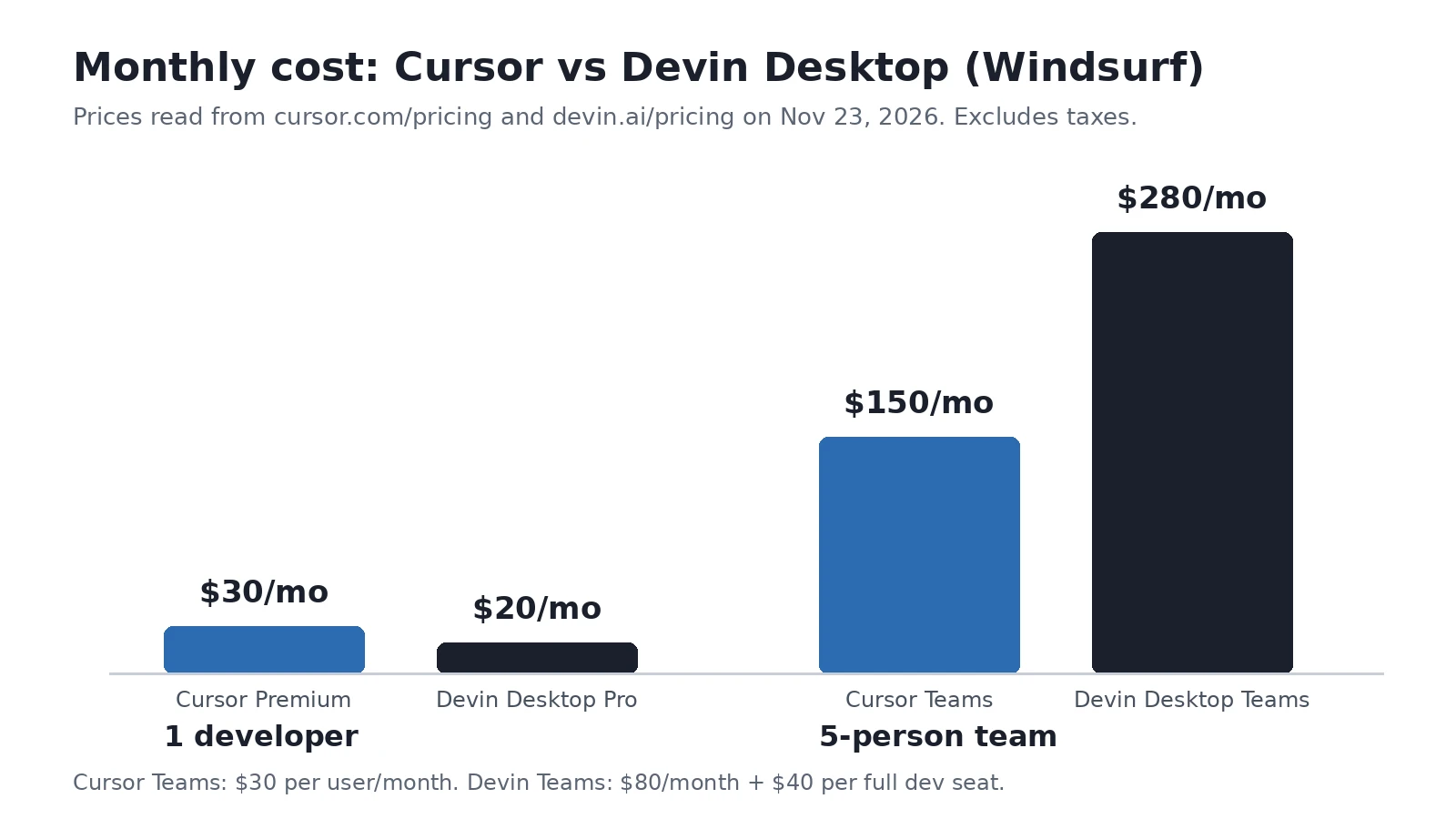
The team math is not the whole story. Devin’s $80 base buys Devin Cloud agents and Devin Bots access that Cursor’s Teams plan does not include at the same tier, and Devin’s Fusion feature pairs a lead model with a cheaper sidekick model to stretch quotas. If your team runs agents overnight on well-specified backlog work, the higher Devin bill can still be the cheaper way to buy finished work. But if five developers mostly want an AI editor with an agent beside them, Cursor is the cheaper subscription by a clear margin — and its Teams plan is the only one of the two with a per-seat price that stays flat as you grow.
Which editor has the better AI agent?
This is where the two products stop being the same kind of tool. Cursor 2.0 is still an editor first. Its headline feature is a multi-agent interface: you can run up to eight agents in parallel on a single prompt, each working in its own isolated copy of the codebase using git worktrees or remote machines, so they never step on each other’s files. Its first agentic coding model, Composer, is built for speed — Cursor says it is 4x faster than similarly intelligent models, with most tasks finishing in under 30 seconds — and Composer 2.5 scored 79.8% on SWE-Bench Multilingual, effectively tied with Claude Opus 4.7 at 80.5% for roughly a tenth of the cost, according to an independent comparison of the two models. Plan Mode drafts an editable plan before any code is written, Bugbot reviews pull requests and its Autofix pushes fixes to a branch, and cloud agents run in isolated VMs with 99.9% reliability — or on your own network with self-hosted cloud agents. The November 2026 releases added two things no rival editor had: live apps built and published from a cloud agent (the agent scaffolds the web app, spins up a Postgres database if needed, sets up authentication behind Cursor SSO and provisions hosting, then hands back a shareable link) and realtime voice chat with agents, running on Grok Voice with selectable voices. The browser tool, now generally available in 2.0, lets the agent test its own work in an embedded browser, select elements and forward DOM information back to the agent.
Devin Desktop is an agent command center first. Its default view is a board of agent sessions, and its local agent, Devin Local, runs subagents of its own. The defining feature is handoff: a session can move to Devin Cloud and keep running when you close your laptop, which no part of Cursor’s local editor does. Through the Agent Client Protocol it can also dispatch third-party agents alongside Devin’s own, and an October 23, 2026 refresh rebuilt the Agent Window to match the Devin web app, with Sessions, Automations, Review and Wiki views and the ability to tile several local or cloud sessions side by side. Where Cursor plans before it codes, Devin Desktop’s strength is fire-and-forget work: well-specified backlog tasks — migrations, dependency upgrades, flaky-test cleanup — that are measured in pull requests merged while you sleep. Devin 2.0 scored 45.8% on SWE-Bench Verified in standard unassisted evaluation, a published number Cursor has not matched with its own. In independent hands-on testing, VibeToolRank scored Cursor 8.9/10 and Devin Desktop 8.1/10, but those were separate tests on different tasks and editions — Cursor’s test ran the CLI on the free Hobby plan in November 2026, Devin Desktop’s ran the Linux desktop build on the Free plan with the SWE-1.6 Slow model in October 2026 — so treat the gap as indicative, not a head-to-head result. My verdict: Cursor’s agent is better for interactive, hands-on development where you want continuous control of the diff; Devin Desktop’s is better for delegating whole tasks and checking the result later.
Which models can you use in each editor?
Both editors let you pick your model, but the choice is shaped by who owns them. Cursor’s model picker includes Claude, GPT, Gemini, Grok (SpaceXAI) and its own Composer models, plus third-party models at API list price on Premium and above — the widest menu of the two, and the only one that includes Grok natively. The catch is the billing: third-party models are never included in the monthly subscription price, so a Claude-heavy month costs the subscription plus the API bill. Devin Desktop’s Pro plan includes full model availability across OpenAI, Claude, Gemini and SpaceXAI, plus leading open-source models and free use of SWE-2, Cognition’s own coding model — and it also lets you bring your ChatGPT plan. The practical difference is small for most developers: both cover the frontier models you would actually choose between. The difference that matters is the default. Cursor’s Auto mode routes tasks to the cheapest suitable model and mostly stays inside your usage pool, while Devin’s Fusion pairs a lead model with a cheaper sidekick model for the same purpose. If you code mostly in Auto mode, both stay cheap; if you manually select Claude Opus for every task, both bills climb fast. For a model-by-model comparison of the two Claude and Gemini options, see my Claude vs Gemini for Coding comparison.
What did I actually test?
I want to be straight about what is hands-on here and what is not. I downloaded the official Cursor Linux build from Cursor’s own download CDN, extracted the AppImage on this machine and confirmed the version from its own product file: Cursor 3.31.15, the current desktop build. This machine has no X server, so I could not launch the graphical editor, and I ran no signed-in agent session in either editor — agent-quality claims in this article rest on the vendors’ own changelogs and documentation plus the independent VibeToolRank test scores cited above, not on a live session of my own. Devin Desktop’s Linux build is distributed from devin.ai/download as a tarball with deb and rpm packages available through Cognition’s repository, per the official getting-started docs; its latest independently tested Linux build was 3.10.67 in October 2026. Every price in this article was read from the official pricing pages — cursor.com/pricing and devin.ai/pricing — on November 23, 2026, and both pages are linked so you can check the current numbers before you subscribe. Prices change often in this category: the older guides ranking for this keyword still quote Cursor’s pre-acquisition $20 Pro plan and Windsurf’s $15 Pro plan, and both are out of date.
Windsurf vs Cursor: the verdict
Choose Cursor if you write code most days and want the AI inside the editor: the most mature agent of the two, Plan Mode before code, Bugbot reviews that fix their own findings, JetBrains support, live apps from a cloud agent, and the cheaper bill for a 5-person team ($150/month against $280). The trade-offs are real — usage-based billing that makes $30/month a floor rather than a ceiling, third-party models billed on top, and a new owner whose long-term plans for the Cursor brand are unconfirmed.
Choose Devin Desktop if you want to hand whole tasks to agents and check the results later: the Agent Command Center runs local, cloud and third-party agents from one board, sessions keep running in Devin Cloud after you close your laptop, SWE-2 is free on the $20 Pro plan, and the solo plan is $10/month cheaper than Cursor Premium. The trade-offs are the steeper team price ($80 plus $40 per seat), the loss of the old Cascade workflow, and a product that has already been renamed once in 2026.
If you are still on Windsurf, you do not need to decide anything today: your editor already updated itself into Devin Desktop, and your settings and pricing carried over. If you are choosing fresh, install both free tiers and run the same task through each — a small refactor with tests in Cursor’s Agent mode, and the same task handed to Devin Local with the laptop closed. The one that finishes the task with the fewest corrections is the right editor for how you actually work.
Frequently asked questions
No, Windsurf was renamed, not shut down. On June 2, 2026, Cognition renamed the Windsurf editor to Devin Desktop and shipped the change as an over-the-air update. Settings, plans, extensions and in-progress work carried over, windsurf.com now redirects to devin.ai/desktop, and the Agent Command Center became the main view. Cascade was replaced by the Devin Local agent.
SpaceX. SpaceX announced a definitive agreement to acquire Anysphere, the maker of Cursor, on June 16, 2026, in a $60 billion all-stock deal. The acquisition closed on August 14, 2026, and Cursor now operates as a wholly owned SpaceX subsidiary inside SpaceXAI, the former xAI.
Cursor costs $0 on the Free plan, $8 per month on Plus (Grok models only), $30 per month on Premium, $100 per month on Super and $200 per month on Ultra, with Teams from $30 per user per month. Usage refreshes weekly, and third-party models such as Claude, GPT and Gemini are billed separately at API list price on Premium and above.
Devin Desktop costs $0 on the Free plan, $20 per month on Pro and $200 per month on Max. Teams costs $80 per month plus $40 per full dev seat, and Enterprise is custom priced. Usage allowances refresh daily and weekly, and extra usage is billed at API pricing. Pro includes free use of SWE-2, Cognition’s latest coding model.
Yes, with different billing. Cursor offers Claude, GPT, Gemini, Grok and its own Composer models, but third-party models are billed separately at API list price and are not available at all on the $8 Plus plan. Devin Desktop Pro includes full model availability across OpenAI, Claude, Gemini and SpaceXAI, plus open-source models and free use of SWE-2.
Choose Cursor if you want the best editor-first experience with the most mature agent, Plan Mode and Bugbot reviews — and the cheaper team bill. Choose Devin Desktop if you want an agent command center that runs several agents at once and keeps working in the cloud after you close your laptop. If you are already on Windsurf, you are already on Devin Desktop, and nothing needs to change.