Figma vs Canva: Which Design Tool Should You Use?

The short answer: pick Figma if what you design has to become a product — app screens, a website, or a design system developers will build from. Pick Canva if what you design has to ship today — social posts, decks, flyers, and print — especially if non-designers will edit it. The two tools look similar in a browser tab, but they are built for different jobs: Figma is a precision instrument for interface work, Canva is a speed machine for finished visuals. I read both official pricing pages and Figma’s Help Center plan documents on November 24, 2026, and checked both editors as a guest first: neither lets you open or edit anything without an account, so the free-tier limits below come from the vendors’ own plan documentation, not from inside the editors. The prices and limits below are what the vendors list right now, not what last year’s comparisons still quote.
Figma vs Canva at a glance
| Figma | Canva | |
|---|---|---|
| Built for | UI/UX design, prototypes, and design systems | Marketing, social, print, video, and decks |
| Scale | About 13 million monthly users; public since July 2025 (NYSE: FIG); fiscal 2025 revenue $1.056 billion, up 41% | More than 220 million monthly users (Canva’s own figure); about $4 billion annualized revenue at the end of 2025; 31 million+ paying customers |
| Free plan | Starter: unlimited drafts, 3 shared Design/Sites files, 3 FigJam and 3 Slides files, 30-day version history | Free: 5 GB storage, 1 Brand Kit, limited AI, no premium templates or background remover |
| Cheapest paid plan | Professional Full seat $16/month billed annually ($20 month to month); Collab seat $3/month | Pro $144/year ($18/month) for one person only |
| Team plan | Organization Full seat $55/month billed annually; Enterprise Full $90/month | Business $250 per person per year ($25/month), no minimum seats |
| Reusable design | Components with variants, variables, and shared team libraries | Templates, Brand Kits, and locked brand templates |
| Developer handoff | Dev Mode, inspect, code snippets, MCP server | No developer handoff; publish to web or export files |
| AI | Figma AI on a credit system (Starter 500 credits/month; Full seat 3,000/month on Professional); Figma Make turns prompts into working prototypes | Magic Studio and Canva AI; Pro gets 10× the AI allowance of Free, Business 20×; Canva Code turns prompts into interactive pages |
| No print service; export PDFs and images | Canva Print delivers printed products; Business gets a 10% print discount | |
| Rating | 4.7 out of 5 on Capterra (April 2026) | 4.7 out of 5 on Capterra (April 2026), from 13,000+ reviews |
How much do Figma and Canva cost?
Price is where most older comparisons go stale first, so here are the numbers exactly as each vendor lists them now — I read Figma’s pricing page and Canva’s pricing page on November 24, 2026. Figma sells seats, not products: one seat price covers every Figma product. Canva sells per-person plans, and the plan you need changes the moment a second person joins.
| Plan | Figma (annual billing) | Canva (annual billing) |
|---|---|---|
| Free | Starter, $0 — unlimited drafts, 3 shared files, 30-day version history, 500 AI credits/month | Free, $0 — 5 GB storage, 1 Brand Kit, limited AI, no premium templates |
| Individual paid | Professional Full seat $16/month ($192/year); Dev seat $12/month; Collab seat $3/month | Pro $144/year ($12/month effective) for one person only |
| Team paid | Organization Full seat $55/month; Enterprise Full $90/month | Business $250 per person per year (about $20.83/month effective) |
| Monthly billing | Full seat $20/month on Professional | Pro $18/month; Business $25 per person per month |
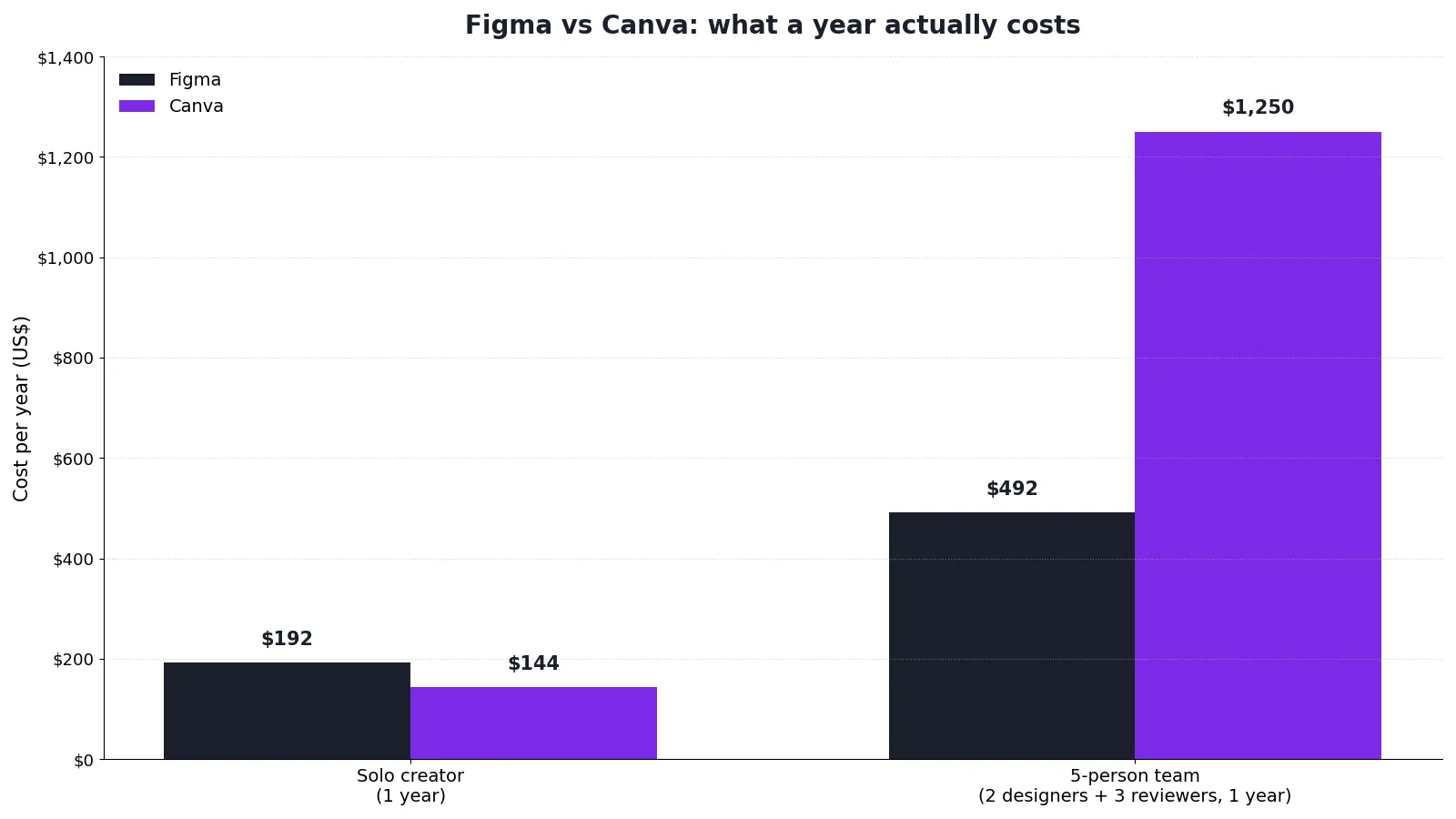
For one person, Canva is cheaper. A solo creator pays $144 a year for Canva Pro against $192 a year for a Figma Professional Full seat — a $48 difference. But Canva Pro is a one-person license: the moment a colleague needs their own login, you move to Business at $250 per person per year. Figma’s seat system works the other way. A Collab seat costs $3 a month and gives full editing in FigJam, Slides, and Buzz plus view-and-comment access in Figma Design, so the people who only review and comment never need a $16 seat.
A worked example makes the difference concrete. Take a five-person marketing team with two designers and three marketers who review, comment, and build decks. On Figma Professional that is two Full seats ($32/month) plus three Collab seats ($9/month): $41 a month, or $492 a year. The same five people on Canva Business cost 5 × $250, or $1,250 a year. Figma is $758 a year cheaper for that mix. Flip the mix — five people who all design marketing assets every day — and Canva Business at $1,250 a year beats five Figma Full seats at $960 a year only if those five never need Figma’s design-system tools; in practice a five-designer team usually wants Figma’s libraries and Dev Mode, which is exactly what the $960 buys. The honest rule: count who actually designs, not headcount.
Two pricing traps catch buyers. First, Figma’s free Starter plan sounds unlimited because drafts are unlimited — but shared team files stop at three, and a fourth shared file forces an upgrade. Second, Canva’s Business plan arrived on October 30, 2025 at $20 per person per month and rose to $25 within a year, so comparisons still quoting the old Teams price of $120 a year are wrong. All prices in this article are US list prices — Canva in particular shows different prices in some other regions. I verified every price above against the vendors’ own pricing pages on November 24, 2026.
What are Figma and Canva, really?
Figma is a product-design platform. It started in 2012 as a browser-based interface design tool and is now the default workspace for product teams: designers draw app screens and websites, build interactive prototypes, maintain shared component libraries, and hand finished files to developers through Dev Mode. Figma went public on the New York Stock Exchange in July 2025, reported fiscal 2025 revenue of $1.056 billion (up 41% year over year), and reached $370.1 million in revenue in the second quarter of 2026, up 48%. About 13 million people use it monthly, according to its IPO filing — a small audience next to Canva’s, but almost entirely professional.
Canva is a visual-communication platform. Founded in Sydney in 2013, it lets anyone produce a polished social post, presentation, flyer, video, or website from a template, with almost no design training. Canva reports more than 220 million monthly active users on its own company page, passed 265 million monthly users by the end of 2025 according to secondary reporting, and reached about $4 billion in annualized revenue with more than 31 million paying customers. The scale gap tells the story: Canva counts roughly twenty times Figma’s users, and only about 12% of them pay. Figma’s users are fewer, but most of them design for a living.
Which is easier to learn and use?
Canva is easier, and it is not close. A new user opens Canva, picks a template for the exact thing they need — an Instagram post, a pitch deck, a birthday flyer — swaps in their text and photos, and exports something presentable in minutes. The editor hides its complexity: drag, drop, resize, done. That is the whole point. People who say “I am not a designer” are Canva’s core audience, and the tool is built around them.
Figma has a real learning curve, and it pays off only if you keep designing. Concepts like frames, auto layout, components, variants, and variables take days to learn and weeks to use fluently. A first-time user opening a blank Figma file faces an empty canvas and a toolbar full of unfamiliar tools. But that blank canvas is the point: Figma assumes you want to define the design, not adapt a finished pattern. If you design interfaces more than twice a week, the curve flattens fast. If you design a social post once a month, it never will.
Templates vs components: how each tool thinks about reuse
This is the deepest difference between the two tools, and the one that decides most purchases. Canva reuses finished designs. Its template library covers nearly every format a marketer touches, and Brand Kits lock in your colors, fonts, and logos so a teammate cannot accidentally go off-brand. When you need the same flyer in ten sizes, Magic Resize rebuilds it for each format. Reuse in Canva means starting from something that already looks good.
Figma reuses parts. A button is a component; change the component once and every screen using it updates. Variables define colors and spacing so a whole product can switch from light mode to dark mode in one edit. Team libraries publish those components across every file in the company, and on Professional and above, design-system theming keeps them consistent. Reuse in Figma means building a system once and letting every screen inherit it. Canva has no equivalent: there is no component system with variants, no variables, and no shared library that updates every file at once.
For a concrete test, imagine a deck your team rebuilds every month. In Canva, you duplicate last month’s deck and edit the text — fast, but the header on slide 12 is a separate object from the header on slide 3, so a client-name change means hunting through slides. In Figma Slides, the header is a real component: change it once and all thirty slides update. Figma’s $3 Collab seat even makes that workflow cheaper than any Canva paid tier for the people who only edit decks. But for a deck that leaves the team once and never comes back, Canva’s template is the faster origin — and the safer one, because nobody has to learn components to use it.
How do Figma and Canva compare on collaboration?
Both tools are browser-based and multi-user, but the collaboration is built for different rooms. Figma’s collaboration is live and precise: multiple designers edit the same file at once, cursors are named, comments pin to exact pixels, and version history (unlimited on paid plans, 30 days on Starter) lets you roll back to any earlier state. Developers get free view seats with basic inspect — measurements, property values, CSS, and asset export — without anyone paying for them. That is why product teams run their whole design process in Figma.
Canva’s collaboration is built around approval. Team members comment and edit together, and on Business, brand approvals let a brand lead sign off before anything ships — a feature Figma does not offer in the same form. The difference is who the collaborator is: in Figma it is usually another designer or a developer; in Canva it is usually a marketer, a manager, or a client who needs to approve, not to design. Both models work; they just serve different teams.
Which is better for prototyping and developer handoff?
Figma wins this outright, and it is not a close contest. Interactive prototypes with variables, conditional logic, and animations are native to Figma, and Dev Mode turns a finished design into measurements, code snippets, and assets a developer can pull directly — including through an MCP server that AI coding tools can query (20 tool calls a month on Starter, 200 a day on Professional). Figma Sites, in beta on Full seats, even publishes a design as a live website with up to 10 custom domains on Professional. Canva has no component system, no variables, no interactive prototyping worth the name, and no developer inspection mode. Its answer to “how does this become a product” is to export a file or publish a page — which is fine for a landing page mockup and useless for an app a team has to build.
If you work with developers at all, this section alone settles the choice. If you never hand work to a developer, it is irrelevant — and that is exactly why Canva can ignore it.
How do Figma AI and Canva Magic Studio compare?
Both vendors now sell AI, but they meter it differently and aim it at different work. Figma AI runs on credits. Every seat gets a monthly allowance — 500 credits on Starter (capped at 150 a day), 3,000 a month for a Full seat on Professional — and Figma has enforced the limits since March 18, 2026. The credits cover features across all Figma products: renaming layers, generating placeholder copy, first-draft UI from a prompt, and image editing inside a design. Figma Make is the flagship use: describe an app, attach your own frames, libraries, and npm packages, and it generates a working, code-backed prototype that follows the components your team already uses. (Figma Make) In Figma’s own reporting, about 60% of its large customers used Figma Make weekly by early 2026.
Canva’s AI is bundled by plan, not metered by the seat. Magic Studio covers writing (Magic Write), image generation and editing (Magic Media, background remover, Magic Eraser), one-click resizing (Magic Resize), and animation (Magic Animate). The allowance scales with the plan, but Canva does not publish a fixed monthly AI count: its pricing FAQ says Pro gets 10× the AI allowance of Free and Business gets 20×, with some tools such as Magic Write usable freely under fair-use limits. Canva AI, rebuilt in April 2026, adds a conversational assistant that drafts a first version of a design from a prompt, and Canva Code turns a prompt into an interactive page or small web experience you can publish in one click. For a marketer, Canva’s AI is the more immediately useful of the two — it removes backgrounds, resizes, and writes captions, the chores that eat a marketing day. For a product team, Figma’s AI is the more structurally useful — it works inside the design system rather than on top of a finished template. If you want to see how AI app builders compare when the prompt has to become working software, our Lovable vs Bolt head-to-head runs the same kind of test on dedicated AI builders.
The overlap is growing: Figma Buzz, Sites, and Make vs Canva Code and Affinity
The old split — Figma for product, Canva for marketing — is blurring at the edges, and 2026 is the year it happened. Figma now sells marketing tools. Figma Buzz (in beta on all seats) generates bulk marketing assets from a template — a hundred social variants from one source file. Figma Slides competes directly with Canva presentations. Figma Sites publishes marketing pages from a design file. A product team that already pays for Figma can now cover a surprising amount of marketing work without opening Canva at all.
Canva is pushing the other way. Canva Code publishes interactive experiences as live websites, Docs and Sheets cover documents and spreadsheets, and Whiteboards covers early-stage brainstorming. The biggest move is Affinity: Canva acquired the professional design suite and now gives the Affinity app away, adding a genuine professional page-layout and illustration tool to the Canva ecosystem for work that needs more precision than Canva’s editor offers. If you only need Canva for one kind of asset, it is worth checking our Canva vs Adobe Express comparison first — Adobe’s rival is the closer fight for pure marketing design.
Neither push changes the core split yet. Figma Buzz and Sites are still in beta, and Canva Code builds simple interactive pages, not products. The overlap matters most for small teams choosing one tool instead of two: a startup with one designer and three marketers can now plausibly run on Figma alone (designers on Full seats, marketers on $3 Collab seats) or on Canva alone (everyone on Business). The deciding question is still what the finished work has to become — code, or a campaign.
What about print, export, and working offline?
Print belongs to Canva. Figma does not attempt print: you export a PDF or image and take it elsewhere. Canva Print orders the finished product — flyers, business cards, posters, t-shirts — and delivers it, with Business plans getting a 10% discount on print orders. If your work ends on paper, Canva is the only one of the two that finishes the job.
Export is a draw with different strengths. Both export PNG, JPG, SVG, and PDF. Figma’s export is built for developers: assets at multiple scales, SVG code, and CSS values straight from inspect. Canva’s export is built for publishers: social-size presets, transparent backgrounds on Pro, and direct scheduling to social accounts. On file ownership, note the asymmetry: Figma files live in Figma’s cloud and export cleanly, while Canva designs export as flat files — you cannot take a Canva design into Figma and keep it editable, and the same is true in reverse.
Offline work favors neither. Both tools are browser-first and need a connection for full functionality. Figma’s desktop app caches recent files for limited offline viewing, and Canva’s mobile app offers limited offline access to recent designs, but neither is a real offline tool. If you regularly design on planes or in dead zones, a desktop app like Affinity — now part of Canva’s ecosystem — or a native tool is the honest answer, not either of these two.
Figma vs Canva: the verdict
Choose Figma if you design interfaces, maintain a design system, or hand work to engineers: components with variants and variables, Dev Mode with code inspection, interactive prototyping, and the $3 Collab seat for everyone who only reviews. The trade-offs are real — a genuine learning curve, a free plan that caps shared files at three, AI metered by credits, and no print service. The bill for a solo designer is $192 a year on Professional, and a five-person team with two designers and three reviewers costs $492 a year.
Choose Canva if your output is marketing material, decks, print, and social: the template depth lets a non-designer produce good work in minutes, Brand Kits and approvals keep a whole team on-brand, Magic Studio removes the tedious edits, and Canva Print finishes the job on paper. The trade-offs are the one-person Pro license (a second user forces Business at $250 per person per year), no component system or developer handoff, and AI allowances that scale with the plan. The bill for a solo creator is $144 a year on Pro, and a five-person marketing team costs $1,250 a year on Business.
If you are still deciding, use both free tiers for one real job before paying: rebuild the same social graphic in each, then rebuild the same landing-page section in each. The tool that finishes both jobs with the least friction is the one your work actually fits — and if the answer is different for each job, that is a real answer too. Plenty of teams run both: designers in Figma, marketing in Canva, with a logo file both sides can use. Our guide to creating a logo with AI tools covers the brand assets both tools will need from you either way.
Frequently asked questions
Neither is better in general — they are better at different jobs. Figma is better for UI design, prototypes, design systems, and developer handoff. Canva is better for marketing design, social posts, presentations, and print. Choose by what the finished work has to become: code, or a campaign.
For marketing work, yes — Canva plus the Affinity app covers most of what a marketing team needs. For product design, no: Canva has no components with variants, no variables, no interactive prototyping, and no Dev Mode, so it cannot replace Figma for app and website interfaces that developers must build from.
Figma costs $0 on the Starter plan, $16 per month for a Full seat on Professional when billed annually ($20 month to month), $12 per month for a Dev seat, and $3 per month for a Collab seat. Organization costs $55 per month for a Full seat billed annually, and Enterprise costs $90 per month. Viewers who only inspect and comment are free on every paid plan.
Canva costs $0 on the Free plan, $18 per month for Pro ($144 per year) for one person only, and $25 per person per month for Business ($250 per person per year). Enterprise is custom priced. Pro is a one-person license, so a second user moves the account to Business.
Yes, Figma’s Starter plan is free with no trial timer. It includes unlimited personal drafts, UI kits and templates, and 500 AI credits a month, but shared team files are capped at three Figma Design or Sites files, three FigJam files, and three Slides files, version history lasts 30 days, and Dev Mode and team libraries are not included.
Most small businesses should start with Canva: it is cheaper for one person ($144 a year against $192), faster to learn, and covers social posts, decks, and print without a designer on staff. Choose Figma instead if the business is building a product — an app or a website — or employs a designer who works with developers. Many small teams end up using both, with Canva for marketing and Figma for product work.