Ghost vs WordPress: Which Platform Should You Choose?

Ghost and WordPress are the two most serious choices for anyone starting a publication, and they solve the same problem from opposite directions. Ghost is a focused publishing platform with newsletters and paid memberships built in; WordPress is a general-purpose content management system that can become almost anything — a blog, a store, a forum, a membership site — with the right plugins. I installed the current Ghost release hands-on and measured it against the WordPress site I run every day, so this comparison uses real numbers, not marketing claims.
The short answer: choose Ghost if you want a fast, focused home for writing, newsletters, and paid members with as little maintenance as possible. Choose WordPress if you need flexibility — an online store, a directory, a forum, or any feature outside publishing — or if you want the largest ecosystem of themes, plugins, and hired help on the internet. The rest of this comparison breaks down exactly where each one wins, with prices checked and speed measured.
Ghost vs WordPress at a Glance
| Feature | Ghost | WordPress |
|---|---|---|
| Best for | Blogs, newsletters, and paid membership publications | Almost any site: blogs, stores, directories, forums, business sites |
| Hosted option | Ghost(Pro), from $18/mo billed yearly | WordPress.com, from $4/mo billed yearly (Personal) |
| Self-hosted cost | VPS from about $11/mo; software itself costs $0 | Shared hosting from about $3–5/mo; software itself costs $0 |
| Newsletters and memberships | Built in, with 0% transaction fees on paid plans | Needs plugins; WordPress.com takes 0–10% depending on plan |
| Plugins and extensions | No plugin system; 8,000+ integrations, mostly through automation tools | 76,000+ free plugins in the official directory |
| Themes | Small curated marketplace; clean default theme | 15,000+ free themes, plus thousands of premium themes |
| Speed (measured) | Homepage TTFB 135–215 ms in my local test | Live WordPress site TTFB around 1,300 ms; depends heavily on hosting and caching |
| SEO tools | Built in: meta, sitemaps, structured data, no plugin needed | Needs an SEO plugin such as Rank Math or Yoast; far more control |
| Updates and maintenance | Automatic weekly updates on Ghost(Pro); manual on self-hosted | Core updates are one click; plugins and themes update separately |
| Market share | 0.1% of all websites (W3Techs, October 2026) | 39.5% of all websites, 58.2% of sites with a known CMS (W3Techs, October 2026) |
| Learning curve | Low: one focused editor, few settings to learn | Medium: more power, more settings, more to keep updated |
What Is Ghost?
Ghost is an open-source publishing platform built on Node.js, run by the nonprofit Ghost Foundation. It does one job — publishing — and it does it with newsletters, memberships, and paid subscriptions built into the core product, not added through plugins. The current release is Ghost 6.77.0, released November 11, 2026, and the release before it, 6.76.0, added custom member fields and a large-image opt-in for Google Discover. You can run Ghost two ways: Ghost(Pro), the hosted service, or self-hosted on your own server.
Ghost is small in market share — about 0.1% of all websites, according to W3Techs data from October 31, 2026 — but it punches above that number among independent publishers, newsletter writers, and small media teams. Its users choose it precisely because it refuses to be a general website builder.
What Is WordPress?
WordPress is the open-source content management system that runs 39.5% of all websites and 58.2% of sites with a known CMS, according to W3Techs on October 31, 2026. That share has slipped from 43.2% in December 2025, but WordPress still powers more of the web than every other CMS combined. The current release is WordPress 7.1.4, released October 28, 2026.
One distinction matters before anything else: WordPress.com and WordPress.org are not the same product. WordPress.com is Automattic’s hosted service — you buy a plan and hosting, security, updates, and a CDN come with it. WordPress.org is the free, open-source software you install on hosting you control, with no plan restrictions on plugins or themes. This comparison covers both, and says which one is meant whenever the difference matters. This site, The San Info, runs self-hosted WordPress 7.1.3 with the Kadence theme and WP Rocket, so the WordPress side of this comparison comes from daily hands-on use.
How Much Does Ghost Cost vs WordPress?
Both platforms have a $0 software license — Ghost is MIT-licensed open source, and WordPress is GPL open source. The money goes to hosting and, on the hosted services, to the plan. Here are the current prices, checked on the official pricing pages.
Ghost(Pro) pricing
Ghost(Pro) has four tiers, billed yearly (monthly billing costs more). The Starter plan is $18 per month billed yearly, for up to 1,000 members and 1 staff user. The Publisher plan is $29 per month billed yearly, for 3 staff users, custom themes, paid subscriptions, advanced analytics, and 8,000+ integrations. The Business plan is $199 per month billed yearly, for 15 staff users, priority support, and 10,000 members. A Custom tier covers unlimited staff and members with a 99.9% uptime SLA. Every paid plan takes 0% transaction fees on memberships and subscriptions, includes unlimited email sends, automatic weekly updates, a worldwide CDN, and SSL. Source: ghost.org/pricing, checked November 17, 2026.
WordPress.com pricing
WordPress.com sells five plans. The Free plan costs $0 with 1 GB of storage on a wordpress.com address. Personal is $4 per month billed yearly ($48 for the first year, renewing at $5 per month) with 6 GB of storage. Premium is $8 per month billed yearly ($96 first year, renewing at $9) with 13 GB. Business is $25 per month billed yearly ($300 first year, renewing at $28) with 50 GB, staging, backups, and SFTP/SSH access. Commerce is $45 per month billed yearly ($540 first year, renewing at $50) with managed WooCommerce extensions. Paying month to month costs more: $9, $18, $40, and $70 respectively. Source: wordpress.com/pricing, checked November 2026.
Two details catch people out. First, the headline prices are first-term prices — every plan renews higher, so budget for the renewal rate, not the introductory one. Second, since April 2, 2026, plugin installation and third-party theme uploads are available on every paid WordPress.com plan, starting with Personal. Older articles still say you need Business for plugins; that is no longer true. WordPress.com also takes its own fee on payments, on top of Stripe’s: 10% on Free, 8% on Personal, 4% on Premium, 2% on Business, and 0% on Commerce.
Self-hosted costs
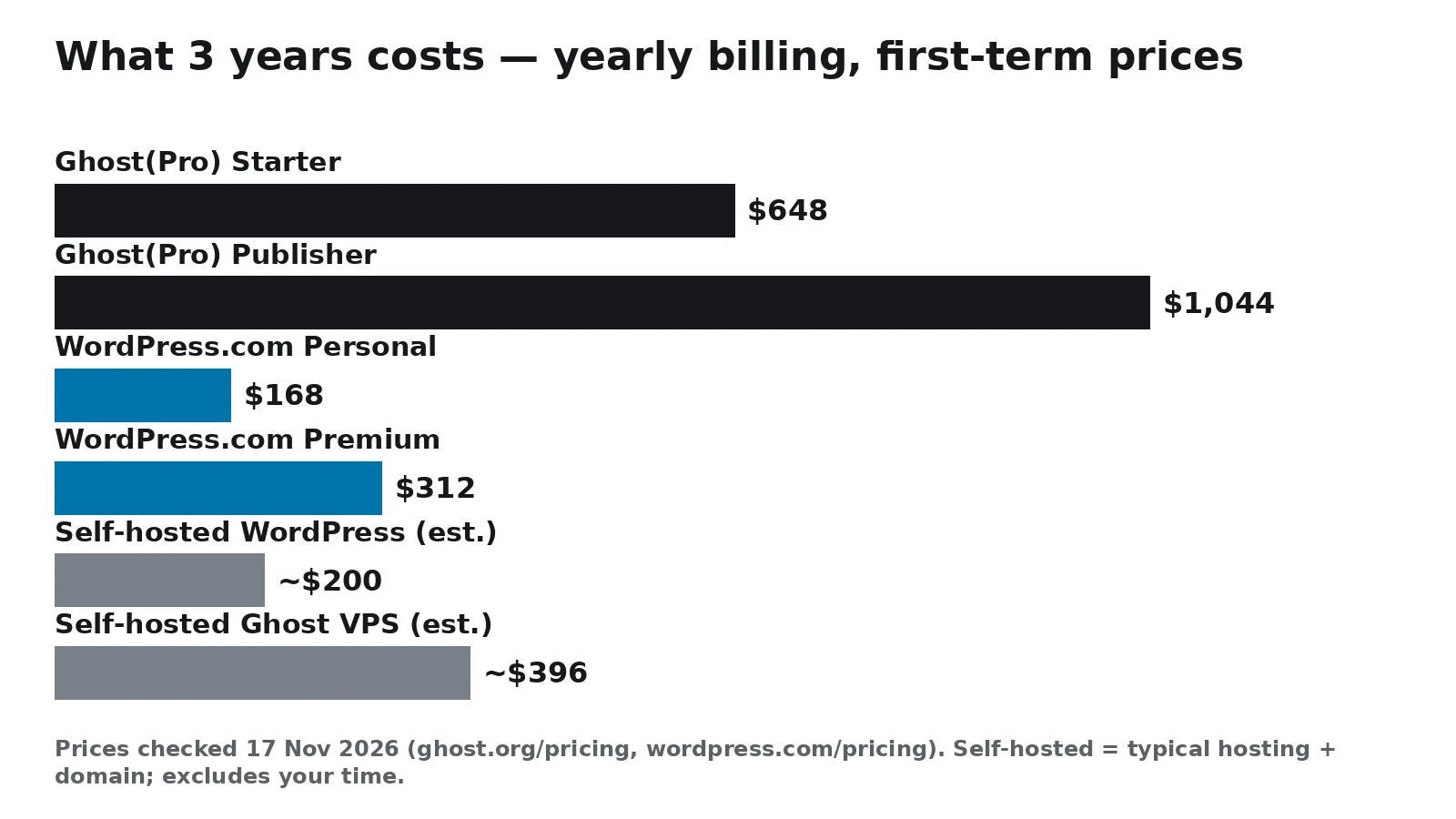
Self-hosted WordPress is the cheapest way to run a serious site: budget shared hosting runs about $3–5 per month for the first term, plus roughly $12 a year for a domain, so about $200 covers three years before any premium theme or plugin. Self-hosted Ghost needs more server: the official minimum is a server with at least 1 GB of memory, and a 2 GB VPS is the practical starting point — about $11 per month, or roughly $396 over three years — because Ghost runs on Node.js with a MySQL 8 database, and both need room. The software costs $0 either way; with Ghost you are paying for a bigger server and spending your own time on updates and backups.
Worked example: what 3 years actually costs
Take a solo blogger publishing weekly for three years. Ghost(Pro) Starter costs $18 × 36 = $648. Ghost(Pro) Publisher costs $29 × 36 = $1,044. WordPress.com Personal costs $48 + $60 + $60 = $168. WordPress.com Premium costs $96 + $108 + $108 = $312. Self-hosted WordPress costs roughly $200 for budget hosting plus a domain. Self-hosted Ghost on a 2 GB VPS costs roughly $396. The cheapest routes are WordPress ones, and the gap is real money — but the hosted Ghost plans include the newsletter and membership system that WordPress charges for separately, either in plugin subscriptions or in WordPress.com’s payment fees. Judge the totals, not the monthly headline.
Which Is Faster, Ghost or WordPress?
Ghost is faster out of the box, and the gap is not close. Ghost is a single Node.js application serving a small, focused codebase; WordPress is a PHP application that usually runs a theme, a page builder or block editor, a caching plugin, an SEO plugin, and several more plugins on top. Independent benchmarks agree with that picture: marcindudek.dev measured an untuned Ghost install at 240–280 ms time to first byte with a 94–96 PageSpeed score, against an untuned WordPress install at 800 ms to 2 seconds. A separate self-hosted test by byte-guard measured Ghost at about 80 ms time to first byte and a 0.8-second page load on a Hetzner server, with WordPress on its default theme scoring 60–85 on Lighthouse.
My own measurements point the same way. On a fresh local Ghost 6.77.0 install, the homepage answered in 135–215 ms across three requests, and a published test post answered in 61 ms. This site, which runs WordPress 7.1.3 with the Kadence theme and WP Rocket caching, answers in about 1,300 ms. The honest caveat is that these ran on different hardware — a local install against a live hosted site — so treat the comparison as directional, not a laboratory result. But the direction matches every independent benchmark I found: Ghost starts fast and stays fast with almost no tuning, while WordPress needs caching, a light theme, and restraint with plugins to get close.
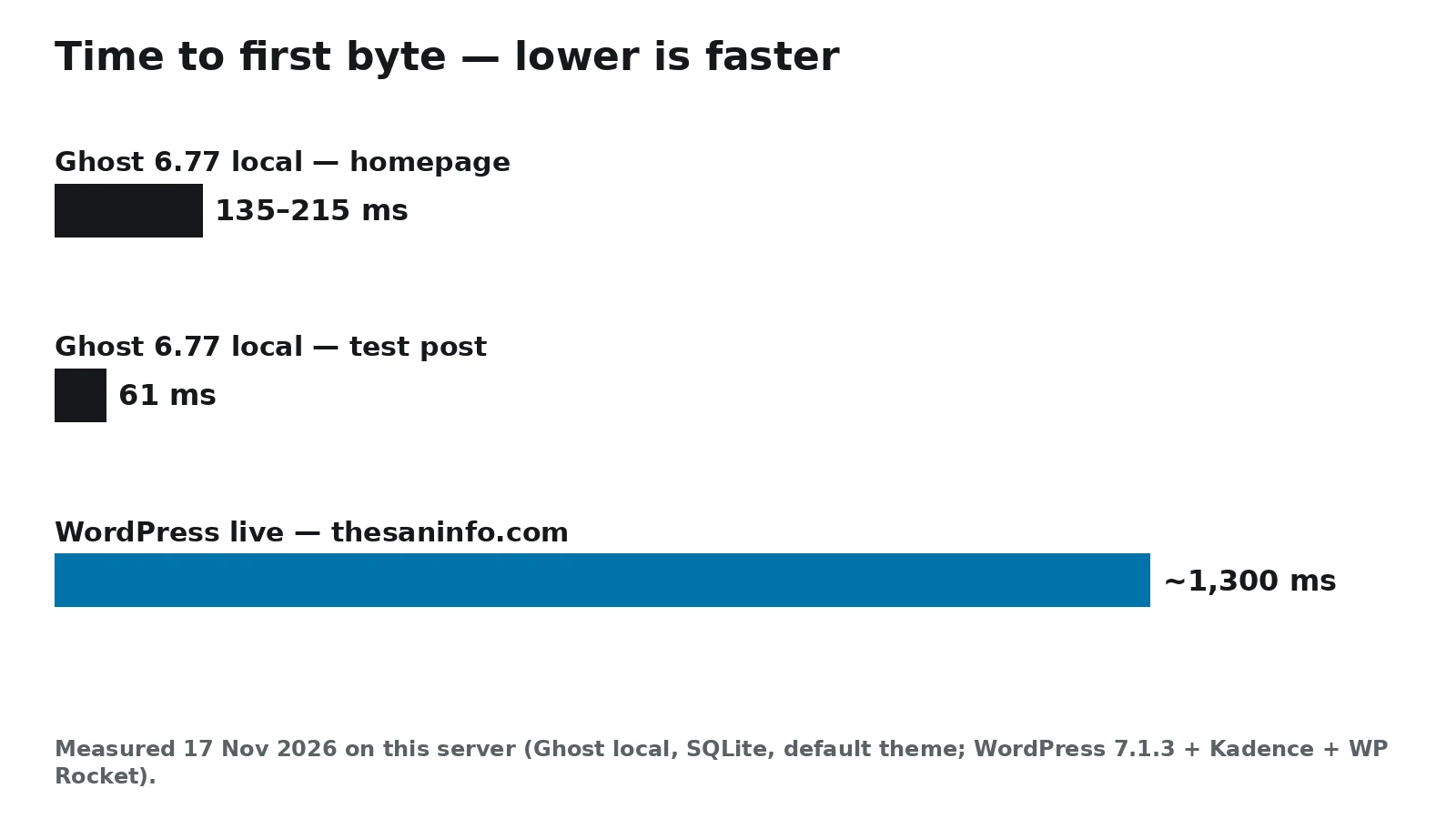
Speed matters for readers and for search, but do not over-read a single number. A well-tuned WordPress site on good hosting with caching can answer in 200–400 ms, and a Ghost site loaded with heavy custom code can get slow. What Ghost buys you is a fast default: you get good performance without becoming a performance engineer.
How I Tested Ghost 6.77.0 Hands-On
I installed Ghost 6.77.0 locally on this server to test the current release rather than quoting last year’s reviews. The install took 1 minute 16 seconds with Ghost-CLI 1.34.1, after a 29-second CLI install and a 5-second pnpm install. The full install used 634 MB of disk, and the running Ghost server used about 403 MB of memory at idle, with the CLI supervisor using another 106 MB. I published a test post through the Admin API, and the post page answered in 61 ms.
The install also showed Ghost’s rough edges. Ghost-CLI refuses to run as the root user, so I had to create a regular user first. Ghost 6.77.0 requires pnpm, which the installer checks for and fails without. And it requires Node.js 24.22.3 or newer — my Node 24.22.1 was rejected, two patch releases short, so I installed Node 24.22.3 before the install would proceed. None of this is hard, but it is a reminder that self-hosting Ghost is a server-admin job: Ubuntu, Node.js 22 or 24 LTS, MySQL 8, NGINX, and systemd, with at least 1 GB of memory. The official documentation lists exactly that stack, and other combinations are not officially supported. If that sentence made you sigh, Ghost(Pro) exists for a reason.
Which Is Easier to Use Day to Day?
For writing, Ghost is the simpler tool. Its editor is a clean, card-based writing surface with almost nothing between you and the text: write, add an image or embed card, publish, send the newsletter. There is one way to do most things, which is a feature when you publish every day. WordPress’s block editor is more powerful — columns, patterns, reusable blocks, and a block for nearly everything — but it carries more settings, more decisions, and a steeper learning curve. After a week, both feel natural; the difference is what you do on day one.
For running the site, the balance flips depending on how you host. Ghost(Pro) and WordPress.com both remove the server work entirely — you write, they handle updates, backups, security, and scaling. Self-hosted WordPress is easier to set up than self-hosted Ghost for most people, because almost every shared host offers one-click WordPress installs on cheap PHP hosting, while Ghost needs a VPS, Node.js, and MySQL 8 configured by hand. On the other hand, a self-hosted Ghost site has fewer moving parts once it runs: one application, one database, no plugin updates to chase every week.
Ghost vs WordPress for Blogging and Newsletters
This is the section that decides the comparison for most readers, because it is where Ghost’s focus pays off. Ghost has newsletters, member signup, and paid subscriptions built into the core: a reader subscribes, you send the newsletter, a member pays, and Ghost handles access, emails, and member management. Paid plans on Ghost(Pro) take 0% of your membership revenue — the only payment fees are Stripe’s. Self-hosted Ghost keeps the same features with the same 0% fee.
WordPress can do all of this, but it assembles the answer from parts. Newsletters need a plugin or an external service, memberships need a membership plugin, and payments flow through WordPress.com’s own fee schedule (8% on Personal, 4% on Premium, 2% on Business, 0% on Commerce) or through a plugin’s subscription on self-hosted WordPress. The WordPress route gives you more choice — different email providers, different membership models, different paywalls — but it also gives you more subscriptions to manage and more places for something to break. If the publication is the business, Ghost’s built-in system is the cleaner answer. If the newsletter is one feature among many, WordPress’s flexibility wins.
Which Is Better for SEO?
Both platforms can rank well, and neither one ranks by itself — content, links, and site quality decide that. What differs is how much work the platform does for you. Ghost ships with SEO basics built in: editable meta titles and descriptions, canonical URLs, XML sitemaps, structured data, and clean, fast HTML with no SEO plugin required. The 6.76.0 release even added a large-image opt-in for Google Discover. WordPress needs an SEO plugin — Rank Math or Yoast — for the same basics, but once installed it offers far more control: granular schema types, redirection management, internal-link suggestions, and integrations with everything else on the site.
For a publication that lives or dies on search traffic, WordPress’s control is worth having — this site’s own SEO setup runs on Rank Math, and the control it gives over titles, schema, and sitemaps is part of how the site is managed. For a writer who wants solid SEO without thinking about it, Ghost’s defaults are genuinely good. The practical difference is small compared with the difference between good and bad content.
What About Security and Maintenance?
WordPress’s size is both its strength and its risk. With 39.5% of the web running WordPress and 76,000+ free plugins in the official directory, it is the most attacked platform on the internet, and most WordPress compromises come through outdated plugins and themes rather than the core. The core itself is patched quickly: WordPress 7.1.4, released October 28, 2026, fixed an actively exploited flaw in the core updater (CVE-2026-119977) that CISA added to its Known Exploited Vulnerabilities catalog on November 3, 2026. Sites still on 7.1.3 should update promptly. The maintenance burden on self-hosted WordPress is real — core, theme, and plugin updates arrive constantly — but managed WordPress hosts and WordPress.com take most of it off your plate.
Ghost’s smaller, single-codebase design is a smaller target, and Ghost(Pro) updates weekly automatically, so hosted Ghost owners rarely think about security at all. Self-hosted Ghost owners still have to update Ghost, Node.js, MySQL, and the server itself, and Ghost’s strict stack — a specific Ubuntu release, a specific Node.js line, MySQL 8 — means updates occasionally demand a server change, not just a button click. The newest Ghost releases have been frequent and small: 6.75.0 on November 4, 6.76.0 on November 10, and 6.77.0 on November 11, 2026. Either platform is secure when it is kept updated; the difference is who does the updating, and how often you are asked.
Can You Migrate Between Ghost and WordPress?
Yes, in both directions, with limits. Ghost ships an official WordPress importer that brings posts, pages, tags, and authors across from a WordPress export file. Moving from Ghost to WordPress is possible through Ghost’s JSON export plus an importer plugin, but it is less polished. What does not migrate either way is the theme and the plugins: a WordPress theme does not work in Ghost, Ghost’s membership system does not map onto a WordPress membership plugin, and any custom functionality has to be rebuilt. Treat a migration as moving your content and your audience, not your site. If you think you might switch later, keep your content clean — standard headings, simple embeds, no shortcode-heavy formatting — and the move stays cheap.
Ghost vs WordPress: Which Should You Choose?
Choose Ghost if: you run a publication — a blog, a newsletter, a paid membership site — and you want the fastest path from writing to publishing to getting paid, with minimal maintenance. Ghost is the right call for independent writers, small media teams, and anyone whose site is the content.
Choose WordPress if: you need anything beyond publishing — a store, a directory, a forum, a booking system, a custom web application — or you want the largest ecosystem of themes, plugins, developers, and tutorials. WordPress is also the safer choice if your site might grow in directions you cannot predict yet, because almost anything can be added later. If you are comparing WordPress against a hosted website builder instead of Ghost, see our WordPress vs Squarespace comparison.
Choose Ghost(Pro) over self-hosted Ghost if: you would rather write than administer a server. The $18-per-month Starter plan costs more than a VPS, but it buys back the updates, backups, email delivery, and uptime. Choose self-hosted Ghost if: you are comfortable with Node.js and MySQL, you want the 0% membership fees without the Ghost(Pro) price, and you accept the maintenance. Choose WordPress.com over self-hosted WordPress if: you want hosting, security, and updates handled for you at a lower price than Ghost(Pro). Choose self-hosted WordPress if: you want total control, the cheapest running costs, and the full 76,000-plugin directory.
My verdict after testing both: Ghost is the better publishing tool, and WordPress is the better website platform. Most people asking this question are starting a publication, and for them Ghost is the honest recommendation — it is faster, simpler, and it has the newsletter and membership system built in. But if there is any chance the site becomes more than a publication, WordPress’s flexibility is worth the extra complexity. Pick the one that matches what the site will be in two years, not just what it is on launch day.
Frequently Asked Questions
For pure blogging, Ghost is the more focused tool: a clean editor, built-in newsletters and memberships, and fast performance with no tuning. WordPress is better when the blog is part of a bigger site, because its 76,000+ plugins can add a store, a forum, or any other feature a publication alone cannot provide.
Yes, out of the box. In my own test, a local Ghost 6.77.0 install answered the homepage in 135–215 ms and a test post in 61 ms, while this live WordPress site answers in about 1,300 ms. Independent benchmarks agree: an untuned Ghost install measured 240–280 ms time to first byte against 800 ms to 2 seconds for untuned WordPress. A well-tuned WordPress site can close most of that gap, but it takes caching, a light theme, and plugin restraint.
The Ghost software is open source under the MIT license, so the code itself costs $0 — you pay for hosting instead. Ghost(Pro), the hosted service, starts at $18 per month billed yearly. Self-hosting needs a VPS with at least 1 GB of memory, realistically 2 GB, plus your time for updates and backups. WordPress works the same way: the software is $0, and you pay for hosting.
Yes. Ghost ships an official WordPress importer that brings posts, pages, tags, and authors across from a WordPress export file. Your theme and plugins do not migrate, and membership features have to be rebuilt in Ghost’s own system, so treat it as moving your content and audience rather than your whole site. Moving from Ghost back to WordPress is possible through Ghost’s JSON export, but it is less polished.
No. Ghost has no plugin system. It offers 8,000+ integrations, mostly through automation tools, plus custom themes and code injection for small changes. WordPress has 76,000+ free plugins in its official directory, which is the biggest practical difference between the two platforms: if a feature does not exist in Ghost’s core, you usually cannot add it, while WordPress almost always has a plugin for it.
Ghost. Newsletters, member signup, and paid subscriptions are built into Ghost’s core, and paid plans on Ghost(Pro) take 0% of membership revenue — only Stripe’s payment fees apply. WordPress needs a newsletter plugin or service plus a membership plugin, and WordPress.com takes 8% on Personal, 4% on Premium, and 2% on Business, on top of Stripe’s fees.