How to Transcribe Audio With AI: Tested Methods That Work

Yes — you can transcribe audio with AI in minutes, and the best method depends on what you recorded. If it is a voice memo on your phone, the transcription is probably already built in. If it is a file on your computer, an upload service will handle it. And if the recording is confidential, you can run the whole job on your own machine without uploading anything. I tested the most flexible route myself: I recorded a 44.5-second talk with names, numbers, and technical terms, then ran it through OpenAI’s Whisper four ways and counted every error. This guide shows you the methods that actually work, what each one costs, and where AI transcription still gets things wrong.
The short answer: For a voice memo, use your phone’s built-in transcription — iPhone Voice Memos on iOS 18 or Google Recorder on a Pixel, both on-device and $0. For an audio file, TurboScribe’s free plan covers three 30-minute files a day. For confidential recordings, run Whisper locally with MacWhisper on a Mac. And if you already pay for ChatGPT, you can upload audio files to a chat — a feature OpenAI added on October 6, 2026. Whisper’s own benchmark is 2.7% word error on clean audio, but my test landed at 4.6% with the base model, and noise made it worse. Always spot-check names, numbers, and quotes before you use a transcript.
How to Transcribe Audio With AI at a Glance
| Method | Best for | What it costs | Your audio stays |
|---|---|---|---|
| iPhone Voice Memos | Voice memos on iPhone | $0, built in | On your phone |
| Google Recorder | Voice memos and interviews on Pixel | $0, built in | On your phone |
| TurboScribe | Occasional audio files | $0 for 3 files a day (30 min each); Unlimited $10 a month billed yearly | Uploaded to TurboScribe |
| Otter | Meetings and interviews with summaries | $0 for 300 min a month; Pro $8.33 a month billed annually | Uploaded to Otter |
| Notta | File uploads with translations | $0 for 120 min a month; Pro $8.17 a month billed annually | Uploaded to Notta |
| ChatGPT audio upload | Short files you also want to analyze | Included with a paid ChatGPT plan; not on Free | Uploaded to OpenAI |
| MacWhisper / Whisper | Confidential recordings, any volume | $0 (MacWhisper free, no cap; Pro is a one-time €64) | On your computer |
How I Tested Whisper for This Guide
Most transcription guides quote the vendor’s benchmark and stop there. I wanted a number I had measured myself, on a recording with the traps real audio contains. I wrote a 131-word talk — a project update with a person’s name (Maya Chen), a city (Zurich), numbers spoken out loud ($1,450, 47 percent, 3.5 million), acronyms (API, NASA), and technical terms (PostgreSQL, Kubernetes) — and generated a clean 44.5-second recording of it. Then I transcribed that recording four times with faster-whisper, the open-source implementation of OpenAI’s Whisper: the tiny model and the base model, each on the clean recording and on a second copy mixed with pink noise to simulate a noisy room. I measured word error rate (WER) — the share of words the transcript gets wrong — with numbers normalized to words first, because Whisper writes “3.5 million” where my script said “three point five million”, and counting that as an error would punish the model for formatting, not for hearing.
Two honest limits on this test. First, the voice is a clean synthetic recording of a single speaker, which is easier audio than a real interview: no accents, no crosstalk, no room echo. Real-world accuracy will be worse than these numbers. Second, I tested Whisper’s tiny and base models, not the large model behind the hosted API — the large model is more accurate, and its published benchmark is better than anything I measured here. The test still answers the question that matters for a reader choosing a tool: how much accuracy you lose to a small model, and how much noise costs you.
| Whisper model | Clean recording | With background noise | Time for 44.5 seconds of audio |
|---|---|---|---|
| tiny | 6.1% word error rate | 8.4% word error rate | 2.9 seconds |
| base | 4.6% word error rate | 5.3% word error rate | 5.7 seconds |
The errors themselves are more useful than the percentages. On the clean recording, the base model made only two real mistakes in 131 words: it heard “match ours” as “match hours” and “a form at the back of the room” as “a forum at the back of the room”. The tiny model made more: it split “PostgreSQL” into “Postgres QL”, dropped the ending of “resolved”, and made the same “match hours” mistake. Noise added one more error to each model — the tiny model turned “Northwind Labs” into “Northland Labs” and the base model split “PostgreSQL” into “PostGress QL”. Three patterns show up in every transcription test, and they are worth remembering: proper nouns and technical terms are the first things to break, homophones (“ours” vs “hours”, “form” vs “forum”) are the second, and a bigger model fixes more of both than a smaller one. None of the four transcripts had a wrong number — every dollar figure, percentage, and date came through correctly, which is the part of a transcript you can least afford to get wrong.
What Is the Fastest Way to Transcribe Audio?
Check your phone before you install anything. Both major phone platforms now transcribe recordings on the device itself, which means no upload, no account, and no per-minute charge — and for a single-speaker voice memo, the accuracy is good enough that most people never need another tool.
iPhone: Voice Memos on iOS 18
On an iPhone 12 or later running iOS 18, the Voice Memos app transcribes speech to text automatically. Open a recording, tap the three-dot menu, and choose View Transcript — older recordings made on iOS 17 or earlier get a transcript the first time you open them, as long as they contain speech. Transcription runs on-device in ten languages: English (all variants), Spanish, Portuguese, Italian, French, German, Japanese, Korean, and Simplified and Traditional Chinese, according to Apple’s support page. The same feature works in the Notes app when you record audio inside a note. The limits are real: no speaker labels, no export to DOCX, PDF, or SRT — you copy and paste the text out by hand — and iPhone 11 and older models do not get transcripts at all. On a Mac, the same Voice Memos transcription needs macOS 15 or later on Apple silicon.
Pixel: Google Recorder
Google’s Recorder app, built into Pixel phones, transcribes in real time as you record, on-device, and it has been doing it longer than Apple’s version. It supports more than 50 languages, lets you search the transcript for any word, and on Pixel 6 and later it can label different speakers in US English. On Pixel 8 and later, it can also summarize a transcribed recording with AI — summaries cover recordings from 5 minutes to 1 hour of speech. You can re-transcribe an existing recording in another language, though Google notes that re-transcription may process the audio on its servers. Recorder is a Pixel exclusive, so it is not an option on other Android phones — Samsung’s Voice Recorder has its own transcription, but it is a different feature with its own limits.
How Do I Transcribe an Audio File I Already Have?
When the recording is a file on your computer — an MP3, M4A, or WAV from a recorder, a Zoom export, or a downloaded lecture — the upload services are the fastest route. You drop the file in a browser window and get a transcript back, usually in a few minutes. Three of them cover most needs, and their free plans are genuinely usable rather than trials in disguise.
TurboScribe is the best starting point for occasional files. Its free plan transcribes three files a day, each up to 30 minutes, with no credit card. The paid plan, Unlimited, costs $20 a month or $10 a month billed yearly, and takes files up to 10 hours long or 5 GB, 50 at a time, with no cap on total usage. It runs on OpenAI’s open Whisper model, so the accuracy is in the same family as my test above. The catch on the free plan is the queue: free files wait behind paying customers, and you upload one file at a time.
Otter is the pick when the recording is a meeting or an interview and you want more than a transcript — summaries, action items, and speaker identification. Its free plan includes 300 transcription minutes a month, but conversations are capped at 30 minutes and you can import only three audio files ever, which makes it a poor fit for a backlog of recordings. Pro costs $16.99 a month, or $8.33 a month billed annually, and raises the limit to 1,200 minutes a month with 90-minute conversations. Otter can also join Zoom, Teams, and Google Meet calls to take notes live, which is why it is the standard recommendation for meetings — for that job specifically, see our guide to transcribing meetings with AI.
Notta is the strongest option if you need translations or work in more than one language. Its free plan gives you 120 transcription minutes a month, but each conversation is capped at 3 minutes, so it is really a trial of the workflow rather than a working allowance. Pro costs $8.17 a month billed annually and gives you 1,800 minutes a month with recordings up to 5 hours, plus transcript translation and a custom vocabulary for names and jargon. Notta also records Zoom, Teams, Google Meet, and Webex calls directly. Prices and limits above were checked on each vendor’s own pricing page in November 2026.
Can ChatGPT Transcribe Audio?
Yes — since October 6, 2026, when OpenAI added audio uploads to ChatGPT’s release notes. On a paid ChatGPT plan or workspace, you can attach a recording to an ordinary chat and ask for a transcript, a summary, or answers about what was said. The feature is not available on the Free plan. Supported formats are WAV, MP3/MPEG, OGG/OGA, audio-only WebM, PCM, FLAC, AAC, M4A, and audio-only MP4, with files up to 512 MB — but very long recordings may time out, and in a regular chat on GPT-6 set to Instant, recordings run up to about 6 minutes. OpenAI warns that transcripts may contain errors and that speaker identification may be unreliable, which matches what my own test showed about names and homophones.
The upload route is best when the transcript is the start of the work rather than the end of it: turn a lecture into study notes, an interview into a quote sheet, or a voice memo into a draft email, all in the same chat. For anything longer than a few minutes, split the file at sentence boundaries and upload it in pieces. If you write code, the API is the better route: OpenAI’s transcription API now recommends the gpt-transcribe model at $0.0045 a minute, with files up to 25 MB, and the hosted Whisper model (whisper-1) at $0.006 a minute. The cheaper gpt-4o-mini-transcribe model costs $0.003 a minute. All three prices were verified on OpenAI’s pricing page on November 22, 2026.
What If the Recording Is Confidential?
Every upload service above reads your audio on someone else’s server. For most recordings that is fine, but for a job interview, a therapy session, a legal conversation, or anything with a source who trusted you, it is the wrong trade. The fix is to transcribe on your own computer, where the file never leaves the machine.
On a Mac, MacWhisper is the easiest way to do it. It runs OpenAI’s Whisper models locally, accepts MP3, WAV, M4A, OGG, Opus, MOV, and MP4 files in 100 languages, and exports TXT, SRT, and VTT — and the free version has no minute cap at all. Pro is a one-time €64 license that adds speaker recognition, batch transcription, and DOCX and PDF export. It needs macOS 14 or later, and Apple silicon is recommended, because transcription speed depends on your Mac. On Windows or Linux, the free Buzz app does the same job, and if you are comfortable with a terminal, Whisper itself is free and MIT-licensed — my test in this guide ran on faster-whisper, its community implementation, on an ordinary CPU with no graphics card.
Two privacy rules apply whatever tool you use. First, get permission before you record or transcribe someone: in many US states and in the EU, recording a conversation without consent is illegal, and a transcript does not fix that. Second, strip the file before you upload it anywhere — trim the first minutes of small talk, remove anything with account numbers or addresses, and never paste a transcript containing passwords or personal data into a chatbot. If the recording is sensitive enough that you would not email it, do not upload it to a transcription service either.
How Accurate Is AI Transcription?
Accurate enough to trust for a first draft, not accurate enough to publish or quote without checking. OpenAI reports a 2.7% word error rate for Whisper’s large-v3 model on LibriSpeech test-clean, a curated set of clean audiobook recordings — and independent checks land in the same range, at 2.8%. But clean benchmarks are the easy case. The same model scores 11.4% word error on noisy real-world audio in CodeSOTA’s March 2026 comparison, and studies of call-center and emergency medical recordings have measured word error rates up to 17.7% in noisy environments. The newest models are better: ElevenLabs’ Scribe v3 scores 1.9% on Artificial Analysis’s AA-WER v2 index from November 2026, against about 4.1% for a well-hosted Whisper large-v3 endpoint on the same audio. My own test sits between those poles — 4.6% with the base model on clean audio, 5.3% with background noise — because I used a smaller model on a short, clean, single-speaker recording.
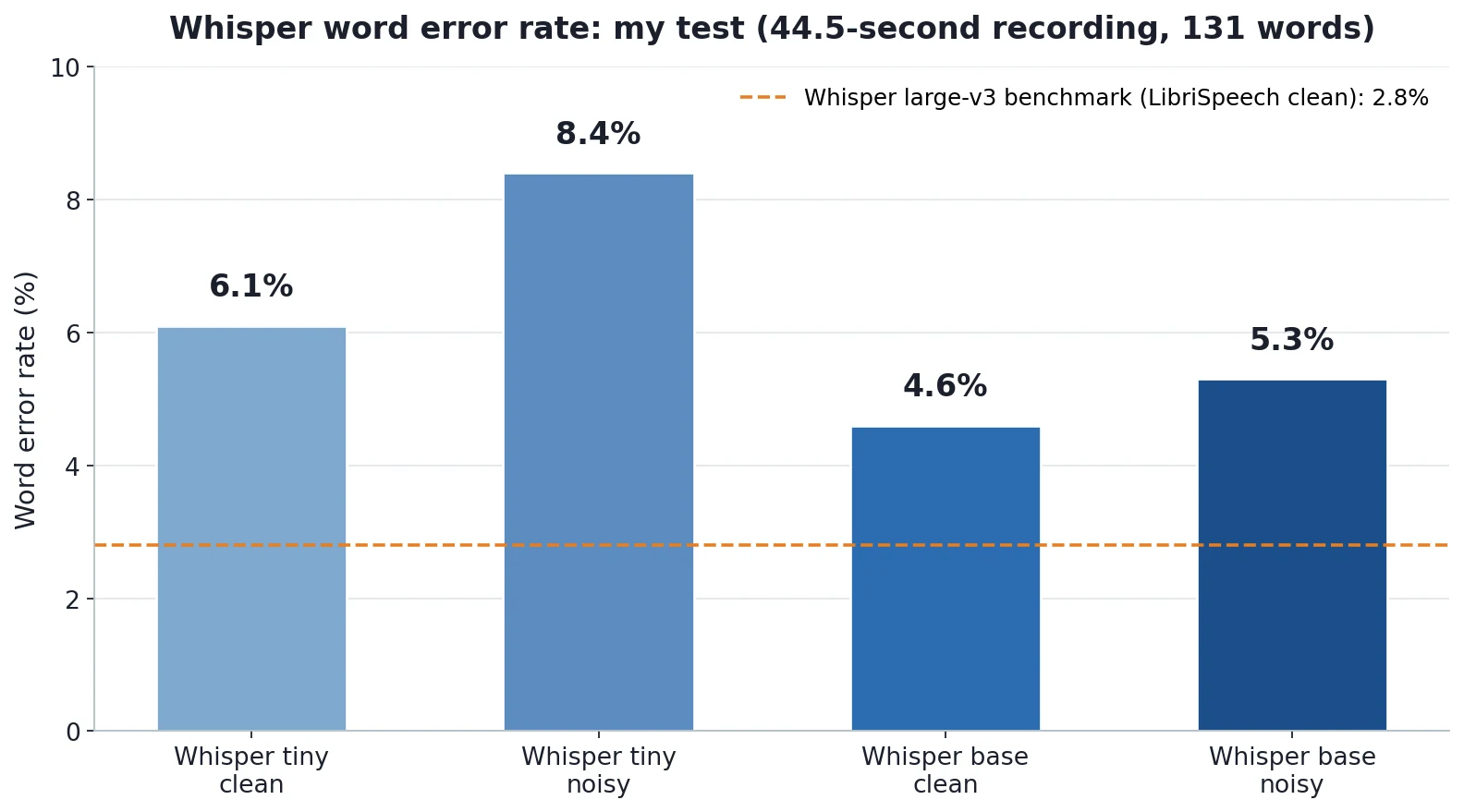
Four things break accuracy more than anything else. Accents and overlapping speech are the biggest: two people talking at once is the hardest case in transcription, and every tool struggles with it. Background noise is next — my test showed it adding roughly one extra error per hundred words even at low volume, and a cafe or a car adds far more. Jargon and proper nouns come third: my test’s worst errors were all names and technical terms, which is why Otter and Notta both sell a custom-vocabulary feature that lets you teach the tool your names in advance. And long files drift: accuracy falls off as a recording goes on, because the model has more chances to lose the thread. The fix is the same in every case — a verification pass. Re-listen to every name, number, date, and quote before you use it, and when a passage matters, check it against the audio at that timestamp rather than trusting the text.
How Do I Turn a Transcript Into Something Useful?
A raw transcript is a wall of text. The value comes from what you ask an AI to do with it next — and the trick is to ask for the transcript first, then ask for the structured output as a second step, so you can check the words before they get summarized away. These prompts work in ChatGPT, Claude, or Gemini once you have the transcript pasted in:
For a lecture or a talk: “Turn this transcript into study notes. For each main idea, give a two-sentence explanation, one example from the transcript, and one question I should be able to answer. Mark anything uncertain as [unclear] instead of guessing.” Pair it with our guide to using NotebookLM for studying, which can do the same job from the recording itself.
For an interview: “Extract every direct quote from this transcript, with the timestamp of each one. Do not clean up the wording — keep the speaker’s exact words, including false starts. List any claim that needs a fact-check separately.”
For a meeting: “List the decisions made in this meeting, who owns each action item, and the deadline for each. If a deadline was not stated, write [no deadline] instead of inventing one.” Our guide to transcribing meetings with AI covers the live-meeting version of this workflow, including the bots that join the call for you.
For a voice memo to yourself: “Turn this voice memo into a short plan: the goal in one sentence, the next three actions in order, and anything I need to decide before starting. Keep it under 150 words.” If the memo is the seed of something longer, the same transcript-first workflow works for a podcast episode — see how to create a podcast with AI — or for turning a long document into a summary, as in our PDF summarization shootout.
Which Method Should I Use?
Match the method to the recording, not to the tool with the most features. A voice memo on your phone is already solved — use Voice Memos or Recorder and move on. A handful of files a month is solved by TurboScribe’s free plan, which is the most generous no-cost allowance in this category. A weekly interview or lecture habit is where the paid plans start to make sense, and the math is straightforward: ten hours of audio a month costs $3.60 through OpenAI’s Whisper API at $0.006 a minute, $10 a month on TurboScribe Unlimited billed yearly, or $8.33 a month on Otter Pro billed annually — the API is cheapest if you are comfortable with a little setup, TurboScribe is cheapest if you want a website that just works, and Otter is the pick if you also want summaries and meeting notes. And for anything confidential, the answer is local transcription on your own machine, where the price is $0 and the privacy is total.
One last rule, and it is the one that saves you from the only transcription mistake that actually matters: never send a transcript to someone else — a client, an editor, a professor — without reading it first. AI transcription is fast, cheap, and good. It is not perfect, and the errors it makes are exactly the kind a reader will notice: the wrong name, the wrong number, the quote nobody said. Five minutes of checking is the difference between a transcript that helps you and one that embarrasses you.
Frequently Asked Questions
Yes, for clean single-speaker audio. Whisper’s large model scores about 2.7% word error rate on clean benchmark audio, and in my own test the base model scored 4.6% on a clean recording and 5.3% with background noise. Accuracy drops with accents, overlapping speakers, and noise — noisy real-world recordings can reach 11% to 18% word error. Treat every transcript as a first draft and check names, numbers, and quotes against the audio.
Yes. Your phone already does it: iPhone Voice Memos on iOS 18 (iPhone 12 or later) and Google Recorder on Pixel phones both transcribe on-device. On a computer, MacWhisper on a Mac and Buzz on Windows, Mac, or Linux run Whisper locally with no upload and no minute cap, and Whisper itself is free and open source.
A few minutes at most. In my test, Whisper’s base model transcribed 44.5 seconds of audio in 5.7 seconds on an ordinary CPU, and the tiny model did it in 2.9 seconds. Upload services usually return an hour-long file in 5 to 15 minutes depending on the queue. Your phone transcribes voice memos in real time as you record.
Yes, on a paid ChatGPT plan or workspace — the feature arrived in OpenAI’s release notes on October 6, 2026, and is not available on the Free plan. Attach a WAV, MP3, M4A, FLAC, AAC, or OGG file up to 512 MB and ask for a transcript, a summary, or answers about the recording. In a regular chat, keep files to about 6 minutes; longer recordings may time out. Developers can use the transcription API instead, with the gpt-transcribe model at $0.0045 a minute.
MP3, WAV, M4A, FLAC, and OGG work almost everywhere. ChatGPT also accepts AAC and audio-only MP4 and WebM, and the Whisper API accepts MP3, MP4, MPEG, MPGA, M4A, WAV, and WebM up to 25 MB per file. If a tool rejects your file, convert it to WAV with a free converter — WAV is the most widely accepted format and it preserves the most audio detail.
Yes — get consent before you record or transcribe another person. Many US states require all parties to agree to a recording, and the EU’s GDPR treats voice as personal data. Tell people you are recording, say what the transcript is for, and delete the recording and the transcript when you no longer need them. For a meeting, the host announcing the recording at the start is usually enough; for an interview, ask explicitly.