OpenHuman: What Is It? Features, Pricing, Installation & Review

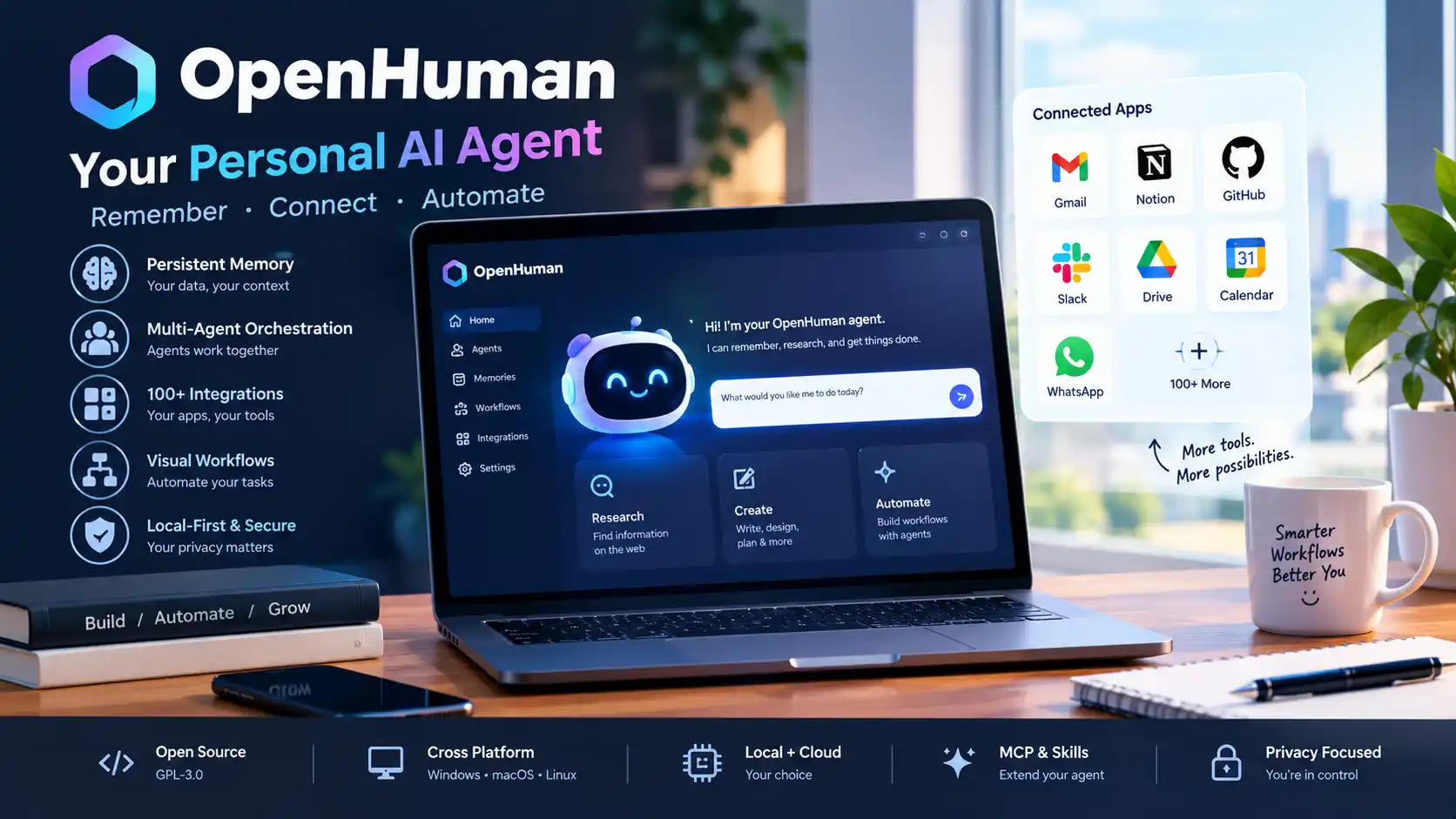
OpenHuman AI is an open-source personal AI agent designed to remember your information, connect to your everyday apps, coordinate multiple AI agents, research the web, and automate workflows.
Unlike a traditional AI chatbot that mainly answers prompts, OpenHuman is designed as an AI agent harness. Its goal is to give AI persistent context about your work while allowing multiple agents and tools to work together.
OpenHuman is built by TinyHumans and uses a Rust-based core with a desktop application. The project is released under the GNU GPL-3.0 license and is currently described by its developers as being in early beta.
Quick Answer: What Is OpenHuman AI?
OpenHuman is an open-source personal AI assistant and agent harness that combines persistent memory, multi-agent orchestration, workflows, integrations, web research, and automation.
Its main idea is simple:
Instead of giving an AI a new context every time you start a conversation, OpenHuman attempts to build a persistent knowledge base about your information and use that context across future tasks.
It can connect to services such as Gmail, Notion, GitHub and Slack, maintain a local-first memory system, coordinate agents, create workflows and use MCP servers and skills to expand what its agents can do.
OpenHuman at a Glance
| Feature | OpenHuman |
|---|---|
| Type | Open-source AI agent harness / personal AI |
| Developer | TinyHumans |
| Core technology | Rust-based core with desktop application |
| License | GNU GPL-3.0 |
| Memory | Local-first Memory Tree and Obsidian-style knowledge base |
| Agent orchestration | Multi-agent workflows and durable agent graphs |
| Integrations | 100+ OAuth integrations plus MCP and skills |
| Platforms | Windows, macOS and Linux |
| Local models | Supported through providers such as Ollama |
| Web research | Built-in web search and research tools |
| Open source | Yes |
| Current status | Early beta / actively developing |
OpenHuman’s official repository describes it as an open-source agent harness focused on local-first memory, orchestration and workflows.
How Does OpenHuman Work?
OpenHuman can be understood as several layers working together.
1. Memory
OpenHuman collects information from connected sources and turns it into a structured memory system.
2. Agents
Instead of relying on one AI agent for everything, OpenHuman can coordinate multiple specialized agents.
3. Tools
Agents can use connected applications, MCP servers, skills, browser tools, search and other capabilities.
4. Workflows
You can turn repeated tasks into workflows containing agents, conditions, loops, approvals and other steps.
5. Models
OpenHuman can use managed AI providers, your own provider credentials, or local models such as Ollama.
This architecture is why calling OpenHuman simply an AI chatbot misses the main point.
OpenHuman Memory: The Biggest Feature
One of OpenHuman’s most interesting features is its Memory Tree.
Traditional chatbots often rely heavily on the context available in a conversation. OpenHuman instead attempts to build a longer-term knowledge base from your connected information.
The project says it can process information from sources such as:
- Gmail
- Calendar
- GitHub
- Notion
- Slack
- Documents
- Messages
- Personal notes
The information can be compressed into a structured Markdown-based memory system stored locally. OpenHuman also provides an Obsidian-style vault representation of the knowledge.
Why persistent AI memory matters
Imagine asking:
What did I discuss with the client last month about the website redesign?
A normal chatbot may need you to provide the conversation.
A personal AI with connected data could potentially retrieve the relevant context from its memory system.
That is the core idea behind OpenHuman.
OpenHuman as a Personal AI
OpenHuman is designed to become more useful as it gains access to your information and tools.
The official project describes its goal as creating an AI that can remember your world and use that information across tasks.
For example, you could potentially ask it to:
- Find important emails
- Summarize recent conversations
- Research a topic
- Analyze documents
- Organize information
- Track goals
- Work with GitHub
- Create workflows
- Coordinate multiple agents
- Search the web
- Automate repetitive tasks
This makes OpenHuman closer to a personal AI operating layer than a conventional chat application.
OpenHuman Agent Orchestration
Another major feature is multi-agent orchestration.
Instead of running one agent through a simple loop, OpenHuman can coordinate multiple agents through durable graphs.
The project’s architecture uses open-source components such as tinyagents and tinyflows for agent execution and workflow automation.
A simplified workflow might look like:
Your Goal
   ↓
Planning Agent
   ↓
Research Agent
   ↓
Analysis Agent
   ↓
Writing Agent
   ↓
Review / Approval
   ↓
Final Result
This is useful for tasks that are too large or complicated for a single prompt.
OpenHuman Workflows
OpenHuman also includes a visual workflow system.
The idea is similar to automation platforms such as Zapier or n8n, but with an AI agent able to propose the workflow. New to automation? Start with our beginner’s guide to no-code AI automation.
You describe what you want to automate.
OpenHuman can then propose a workflow that you review before saving it.
Workflows can contain elements such as:
- AI agents
- HTTP requests
- Conditions
- Loops
- Sub-workflows
- Code
- Approvals
- Scheduled triggers
- Application events
The project describes these as durable, trigger-driven workflows that can pause and resume.
Example
You could design:
New Email
   ↓
Analyze Email
   ↓
Classify Request
   ↓
Research If Necessary
   ↓
Draft Response
   ↓
Human Approval
   ↓
Send
The important part is the approval step.
You do not necessarily have to let an AI agent perform every consequential action automatically.
OpenHuman Integrations
OpenHuman is designed to connect with the applications where users already work.
The official project currently advertises more than 100 OAuth integrations along with MCP servers and a large skills catalog.
Examples include:
- Gmail
- Notion
- GitHub
- Slack
- Google services
- Microsoft services
- Telegram
- Discord
- Linear
- Jira
- Stripe
The exact connector list can change as the project develops.
What Is MCP in OpenHuman?
MCP stands for Model Context Protocol.
It provides a standardized way for AI applications to connect models with external tools and data sources.
OpenHuman supports MCP, allowing users to expand what their agents can access beyond built-in capabilities. The project’s documentation also describes a large MCP ecosystem alongside its skills system.
This matters because AI agents become much more useful when they can do things rather than simply generate text.
For example:
AI Model
   ↓
OpenHuman
   ↓
MCP Tool
   ↓
GitHub / Database / API / Service
   ↓
Result
   ↓
AI Agent
OpenHuman Skills
OpenHuman also supports a large skills ecosystem.
Skills can provide specialized capabilities or instructions that agents can use for particular types of tasks.
The project currently advertises a catalog of tens of thousands of skills. Because the ecosystem is changing rapidly, treat the current number as a product snapshot rather than a permanent specification.
This architecture gives OpenHuman a potential advantage over a closed AI assistant:
The capabilities can be extended.
OpenHuman and Local AI Models
OpenHuman is not locked to a single AI model.
The project says users can connect their own provider credentials and can also use local models through tools such as Ollama.
This creates several possible setups.
Cloud AI
OpenHuman → Managed AI Provider
Bring Your Own Key
OpenHuman → Your API Provider
Local AI
OpenHuman → Ollama → Local Model
Hybrid
Simple Tasks → Local Model
Complex Tasks → Cloud Model
Research → Web Search
Automation → Tools
The hybrid approach can be particularly useful for users who want a balance between privacy, cost and capability.
Is OpenHuman Really Local?
This is an important question.
OpenHuman should not be described as “everything runs locally.”
The project uses a local-first architecture for important data and memory, but its default managed experience can use hosted services for model routing, web search, integrations and other capabilities. Users can configure their own providers or local models where supported.
OpenHuman also offers a Privacy Mode designed to prevent inference from leaving the machine when configured appropriately.
Therefore, the more accurate description is:
OpenHuman is local-first, not necessarily 100% local by default.
That distinction is important for privacy-conscious users.
OpenHuman Privacy and Security
OpenHuman emphasizes local-first data handling, encrypted local data and user approval for consequential actions.
The project describes features including:
- On-device encrypted data
- Approval gates
- OS keyring secrets
- Optional sandboxing
- Privacy Mode
- Local memory
- User-controlled providers
However, OpenHuman is still an evolving beta project.
That means users should not assume that “open source” automatically means risk-free.
Before connecting sensitive accounts, review:
- Permissions
- OAuth scopes
- API keys
- Connected applications
- Agent capabilities
- Workflow approvals
- Current release notes
- Security advisories
OpenHuman Supported Operating Systems
OpenHuman is designed for desktop environments.
The project’s documentation lists support for:
- Windows
- macOS
- Linux
The getting-started documentation recommends at least 4 GB RAM, with 16 GB or more recommended for large mailboxes, repositories or local-model workloads.
This makes OpenHuman accessible to a much broader group than AI tools that require a dedicated GPU server.
OpenHuman Pricing
This is where an important distinction matters.
The OpenHuman software is open source, but some hosted services are paid.
| Plan | Price | Main Details |
|---|---|---|
| Basic | $19.99/month | 60 credits/month, 1 GB storage, managed services |
| Pro | $199.99/month | 1,800 credits/month, 100 GB storage, higher limits |
| Enterprise | Custom | Teams, security, compliance and on-premise deployment |
| Pay-as-you-go | From $5 top-up | Usage-based credits |
TinyHumans currently lists the following subscription structure:
These are the current prices published by TinyHumans and can change as the product develops.
Do you have to pay to use OpenHuman?
Not necessarily.
The OpenHuman software itself is GPL-3.0 open source and can be run without buying a TinyHumans subscription. Paid plans provide access to managed services and hosted capabilities.
This is an important distinction when comparing OpenHuman with commercial AI assistants.
OpenHuman vs Traditional AI Chatbots
| Capability | Traditional AI Chatbot | OpenHuman |
|---|---|---|
| Conversation | Yes | Yes |
| Persistent personal memory | Varies | Core feature |
| Multi-agent orchestration | Limited or product-dependent | Core feature |
| Workflow automation | Varies | Yes |
| MCP support | Product-dependent | Yes |
| Local models | Usually limited | Supported |
| Open source | Usually no | Yes |
OpenHuman vs OpenClaw
OpenHuman and OpenClaw are often discussed together because both belong to the rapidly growing personal-AI-agent category.
However, their architectural emphasis is different.
OpenHuman places significant emphasis on:
- Persistent personal memory
- Connected data
- Agent orchestration
- Visual workflows
- Desktop experience
- Local-first knowledge
OpenClaw is more commonly positioned around a broad agent gateway and multi-channel automation environment.
The OpenHuman project itself compares these systems and describes OpenHuman as particularly focused on persistent personal context and orchestration.
Simple distinction
OpenHuman: “Remember my world and coordinate agents around it.”
OpenClaw: “Give my agent a broad automation and communication gateway.”
Neither is automatically better.
The correct choice depends on your workflow.
OpenHuman vs Hermes Agent
Hermes Agent is another open-source AI agent project frequently compared with OpenHuman.
A useful distinction is:
| Need | Better fit |
|---|---|
| Persistent personal context | OpenHuman |
| Memory-first personal AI | OpenHuman |
| Visual workflow builder | OpenHuman |
| Multi-agent orchestration | Both |
| Terminal-oriented agent workflows | Hermes may be preferable |
| Developer-centric automation | Depends on setup |
| Local-first personal knowledge | OpenHuman |
OpenHuman’s own documentation positions its Memory Tree, workflows and orchestration as central parts of the product.
Who Should Use OpenHuman?
OpenHuman is particularly interesting for:
Developers
Developers can connect GitHub, repositories, tools and AI models while building automated workflows.
Freelancers
A freelancer could connect email, project-management tools, documents and calendars to create a more context-aware personal assistant.
Researchers
OpenHuman’s web research and connected-memory approach can help organize information across multiple sources.
Small-business owners
A small business can potentially connect communication, project management, documents and operational tools.
Privacy-conscious users
The local-first architecture and support for local models can be attractive to users who want more control over their data.
Who Should Avoid OpenHuman?
OpenHuman may not be the best choice if you:
- Only want a simple chatbot
- Do not want to configure integrations
- Don’t need persistent memory
- Don’t want to manage an evolving beta product
- Need a fully mature enterprise platform
- Want every AI feature to work without setup
OpenHuman is more powerful precisely because it is more involved than a normal chatbot.
OpenHuman Pros and Cons
| Pros | Cons |
|---|---|
| Open source | Still evolving in beta |
| Persistent memory | More complex than a normal chatbot |
| Multi-agent orchestration | Some hosted capabilities require payment |
| Visual workflows | Features can change quickly |
| MCP and skills | Connected accounts require careful permission management |
| Local model support | Local setup may require technical knowledge |
| Windows, macOS and Linux | Not intended to replace every AI assistant |
How to Install OpenHuman
The easiest approach is to use the official desktop installer for your operating system.
OpenHuman’s documentation supports:
- Windows
- macOS
- Linux
The project recommends the graphical installation path for most users, while command-line installation options are also available.
Basic setup process
1. Download OpenHuman
        ↓
2. Install the desktop application
        ↓
3. Sign in
        ↓
4. Connect selected apps
        ↓
5. Allow the first memory sync
        ↓
6. Test a simple prompt
        ↓
7. Create workflows and add tools
Start with low-risk data before connecting highly sensitive accounts.
Is OpenHuman Free?
The software is open source and free to run, but hosted services can cost money.
TinyHumans currently offers subscription plans starting at $19.99 per month, with higher tiers for users requiring more credits, storage and rate limits. There is also pay-as-you-go usage.
Users can also bring their own model providers or use supported local models, which can change the cost structure significantly.
Is OpenHuman Safe?
OpenHuman includes several security-oriented features, including encrypted local data, approval gates, keyring-based secret storage and an optional Privacy Mode.
But no AI agent should automatically be considered safe simply because it is open source.
An agent that can access email, GitHub, files or financial services has significant privileges.
Before connecting accounts:
- Review permissions.
- Start with non-sensitive accounts.
- Use approval gates.
- Avoid giving unnecessary write permissions.
- Keep the application updated.
- Review workflows before enabling automation.
- Use local models when appropriate for sensitive workloads.
Is OpenHuman Better Than ChatGPT?
Not necessarily.
ChatGPT is primarily a general-purpose AI assistant and can be used without building a personal agent infrastructure.
OpenHuman is designed more like an AI operating layer for your information, tools and agents.
Choose ChatGPT when you primarily want:
- Conversation
- Writing
- Research
- Coding
- General AI assistance
Consider OpenHuman when you want:
- Persistent local-first memory
- Connected applications
- Multi-agent orchestration
- Workflow automation
- MCP tools
- Local models
- An open-source agent harness
They can also complement each other rather than being direct replacements.
Is OpenHuman Worth Trying?
For developers, AI enthusiasts and power users, yes, OpenHuman is worth experimenting with.
Its most interesting feature is not simply its ability to chat.
The bigger idea is the combination of:
Memory + Agents + Tools + Workflows + Local Control
That architecture makes OpenHuman one of the more interesting open-source personal AI projects to watch.
However, it is still a developing project. Users should expect rapid changes and should verify current features, pricing and compatibility before relying on it for critical workflows.
OpenHuman Review: Final Verdict
OpenHuman is more than an AI chatbot.
It is an open-source personal AI and agent harness built around persistent memory, multi-agent orchestration, workflow automation and connections to external tools.
Its biggest strengths are:
- Persistent personal memory
- Open-source architecture
- Multi-agent orchestration
- Workflow automation
- MCP support
- Large integration ecosystem
- Local-first data architecture
- Local-model support
- Cross-platform desktop support
Its biggest limitations are:
- Early-beta maturity
- Increasing technical complexity
- Some managed features require payment
- Connected-agent permissions require careful management
- Product capabilities can change quickly
Bottom line
If you want a simple chatbot, OpenHuman may be overkill.
If you want an open-source personal AI that can remember your information, coordinate agents and automate workflows, OpenHuman is a project worth watching and testing.
The most important reason to pay attention to OpenHuman is its architectural direction:
The future of personal AI may be less about asking an AI questions and more about giving an AI persistent context, tools and controlled autonomy.
Frequently Asked Questions About OpenHuman
OpenHuman is an open-source personal AI agent and agent harness that combines persistent memory, multi-agent orchestration, workflows, integrations, web research and AI tools.
The OpenHuman software is open source under GPL-3.0 and can be run without a subscription. TinyHumans also offers paid plans for managed services, credits and other hosted capabilities.
Yes. OpenHuman is released under the GNU GPL-3.0 license.
Yes. OpenHuman supports Windows, macOS and Linux desktop environments.
Yes. macOS is one of the supported desktop platforms.
Yes. OpenHuman provides Linux installation options in addition to Windows and macOS.
Yes. OpenHuman supports local-model setups through providers such as Ollama, alongside hosted and user-provided model providers.
Yes. Persistent memory is one of OpenHuman’s central features. Its Memory Tree is designed to organize information from connected sources into a structured local knowledge system.
OpenHuman can be used for personal AI assistance, research, document analysis, connected-app tasks, agent orchestration, workflow automation, development tasks and other multi-step AI workflows.
Neither is universally better. OpenHuman emphasizes persistent personal memory, connected data and agent orchestration, while OpenClaw has a different architecture and automation focus. Your workflow should determine the choice.
No. OpenHuman is an AI agent harness and personal AI system. The project itself explicitly says that OpenHuman is not AGI.
OpenHuman uses a local-first memory architecture, but not every service is necessarily local by default. Managed model routing, search and integration services can use hosted infrastructure. Privacy Mode and local providers can provide greater local control.
Yes. Developers can connect repositories, AI models, MCP servers and development tools while creating multi-agent workflows. Its Rust core also makes it interesting for developers who want an extensible open-source agent framework.
Conclusion
OpenHuman represents a different direction for AI assistants.
Instead of treating AI as a conversation window, it attempts to create a persistent personal AI system that understands your information, connects to your tools, coordinates specialized agents and executes workflows.
It is still early, so it should not be treated as a finished replacement for every commercial AI assistant.
But for developers, freelancers, researchers and AI enthusiasts interested in open-source personal AI, agentic automation, persistent memory and local-first AI, OpenHuman is one of the projects worth keeping on your radar.