What Is Obsidian? The Note App That Turns Notes Into a Knowledge Base

Obsidian is a note-taking app that stores your notes as plain Markdown files in a folder on your own device — and then turns those notes into a connected knowledge base with links, backlinks, and a visual graph of how your ideas relate. There is no account to create, no cloud you must use, and no monthly bill for the app itself: the core app is free, with no sign-up and no feature limits. You pay only if you want the optional extras, Obsidian Sync and Obsidian Publish. If you have ever lost notes to a shut-down app, a price hike, or an export that mangled your formatting, that ownership model is the whole pitch — and it is why Obsidian keeps showing up in “best note-taking app” lists six years after launch. Prices, features, and ratings below were checked against Obsidian’s own pages and review sites on 22 November 2026; where a claim rests on a vendor page or a third-party review rather than my own signed-in session, I say so.
Obsidian at a glance
| What | Detail |
|---|---|
| What it is | Local-first note-taking and personal knowledge management app built on plain Markdown files |
| Maker | Dynalist Inc., founded by Erica Xu and Shida Li; launched in public beta in 2020; 100% user-supported, no outside investors |
| Platforms | Windows, macOS, Linux, iOS, and Android; notes live as files on your device, so the app works fully offline |
| Price | Core app $0 with no sign-up; Sync $4/user/month billed annually ($5 month to month); Publish $8/site/month billed annually ($10 month to month); Catalyst $25 one-time; Commercial $50/user/year (optional) |
| Best for | Writers, researchers, students, and developers building a long-term personal knowledge base from linked notes |
| Watch out for | No real-time collaboration; syncing across devices costs extra (or needs your own cloud folder); the blank-slate start takes setup before it feels powerful |
| User ratings | G2 4.5/5 (12 reviews); Capterra 4.8/5 (46 reviews); Product Hunt 4.9/5 (176 reviews) — all read 22 November 2026 |
| Current version | 1.15.1 (12 November 2026), with Bases, Canvas, and a built-in Web viewer on mobile |
What is Obsidian?
Obsidian is a Markdown note-taking app for building a personal knowledge base — a collection of notes that link to each other the way pages on a wiki do. The idea behind it is simple and, in the note-app world, unusual: your notes are not stored in a company’s database. They are ordinary text files in a folder on your computer, called a vault. Open that folder in any text editor and your notes are all there, readable, forever, whether Obsidian exists or not. Everything else Obsidian does — the linking, the graph, the search, the plugins — is built on top of those files.
The app comes from Dynalist, a small team led by co-founders Erica Xu and Shida Li, and reached public beta in 2020. It grew out of the same team’s outliner app, Dynalist, and out of a decade of frustration with note apps that lock your thinking into their format. Obsidian says it is 100% user-supported rather than funded by investors, which is why the business model is optional add-ons instead of a subscription paywall around the app itself. The core app costs nothing for personal or commercial use — Obsidian’s pricing page states plainly that no commercial license is required, though it encourages organizations to buy one to support development.
That matters because most note apps rent you your own notes. With Notion, Evernote, or Google Keep, your notes live on someone else’s servers in a proprietary format, and leaving means exporting and hoping the format survives. With Obsidian, leaving means opening the folder. It is the rare productivity app where the exit strategy is built into the design — and that, more than any single feature, is why people who take notes for a living tend to end up here. We put Obsidian head to head with its closest rivals in our Obsidian vs Logseq and Notion vs Obsidian comparisons, and in our roundup of the best AI note-taking apps.
How does Obsidian work?
Obsidian works in four layers, and understanding them is the fastest way to decide whether it fits how you think.
1. The vault: a folder of Markdown files
Everything starts with a vault, which is just a folder on your device. Create a vault, and Obsidian shows its contents in a file explorer on the left. Every note is a Markdown file — a plain-text file with simple formatting marks like # for headings and ** for bold. You do not need to know Markdown to use Obsidian, but the fact that your notes are plain text is the foundation of everything else: they open in any editor, sync with any cloud folder, survive in version control, and will still be readable in twenty years.
2. Links and backlinks: notes that point at each other
The core move in Obsidian is linking. Type [[ and the name of another note, and the two notes are connected. Open a note and Obsidian shows you its backlinks — every other note that mentions it. Write a note about “second brain”, link it to your notes on “reading” and “writing”, and months later you can open any one of them and see the whole thread. This is the Zettelkasten idea — a slip-box of connected notes — made effortless, and it is the feature that separates Obsidian from a folder of documents. A normal notes app behaves like a filing cabinet; Obsidian behaves like a network.
3. The graph view: your notes as a map
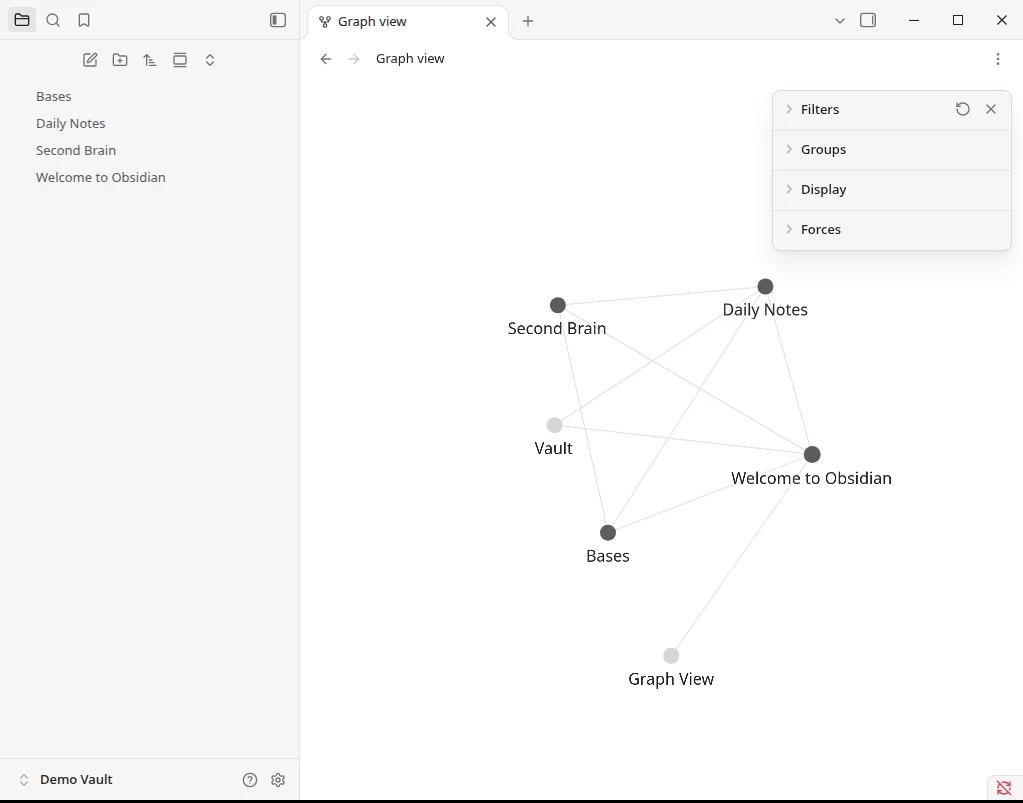
The graph view draws every note as a dot and every link as a line, so you can see the shape of your thinking. Dense clusters show the topics you keep returning to; lone dots show notes that never connected to anything. In a small vault it is a curiosity. In a vault with hundreds of notes it becomes a genuine research tool — a way to spot that two projects share an idea, or that a note you wrote two years ago answers a question you have today. The screenshot below is the real graph view from Obsidian 1.15.1, taken in a small demo vault with four linked notes.
4. Search that actually finds things
Because the notes are plain files on your disk, search is fast and complete: full-text search across every note, with operators for tags, file names, and sections. Version 1.15.1, released 12 November 2026, added a Relevance sort to search results, so the best matches surface first instead of in file order. Combined with tags, bookmarks, and the graph, it means a note you wrote once is a search away forever — which is the entire point of a second brain.
What can you do with Obsidian?
Out of the box, Obsidian is deliberately plain: an editor, a file explorer, links, backlinks, the graph, and search. The power comes from the core plugins that ship with it and the community plugins you add yourself. The features that matter most in day-to-day use:
- Daily notes. A dated note for each day, one click away — the inbox of a vault. Capture first, connect later: jot down what happened, link the interesting parts to permanent notes, and let the daily notes pile up as a searchable diary.
- Canvas. An infinite whiteboard for laying out notes, images, PDFs, and videos spatially. Use it to plan an article, map a project, or arrange research visually instead of linearly. Canvas files use the open JSON Canvas format, so they are portable too.
- Bases. The newest core feature: turn a folder of notes into a database with table, card, and kanban views. A folder of book notes becomes a reading tracker; a folder of project notes becomes a status board. Bases landed for everyone in 2026, and version 1.14 added a kanban view for them.
- Web Clipper. A browser extension that saves web pages, articles, and highlights into your vault as Markdown, so research from the web lands in the same place as your own notes.
- Community plugins and themes. The plugin directory holds thousands of community plugins — reviewers counting it in 2026 land between about 1,700 and 2,700, depending on what they count — covering calendars, task management, spaced repetition, Dataview queries that turn notes into live tables, and AI assistants. There are also more than 1,000 community themes. Plugins run locally, and Obsidian asks you to trust a vault’s author before running them.
- Web viewer (mobile). New in 1.15.1: links to web pages open in an in-app browser that slides up over your note, so you can check a source without leaving the app.
- Sync and Publish (paid). Sync keeps vaults identical across devices with end-to-end encryption and version history; Publish turns notes into a public website with graph and full-text search. Both are optional — the app works fully without them.
How much does Obsidian cost?
Obsidian’s pricing is the opposite of most SaaS: the app is the free part, and the money is in optional services. All figures below are from Obsidian’s pricing page, read live on 22 November 2026.
| Plan | Billed monthly | Billed annually | What you get |
|---|---|---|---|
| Obsidian app | $0 | $0 | Full app on desktop and mobile, no sign-up, no feature limits; links, backlinks, graph view, Canvas, Bases, community plugins and themes; free for commercial use |
| Sync | $5/user/month | $4/user/month ($48/year) | Notes synced across devices, AES-256 end-to-end encryption, version history, shared vaults, priority support |
| Publish | $10/site/month | $8/site/month ($96/year) | Publish notes to the web, customizable theme, graph and full-text search, priority support |
| Catalyst | $25 one-time | $25 one-time | Early access to beta versions, community badges, exclusive channels — a support license, not a feature unlock |
| Commercial | — | $50/user/year | Optional license for organizations that want to support development; not required to use Obsidian at work |
Two details are worth knowing before you pay anything. First, students, faculty, and nonprofit employees get a 40% discount on Sync and Publish. Second, Sync and Publish come with full refunds within 7 days, no questions asked; Catalyst, Commercial, and Obsidian Credit are non-refundable. And the practical question most people ask — do I need Sync at all? — has a cheaper answer: because your vault is an ordinary folder, you can point it at iCloud, Dropbox, or any folder-sync tool and get your notes on every device for nothing. Sync exists for people who want version history, end-to-end encryption, and shared vaults without managing sync themselves.
A worked example: a three-person research team that wants encrypted sync on every device and a public site for its published notes would pay $4 × 3 users × 12 months = $144 a year for Sync, plus $8 × 12 = $96 a year for one Publish site — $240 a year total, with the app itself costing nothing. A solo user who syncs through iCloud instead pays $0.
What is new in Obsidian?
Obsidian ships steadily rather than loudly, and the last two months have been busier than usual. The current version is 1.15.1, and the changes since October matter if you are reading older guides — most top-ranking explainers predate all of them. From Obsidian’s changelog:
- Version 1.14 (5 October 2026): Bases gained a kanban view, six new highlight colors arrived, and Obsidian can now open single Markdown files from outside a vault — handy for a quick edit without importing a file.
- Version 1.15 (2 November 2026): Mermaid diagrams moved to a new renderer called Pele that follows the note’s theme, so diagrams finally match dark and light themes instead of fighting them.
- Version 1.15.1 (12 November 2026): a built-in Web viewer on mobile, a Relevance sort for search results, clearer vault management (each vault now shows where it is stored, its file count, and its plugins before you open it), and new home-screen widgets for quick capture on iOS and Android.
The bigger 2026 story is Bases, which arrived for everyone earlier in the year and turned Obsidian from a note app with a graph into a note app that can also act as a lightweight database. If an older review tells you Obsidian cannot do tables or trackers, it predates Bases — check the version it was written against.
Who is Obsidian for — and who should skip it?
Obsidian is at its best for people whose notes compound: writers building a body of work, researchers collecting sources over years, students taking notes they will reuse next semester, and developers keeping a personal wiki of how systems work. If you write more than you collaborate, and you care that your notes will still open in ten years, Obsidian is hard to beat. The ratings agree in direction, if not in sample size: G2 gives it 4.5 out of 5 from 12 reviews, Capterra 4.8 out of 5 from 46 reviews, and Product Hunt 4.9 out of 5 from 176 reviews — all read on 22 November 2026. Reviewers consistently praise the speed, the local storage, and the plugin ecosystem, and consistently warn about the learning curve.
Skip it — or at least do not make it your first note app — if your work is mostly teamwork. Obsidian has no real-time collaboration: no shared cursors, no comments, no live co-editing. A shared vault through Sync is file sharing, not collaboration. Teams that live in shared docs should use Notion, Google Docs, or a wiki built for groups, and keep Obsidian for personal notes. Also skip it if you want an app that organizes itself: Obsidian hands you a blank vault and expects you to build the system. That freedom is the point for some people and a chore for others — and the honest test is whether you enjoy setting up a tool, because the first week is mostly setup.
Obsidian vs Notion vs Logseq: which one fits how you think?
The three-way choice comes down to one question: where do your notes live, and who else needs them? This table is the short version; the full head-to-heads are in our Notion vs Obsidian, Obsidian vs Logseq, and Joplin vs Obsidian comparisons.
| Question | Obsidian | Notion | Logseq |
|---|---|---|---|
| Where notes live | Local Markdown files you own | Notion’s cloud, proprietary format | Local Markdown files you own |
| Works offline | Yes, fully | Limited — desktop app caches pages | Yes, fully |
| Real-time collaboration | No | Yes — its strongest feature | No (Sync is file-based) |
| Structure | Freeform pages linked together | Pages + powerful databases | Block-based outliner, daily journal first |
| Extensibility | Thousands of community plugins | Integrations and API, no plugins | Smaller plugin catalog (50+) |
| Price for the app | $0, no sign-up | Free plan with limits; Plus $10/user/month billed annually | $0, open source |
| Pick it if | You want a personal knowledge base you own outright | Your team shares docs and databases | You think in outlines and daily journals, and want open source |
How to get started with Obsidian in 15 minutes
You do not need a system, a course, or a plugin list to start. Fifteen minutes is enough to know whether Obsidian clicks for you.
- Download and install it. Get it from obsidian.md for Windows, macOS, or Linux, or from your phone’s app store. There is no account step — install and open it.
- Create your first vault. Pick a folder on your device and give it a name. This folder is your vault; everything you write lands here as Markdown files.
- Write one real note. Not a test note — something you actually want to keep. A book summary, a project plan, meeting notes. Give it a clear title.
- Link it to a second note. Mention another idea, type [[, pick or create the note, and you have your first connection. Open the second note and check its backlinks panel — the link works both ways.
- Open the graph view. Press Ctrl+P (or Cmd+P on Mac), type “graph”, and open it. Two linked notes look unimpressive; come back when you have fifty and it starts to mean something.
- Turn on Daily Notes. In Settings, enable the Daily Notes core plugin. Tomorrow’s note is one click away, and it becomes the capture habit the whole system rests on.
- Decide on sync later. Use it on one device for a week first. If you need it on your phone too, try your existing cloud folder — or pay for Sync when the version history and encryption are worth $4 a month to you.
What Obsidian gets wrong
No honest explainer should skip the trade-offs, and Obsidian’s are real. The blank slate is the biggest: a new vault is an empty folder, and the app does not tell you how to organize it — which is why so many first-time users bounce after a day. Sync costs extra for a feature every cloud note app includes, and the mobile apps, while much improved in 1.15, are still companions to the desktop app rather than equals. There is no built-in web clipper on desktop beyond the browser extension, no native task manager, no AI writing assistant in the core app — each of those is a plugin you must find, trust, and maintain. And because the app is closed-source (the file format is open, the app itself is not), you are trusting a small independent company to keep shipping. That trust has held since 2020, and the company says it is fully user-supported with no investors to answer to — but it is a trust decision, not a technical guarantee. The counterweight is the exit: even if development stopped tomorrow, your notes would still be plain files in a folder.
The bottom line: Obsidian is not the easiest note app, and it is not the best team app. It is the note app for people who want their notes to outlive the app that holds them — local files, open formats, links that turn a pile of notes into something you can think with. If that sentence sounds like what you have been looking for, download it and write one real note. The graph does the convincing from there.
Frequently asked questions
Yes. The core app is free with no sign-up, no telemetry, and no feature limits — including Bases, Canvas, and the graph view. You only pay for optional services: Obsidian Sync ($4/user/month billed annually), Obsidian Publish ($8/site/month billed annually), or the one-time $25 Catalyst license. Since 2025, no separate commercial license is required to use Obsidian at work.
It depends on the job. For solo knowledge work — linked notes, offline use, and owning your files — Obsidian wins. For teams, Notion wins: real-time collaboration, shared workspaces, and databases your whole team can edit at once. Many people use both: Obsidian for personal thinking, Notion for shared work.
Yes, completely. Your notes are plain files on your device, so the app works with no internet connection at all. Syncing across devices is the only part that needs the internet — and that is optional, since you can sync the vault folder yourself with iCloud, Dropbox, or any folder-sync tool.
Yes. Obsidian has iOS and Android apps with the same vault format as the desktop app. Keep the vault in sync with Obsidian Sync, iCloud, or another cloud folder, and the same notes open on every device. Version 1.15.1 added a Web viewer and new home-screen widgets for quick capture on mobile.
Your notes live as plain files on your own device, the app collects no telemetry, and Obsidian Sync is secured with AES-256 end-to-end encryption, so not even Obsidian can read synced notes. The apps have also been independently audited — Cure53 audited the apps in 2023 and 2024, and Trail of Bits audited Sync in 2025, according to a November 2026 review of the product.
Both are local-first Markdown note apps, but they organize differently. Obsidian is page-based: freeform notes linked together, with a graph view and thousands of community plugins. Logseq is block-based: an outliner built around a daily journal, where every bullet can link and be referenced. Obsidian fits writers and researchers building a knowledge base; Logseq fits people who think in outlines and daily logs.