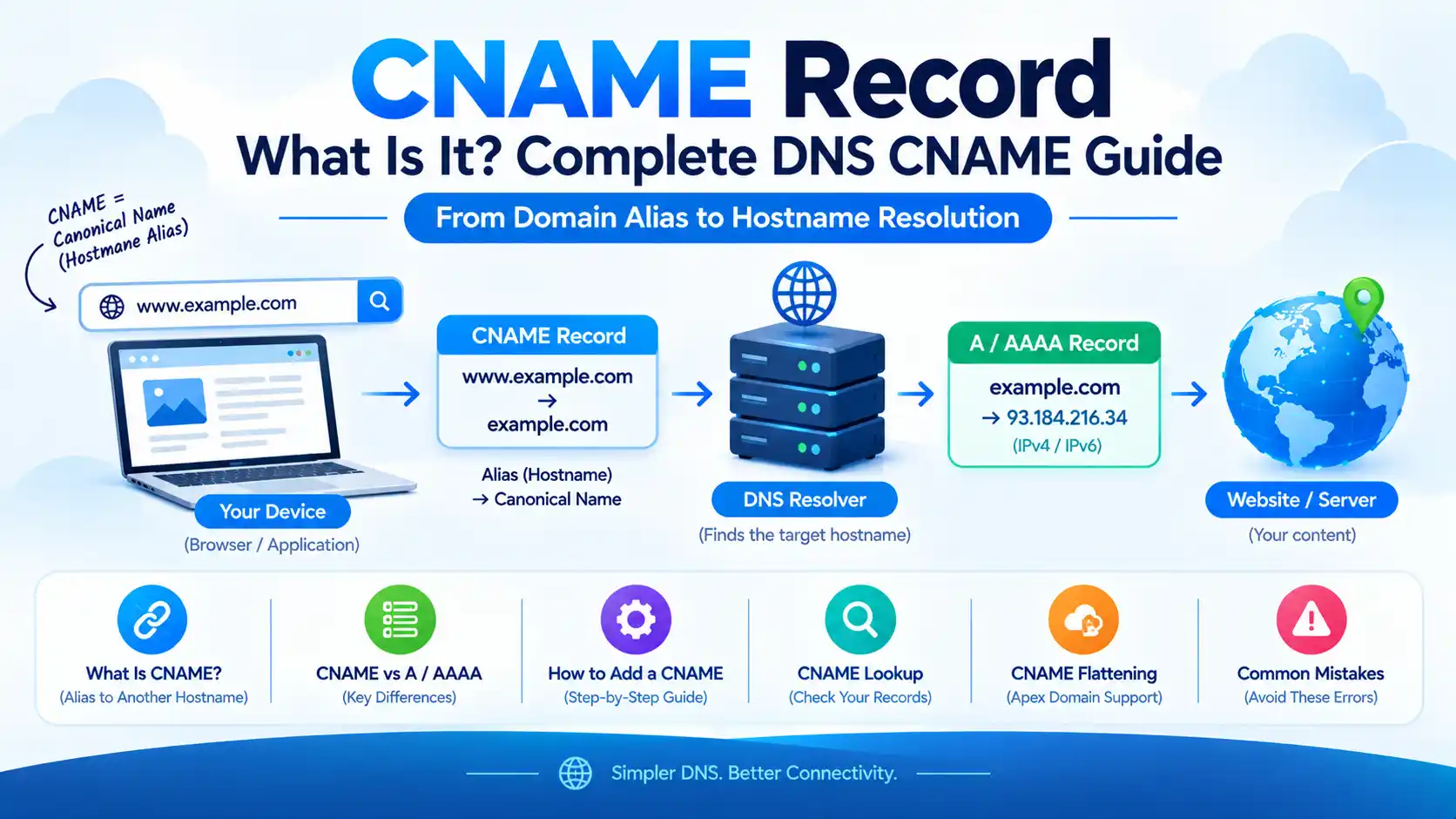
CNAME Record: What Is It? Complete DNS CNAME Guide

A CNAME record is a type of DNS record that creates an alias from one domain name or hostname to another canonical hostname.
For example:
www.example.com → example.com
Instead of storing an IP address directly, the CNAME tells DNS that www.example.com is an alias for example.com. DNS can then resolve the target hostname to its relevant A or AAAA records.
CNAME stands for Canonical Name. The DNS specifications define a CNAME record as identifying an alias and specifying its canonical or primary name.
What Is a CNAME Record?
A CNAME record is a DNS record used to point one hostname to another hostname.
A simple example is:
www.example.com CNAME example.com
Here:
www.example.comis the aliasexample.comis the target/canonical name- DNS can then resolve
example.comto its A or AAAA records
The important thing to remember is:
CNAME points to a hostname, not directly to an IP address.
For example, this is conceptually valid:
www.example.com → example.com
But this is not a CNAME target:
www.example.com → 192.0.2.1
An IP address belongs in an A record for IPv4 or an AAAA record for IPv6. Google Cloud’s DNS documentation likewise describes CNAME as an alias for another domain name, while A and AAAA records contain IPv4 and IPv6 addresses.
What Does CNAME Stand For?
CNAME stands for Canonical Name.
In DNS terminology, however, it is useful to understand that the owner/name of the CNAME record is the alias, while the value of the record identifies the canonical name.
For example:
blog.example.com CNAME sites.example.net
Here:
blog.example.com
is the alias.
sites.example.net
is the canonical/target name.
RFC 2181 specifically clarifies this terminology because people commonly refer to the owner of a CNAME record as “the CNAME,” even though technically it is the alias.
How Does a CNAME Record Work?
Suppose you have:
www.example.com CNAME example.com
and:
example.com A 192.0.2.1
When a DNS resolver needs the address for www.example.com, the CNAME tells it that the name is an alias for example.com.
The resolver can then resolve the target name.
Conceptually:
User
  ↓
www.example.com
  ↓
CNAME
  ↓
example.com
  ↓
A / AAAA record
  ↓
IP address
  ↓
Server
The CNAME itself does not contain the final IP address.
RFC 1034 specifies that when a CNAME exists, DNS processing can restart the query at the canonical name.
CNAME Record Example
A typical DNS record might look like this:
| Field | Example |
|---|---|
| Type | CNAME |
| Name | www |
| Target | example.com |
| TTL | 3600 |
The resulting relationship is:
www.example.com
       ↓
     CNAME
       ↓
example.com
The target can then have an A record, AAAA record, or other DNS data appropriate to the service.
What Is a CNAME Used For?
CNAME records are useful when multiple hostnames need to refer to another hostname rather than maintaining separate address records.
Common examples include:
wwwpointing to the main domain- Subdomains pointing to hosted services
- Connecting a domain to SaaS platforms
- Connecting custom domains to applications
- CDN configuration
- Domain verification
- Service-specific hostnames
- Creating aliases for infrastructure that may change IP addresses
For example:
www.example.com CNAME example.com
or:
shop.example.com CNAME stores.provider.com
The second example allows shop.example.com to use the DNS information associated with the provider’s hostname.
CNAME vs A Record
This is one of the most important DNS comparisons.
| Feature | CNAME Record | A Record |
|---|---|---|
| Points to | Hostname | IPv4 address |
| Example | www → example.com | example.com → 192.0.2.1 |
| Direct IP? | No | Yes |
| IPv4 | Indirectly resolved through target | Yes |
| Typical use | Hostname alias | Direct IPv4 address mapping |
Google Cloud DNS documents the distinction clearly: A records contain IPv4 addresses, while CNAME records specify alias names.
Simple rule
Use:
A → when you have an IPv4 address
AAAA → when you have an IPv6 address
CNAME → when you want one hostname to point to another hostname
CNAME vs AAAA Record
The difference between CNAME and AAAA is similarly straightforward.
CNAME
www.example.com → hosting.example.com
versus:
AAAA
www.example.com → 2001:db8::1
A CNAME contains a hostname.
An AAAA record contains an IPv6 address.
If your DNS provider gives you:
2001:db8::1234
you normally need an AAAA record.
If the provider gives you:
customer.example-host.com
you may need a CNAME record.
CNAME vs ALIAS Record
CNAME and ALIAS records are related but are not identical.
A traditional CNAME record has special DNS rules that prevent it from coexisting with other records at the same name.
This becomes particularly important at the zone apex, such as:
example.com
The DNS zone apex normally already has required records such as SOA and NS, so a standard CNAME cannot simply coexist with them.
Some DNS providers therefore offer alternatives such as:
- ALIAS
- ANAME
- CNAME flattening
Google Cloud DNS, for example, provides an ALIAS record as a provider-specific feature that behaves similarly to CNAME at the zone apex.
Cloudflare uses CNAME flattening to provide CNAME behavior at the zone apex.
Important distinction
Do not assume that an ALIAS record or CNAME flattening is a standard DNS record type available everywhere.
These features depend on the DNS provider.
Can You Use a CNAME for the Root Domain?
With standard DNS rules, a CNAME at the zone apex presents a problem because the apex must also contain other DNS records.
For example:
example.com
is the zone apex.
A normal CNAME cannot coexist with the required SOA and NS records at that same name.
However, some DNS providers offer special implementations.
Cloudflare supports CNAME flattening at the zone apex, allowing a domain such as example.com to use CNAME-style configuration while returning address records to DNS clients.
Therefore, the practical answer is:
A standard CNAME generally should not be used at the root/apex, but some DNS providers offer CNAME flattening or equivalent functionality.
What Is CNAME Flattening?
CNAME flattening is a DNS-provider feature that resolves the CNAME target and returns the resulting address information instead of exposing the CNAME directly to the querying client.
For example:
example.com
CNAME
external.example.net
The DNS provider can resolve:
external.example.net
        ↓
A / AAAA
        ↓
IP address
and return the resulting address information.
Cloudflare uses CNAME flattening to support CNAME behavior at the zone apex and describes the process as resolving the target and returning the final IP address.
This is particularly useful for services that ask you to point your root domain to a hostname.
How to Add a CNAME Record
The exact interface varies between DNS providers, but the basic process is similar.
Step 1: Open your DNS management panel
Log in to the service that is authoritative for your domain’s DNS.
Step 2: Find DNS records
Look for an option such as:
DNS → DNS Records → Manage DNS
Step 3: Create a CNAME record
Select:
Type: CNAME
Step 4: Enter the hostname
For example:
Name: www
Step 5: Enter the target
For example:
Target: example.com
Step 6: Set TTL
You can normally use the provider’s default or automatic TTL unless your service specifically recommends another value.
Example
| Setting | Value |
|---|---|
| Type | CNAME |
| Name | www |
| Target | example.com |
| TTL | Automatic / 3600 |
The resulting record means:
www.example.com → example.com
Cloudflare’s current documentation similarly describes the CNAME fields as a name, target hostname, TTL, and proxy status where applicable.
How to Add a CNAME Record in Cloudflare
If your domain uses Cloudflare DNS:
- Log in to Cloudflare.
- Select your domain.
- Open DNS.
- Select Records.
- Choose Add record.
- Select CNAME.
- Enter the hostname in Name.
- Enter the destination hostname in Target.
- Select the appropriate proxy status.
- Save the record.
For example:
Type: CNAME
Name: www
Target: example.com
Cloudflare’s documentation confirms that the CNAME target should be a fully qualified domain name rather than an IP address.
What Is a CNAME Record Used for on a Website?
One of the most common uses is connecting a subdomain to another hostname.
For example:
www.example.com CNAME example.com
Another common situation is a third-party service.
A provider might tell you:
Name:
verify

Target:
verification.provider.com
You then create:
verify.example.com CNAME verification.provider.com
The provider can query DNS to verify that you control the domain.
CNAME records are also commonly used by external services for domain verification and service configuration. Cloudflare’s documentation gives examples of CNAME-based verification records for third-party services.
CNAME for WWW
A very common DNS configuration is:
www.example.com
CNAME
example.com
This allows the www hostname to use the DNS information associated with the main domain.
For example:
www.example.com
       ↓
CNAME
       ↓
example.com
       ↓
A / AAAA
       ↓
Server
Whether you should use this exact setup depends on how your hosting provider expects the domain to be configured.
Do not blindly change an existing www record if your hosting provider has supplied specific DNS instructions.
Is CNAME a Redirect?
No.
This is a very common misunderstanding.
A CNAME is a DNS record, not an HTTP redirect.
For example:
www.example.com CNAME example.com
does not tell a browser:
Redirect the visitor to
https://example.com.
Instead, DNS resolves the hostname to the target’s DNS information.
An HTTP redirect happens later at the web/application layer, such as:
https://www.example.com
        ↓
HTTP 301/308
        ↓
https://example.com
So:
CNAME = DNS alias
301/302/308 = HTTP redirect
They solve different problems.
CNAME vs 301 Redirect
| Feature | CNAME | 301 Redirect |
|---|---|---|
| Layer | DNS | HTTP/Web |
| Points to | Hostname | URL |
| Changes browser URL? | No | Yes |
| Used for | DNS aliasing | URL redirection |
This distinction is especially important for SEO. A CNAME is not a replacement for a canonical URL, 301 redirect, or WordPress redirect.
How to Check a CNAME Record
You can perform a CNAME lookup using command-line DNS tools.
Using nslookup
nslookup -type=CNAME www.example.com
Using dig
dig CNAME www.example.com
For a shorter result:
dig CNAME www.example.com +short
If the domain has:
www.example.com CNAME example.com
the lookup can return:
example.com.
Why use a CNAME lookup?
A CNAME lookup is useful for checking:
- Whether a CNAME exists
- Where the hostname points
- Whether a DNS change has propagated
- Whether a third-party service verification record is configured
- Whether a hostname has an unexpected alias
- Whether a CNAME target still exists
CNAME Lookup vs DNS Lookup
A DNS lookup is a broad term.
It can query many record types:
A
AAAA
CNAME
MX
TXT
NS
SOA
A CNAME lookup specifically asks whether a hostname has a CNAME record and what its target is.
For example:
dig A example.com
asks for an A record.
dig AAAA example.com
asks for an AAAA record.
dig CNAME www.example.com
asks for a CNAME record.
Can a CNAME Point to Another CNAME?
Yes, DNS can encounter CNAME chains.
For example:
www.example.com
      ↓
CNAME
      ↓
service.example.net
      ↓
CNAME
      ↓
target.example.org
      ↓
A / AAAA
However, long or unnecessary chains add complexity.
RFC 1034 describes CNAME chains and specifies that DNS software should follow chains while detecting loops.
For practical DNS configuration, it is generally preferable to use the simplest valid configuration that satisfies the service’s requirements.
What Happens If a CNAME Target Does Not Exist?
A CNAME can exist in DNS while its target is broken or missing.
For example:
shop.example.com
CNAME
old-service.example.net
If old-service.example.net no longer resolves correctly, the alias will not successfully lead users to the intended service.
This is sometimes described as a dangling CNAME.
Cloudflare notes that when CNAME flattening is used and the final target has no A or AAAA records, the flattened response can be empty.
Therefore, whenever you create a CNAME, verify that the target hostname actually works.
Can You Have a CNAME and A Record With the Same Name?
Under normal DNS rules, a CNAME cannot coexist with other data at the same name.
For example, this configuration is problematic:
www.example.com CNAME example.com
www.example.com A     192.0.2.1
The reason is that a CNAME says the name is an alias, while an A record supplies independent data for the same name.
RFC 1034 specifies that when a CNAME exists at a node, other data should not be present there. RFC 2181 further clarifies that a name with a CNAME record cannot simultaneously have ordinary records of other types.
Cloudflare also prevents creating conflicting A, AAAA, and CNAME records with the same name in its DNS interface.
CNAME and Email Records
Be careful when using CNAME records on hostnames associated with email.
A CNAME cannot simply coexist with MX, TXT, or other records at the same name.
For example, if:
mail.example.com
has a CNAME, you cannot independently add ordinary DNS data to that same name as though it were a normal host record.
Email configuration commonly uses records such as:
MX
TXT
at the appropriate names.
Always follow your email provider’s DNS instructions instead of replacing existing records with a CNAME without understanding what they do.
CNAME and DNS Propagation
CNAME changes can be affected by DNS caching.
Suppose you change:
www.example.com
CNAME
old.example.com
to:
www.example.com
CNAME
new.example.com
Some DNS resolvers may temporarily continue returning the old information because they have cached the previous response.
The TTL controls how long DNS information can be cached.
Therefore, there is no single universal “CNAME propagation time” that applies to every DNS change.
The actual experience depends on caching, TTL values, the resolver involved, and the type of DNS change.
Does CNAME Affect Website Speed?
A CNAME does not automatically make a website faster or slower.
A CNAME can introduce another DNS name-resolution step because the target must also be resolved, but modern DNS resolvers cache responses, and DNS behavior depends on the resolver and configuration.
For this reason, you should not choose CNAME purely as a website-speed technique.
Use it when the DNS architecture or service you are connecting requires hostname aliasing.
CNAME and SEO
A CNAME is primarily a DNS configuration mechanism, not an SEO feature.
For example:
www.example.com CNAME example.com
does not itself tell Google to consolidate URLs.
Search engines deal with the web URLs after DNS resolution and HTTP communication.
If you need to consolidate duplicate website URLs, you would normally consider mechanisms such as:
- 301 redirects
- Canonical tags
- Consistent internal linking
- Sitemap configuration
- Correct HTTP/HTTPS setup
The CNAME simply helps DNS resolve the hostname.
Common CNAME Mistakes
1. Entering an IP address as the CNAME target
Incorrect:
CNAME → 192.0.2.1
Use an A record for an IPv4 address.
2. Pointing to a URL
Incorrect:
CNAME → https://example.com/page
A CNAME target is a hostname, not a complete URL.
Correct:
CNAME → example.com
3. Creating CNAME and A records with the same name
For example:
www CNAME example.com
www A 192.0.2.1
This conflicts with normal CNAME rules.
4. Using a CNAME at the root without checking provider support
The zone apex has special DNS requirements.
Check whether your provider supports:
- CNAME flattening
- ALIAS
- ANAME
- Another provider-specific apex solution
5. Creating a CNAME to a broken hostname
Always verify that the target itself resolves.
6. Mistaking CNAME for a redirect
A CNAME does not perform an HTTP redirect.
CNAME vs Other Common DNS Records
| Record | Points To / Contains | Typical Purpose |
|---|---|---|
| A | IPv4 address | IPv4 hostname resolution |
| AAAA | IPv6 address | IPv6 hostname resolution |
| CNAME | Hostname | Hostname alias |
| MX | Mail server hostname | Email delivery |
| TXT | Text data | Verification, policies, email configuration |
| NS | Name server hostname | DNS delegation |
Frequently Asked Questions About CNAME
A CNAME record is a DNS record that makes one hostname an alias for another hostname. The target is the canonical name associated with the alias.
CNAME means Canonical Name. It is the DNS record type used to associate an alias hostname with another canonical hostname.
CNAME records are commonly used to point a hostname or subdomain to another hostname, including third-party services, hosted platforms, CDNs, and other infrastructure.
An A record maps a hostname directly to an IPv4 address. A CNAME maps a hostname to another hostname.
No. A CNAME target is a domain name or hostname. Use an A record for an IPv4 address or an AAAA record for an IPv6 address.
No. A CNAME is a DNS alias. An HTTP 301 redirect is a web-server/application-level redirect.
Yes. A common configuration is:
www.example.com CNAME example.com
The exact configuration depends on your hosting and DNS provider.
A traditional CNAME cannot coexist with the other records required at a zone apex. Some providers support CNAME flattening, ALIAS, or ANAME-style functionality to solve this problem.
You can use:
dig CNAME example.com
or:
nslookup -type=CNAME example.comThere is no universal fixed time. DNS caching and TTL influence when different recursive resolvers begin returning the updated record.
Yes, DNS can follow CNAME chains, although unnecessarily long chains can add complexity. RFC 1034 describes CNAME chaining and loop handling.
Normally, no. A CNAME cannot coexist with other ordinary DNS records at the same name.
No. CNAME is DNS infrastructure and does not directly improve search rankings. It can, however, be part of correctly configuring a website’s domain and hosting infrastructure.
Final Takeaway
The easiest way to remember a CNAME record is:
A     → hostname → IPv4 address

AAAA  → hostname → IPv6 address

CNAME → hostname → another hostname
A CNAME is particularly useful when a service gives you a hostname instead of an IP address.
For example:
www.example.com
       ↓
     CNAME
       ↓
hosting.example.net
       ↓
   A / AAAA
       ↓
   IP address
The most important rule is that CNAME is an alias mechanism, not an IP-address record and not an HTTP redirect.
Once you understand CNAME alongside A records, AAAA records, DNS lookup, DNS propagation, and DNS servers, most basic DNS configurations become much easier to understand.