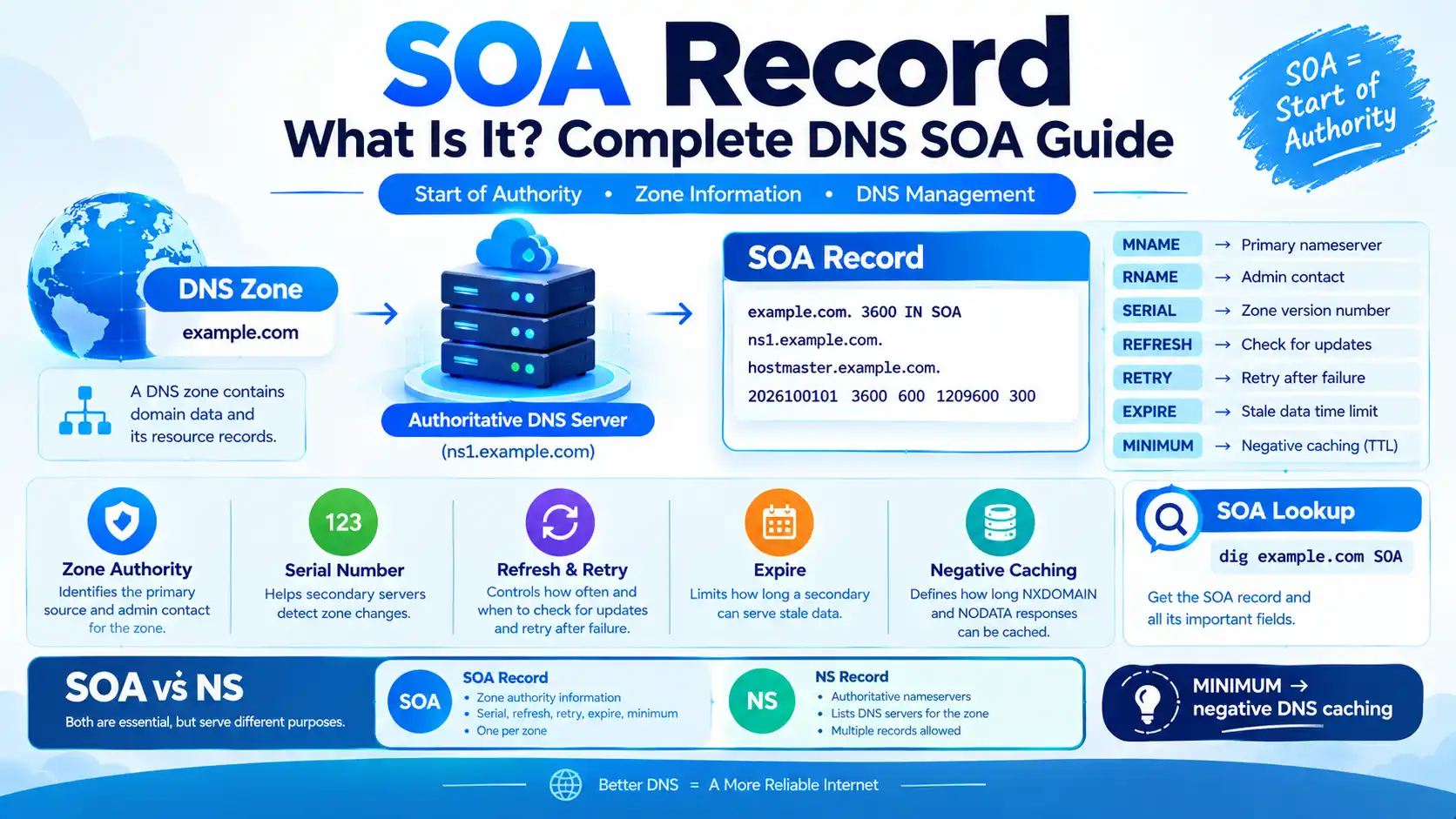
SOA Record: What Is It? Complete DNS SOA Guide

SOA stands for Start of Authority. An SOA record is a DNS record that identifies important authoritative information about a DNS zone, including the primary source of zone data, the responsible administrator, the zone serial number, refresh and retry timers, the expiration interval, and the value used for negative DNS caching.
Every DNS zone has an SOA record. It is particularly important for authoritative DNS servers, secondary DNS servers, zone transfers, DNS administration, and negative caching. RFC 1035 defines the SOA record and its fields, while RFC 2308 later clarified the modern meaning of the SOA MINIMUM field.
Quick Answer: What Is an SOA Record?
An SOA record is a DNS record that contains administrative and operational information about a DNS zone.
A typical SOA record looks like this:
example.com. 3600 IN SOA
ns1.example.com.
hostmaster.example.com.
2026100101
3600
600
1209600
300
The fields represent:
- MNAME → primary source/authoritative nameserver
- RNAME → responsible administrator’s mailbox
- SERIAL → zone version number
- REFRESH → how often a secondary server checks for updates
- RETRY → how long a secondary waits before retrying after a failed refresh
- EXPIRE → how long a secondary can continue serving the zone without successfully refreshing
- MINIMUM → primarily used for negative DNS caching under modern DNS rules
RFC 1035 defines the SOA structure and the first six fields, while RFC 2308 changed the modern interpretation of MINIMUM to negative-response caching.
What Does SOA Stand For?
SOA stands for Start of Authority.
The name reflects the record’s role at the beginning of a DNS zone’s authoritative information. The SOA record provides information that authoritative and secondary DNS servers use when managing and synchronizing a zone.
Google Cloud describes an SOA record as specifying authoritative information about a DNS zone and automatically creates one when a managed zone is created.
What Is an SOA DNS Record Used For?
The SOA record has several important purposes.
1. Identifying the zone’s primary source
The MNAME field identifies the nameserver that is the original or primary source of the zone data in the traditional DNS model.
2. Tracking zone changes
The SERIAL value identifies the version of the zone. Secondary DNS systems can compare serial numbers to determine whether the zone has changed.
3. Refreshing secondary servers
The REFRESH value tells a secondary server when it should check the primary/source for a newer SOA serial.
4. Retrying failed checks
The RETRY value determines when the secondary should try again after a failed refresh.
5. Expiring stale zone data
The EXPIRE value limits how long a secondary can continue serving the zone if it cannot successfully refresh from the primary source.
6. Negative DNS caching
The SOA MINIMUM value is used when determining how long negative responses such as NXDOMAIN or NODATA can be cached.
SOA Record Fields Explained
Here is the most important part of understanding an SOA record:
| Field | Meaning | Purpose |
|---|---|---|
| MNAME | Primary source nameserver | Identifies the server containing the original/primary zone data |
| RNAME | Responsible administrator | Represents the responsible mailbox |
| SERIAL | Zone version | Helps secondary DNS servers detect zone changes |
| REFRESH | Refresh interval | Controls how often secondary servers check for updates |
| RETRY | Retry interval | Controls retry timing after a failed refresh |
| EXPIRE | Expiration period | Limits how long stale zone data can remain authoritative on a secondary |
| MINIMUM | Negative-cache value | Used when determining caching time for negative DNS responses |
These fields are defined by the DNS specifications, while modern DNS implementations may expose them differently in their control panels.
SOA Record Example
Consider this example:
example.com.
3600
IN
SOA
ns1.example.com.
hostmaster.example.com.
2026100101
3600
600
1209600
300
Let’s break it apart:
example.com.
3600
IN
SOA
ns1.example.com.
hostmaster.example.com.
2026100101
3600
600
1209600
300
What does each value mean?
| Value | Meaning |
|---|---|
example.com. | DNS zone |
3600 | SOA record TTL |
IN | Internet DNS class |
SOA | Start of Authority record |
ns1.example.com. | MNAME |
hostmaster.example.com. | RNAME |
2026100101 | Serial number |
3600 | Refresh |
600 | Retry |
1209600 | Expire |
300 | Negative caching value |
The exact values vary by DNS provider. For example, Google Cloud’s documented SOA example uses different timer values from Cloudflare’s defaults, demonstrating that there is no single universal set of numbers.
What Is the SOA Serial Number?
The SOA serial number identifies the version of the DNS zone.
For example:
2026100101
A secondary DNS server can compare its current serial number with the serial provided by the primary/source.
If the authoritative serial has increased, the secondary knows that it needs to obtain the updated zone data.
Cloudflare explains that secondary servers initiate zone transfers when the SOA serial increases. AWS likewise documents the serial as the value used by DNS services supporting secondary DNS.
Common serial number format
DNS administrators often use a date-based format such as:
YYYYMMDDNN
Example:
2026100101
could represent:
2026= year10= month01= day01= first change that day
This is a convention, not a mandatory DNS format. The DNS protocol treats the value as an unsigned 32-bit version number and provides rules for comparing it across wraparound.
What Is the SOA Refresh Value?
The REFRESH value tells a secondary DNS server how long it should wait before checking the primary/source SOA record for a newer serial number.
For example:
REFRESH = 3600
means the configured refresh interval is 3600 seconds, or one hour.
Cloudflare documents its default refresh value as 10,000 seconds, while AWS and Google Cloud use different values in their examples. The actual value is provider- and configuration-dependent.
What Is the SOA Retry Value?
The RETRY value determines how long a secondary DNS server should wait before attempting another refresh after an earlier attempt failed.
For example:
RETRY = 600
means the secondary may retry after 600 seconds, or 10 minutes, according to the zone’s configuration.
The retry value is normally shorter than the refresh interval. Cloudflare explicitly documents that its retry value must not exceed the refresh value.
What Is the SOA Expire Value?
The EXPIRE value defines how long a secondary server can continue serving a zone if it cannot successfully refresh the zone from its primary/source.
For example:
EXPIRE = 1209600
equals:
14 days
After the configured expiration period is exceeded without successful refresh, the secondary should stop treating its stale zone data as authoritative.
Cloudflare describes Expire as the time after which a secondary should stop answering queries if the primary cannot respond; AWS describes the field similarly.
What Is the SOA Minimum Field?
This is one of the most misunderstood parts of an SOA record.
Older DNS documentation associated the MINIMUM field with minimum or default TTL behavior. However, RFC 2308 changed the modern meaning of the SOA MINIMUM field to the TTL used for negative responses.
Negative responses include situations such as:
- NXDOMAIN — the queried domain name does not exist
- NODATA — the name exists, but the requested record type does not
For example, if:
SOA MINIMUM = 300
a negative DNS response may be cached for up to approximately 300 seconds, subject to the DNS server’s SOA TTL and the rules defined by RFC 2308.
RFC 2308 specifies that the negative-response TTL is the smaller of the SOA MINIMUM value and the SOA record’s TTL.
SOA MINIMUM vs DNS TTL
These are not the same thing.
| Term | Meaning |
|---|---|
| DNS record TTL | How long a positive DNS record response may be cached |
| SOA record TTL | TTL applied to the SOA record itself |
| SOA MINIMUM | Modern negative-cache value |
| Negative TTL | How long certain NXDOMAIN/NODATA information may be cached |
This distinction is particularly important when troubleshooting a newly created DNS record.
For example, if a record did not exist earlier, a resolver may have cached the negative answer. Creating the record at the authoritative server does not necessarily make that cached negative response disappear immediately. RFC 2308 defines this negative-caching behavior.
What Is the Difference Between SOA and NS Records?
Both are essential DNS records, but they have different jobs.
| Feature | SOA | NS |
|---|---|---|
| Full name | Start of Authority | Name Server |
| Main purpose | Provides zone authority and administrative information | Identifies authoritative nameservers |
| Serial number | Yes | No |
| Refresh/retry/expire | Yes | No |
| Lists authoritative nameservers | No, MNAME identifies the primary/source field | Yes |
Google Cloud describes NS records as identifying authoritative nameservers, while SOA contains authoritative zone information such as the serial and timers.
SOA vs A Record
An A record maps a hostname to an IPv4 address.
| Record | Purpose | Example |
|---|---|---|
| A | Maps hostname to IPv4 | 203.0.113.10 |
| SOA | Describes DNS zone authority | Serial, refresh, retry, expire, etc. |
An SOA record does not normally provide a website’s IP address.
SOA vs CNAME
A CNAME record creates an alias from one hostname to another hostname.
An SOA record provides information about the DNS zone itself.
For example:
www.example.com → CNAME → example.com
while:
example.com → SOA → zone authority information
The two records perform completely different functions.
How to Check an SOA Record
You can perform an SOA lookup using common DNS command-line tools.
Using dig
Run:
dig example.com SOA
You can also use:
dig SOA example.com
A response may look similar to:
example.com. 3600 IN SOA ns1.example.com. hostmaster.example.com. 2026100101 3600 600 1209600 300
Using nslookup
On systems that support nslookup, try:
nslookup -type=SOA example.com
The exact output depends on your operating system and DNS resolver.
How to Perform an Online SOA Lookup
You can also use an online DNS lookup service.
Search for:
SOA lookup
or:
DNS SOA lookup
An SOA lookup can show:
- SOA record
- Primary/source nameserver
- Administrative contact
- Serial number
- Refresh interval
- Retry interval
- Expire interval
- Minimum/negative-cache value
- SOA TTL
When troubleshooting DNS, it can be useful to compare authoritative results with results from recursive resolvers.
What Happens When an SOA Serial Number Changes?
Suppose the current serial is:
2026100101
After a zone change, the serial becomes:
2026100102
A secondary DNS server can discover the higher serial and request updated zone data.
In traditional DNS zone-transfer systems, AXFR and IXFR can be used to transfer zone data. DNS NOTIFY can additionally allow a primary server to promptly notify secondary servers about changes rather than waiting for the normal refresh interval. RFC 1996 defines the DNS NOTIFY mechanism.
Does Every DNS Provider Use SOA the Same Way?
No.
The DNS protocol defines the structure and semantics, but providers can use different default values and management interfaces.
For example, Cloudflare documents these defaults for its SOA-related settings:
- Refresh: 10,000 seconds
- Retry: 2,400 seconds
- Expire: 604,800 seconds
- Negative-cache value: 1,800 seconds
- SOA record TTL: 3,600 seconds
Google Cloud’s example uses:
- Refresh: 21,600 seconds
- Retry: 3,600 seconds
- Expire: 259,200 seconds
- Minimum: 300 seconds
AWS Route 53 documents different default values again.
Therefore, do not assume that a particular SOA value is required for every DNS provider.
Is the SOA Record Important for SEO?
The SOA record is not a direct Google ranking factor in the same way as content relevance, links, or page experience signals.
Its importance for website owners is primarily technical.
A properly functioning DNS configuration helps ensure that:
- Your domain resolves correctly.
- Authoritative nameservers are working.
- DNS changes synchronize correctly where secondary DNS is used.
- Negative caching behaves as expected.
- DNS outages and configuration problems can be diagnosed.
In other words, SOA is part of the DNS infrastructure that makes your website reachable, rather than a conventional on-page SEO optimization.
Can You Change an SOA Record?
Many DNS providers expose some SOA fields through their control panel or API, but what you can edit depends on the provider.
Cloudflare, for example, provides configurable SOA settings through its DNS API, including mname, refresh, retry, expire, min_ttl, and the SOA record TTL.
Managed DNS providers may also generate and maintain parts of the SOA automatically.
Before manually editing SOA values, understand how your DNS provider handles:
- Primary and secondary DNS
- Zone transfers
- Automatic serial updates
- DNS NOTIFY
- Negative caching
- Provider-specific defaults
Common SOA Record Problems
1. Serial number does not increase
With traditional secondary DNS, a secondary may not recognize a zone update if the serial is not appropriately updated.
2. Incorrect refresh value
An unsuitable refresh value can affect how frequently secondary servers check for changes.
3. Incorrect retry value
A retry interval that is poorly configured can delay recovery attempts after communication failures.
4. Incorrect expire value
An improperly configured expiration interval can affect how long secondary servers can continue serving stale zone data.
5. Negative caching confusion
A newly created DNS record may appear to be missing because an NXDOMAIN or NODATA answer was cached previously.
6. Confusing SOA TTL with SOA MINIMUM
These are separate concepts. The SOA record itself has a TTL, while the SOA MINIMUM field is used for negative caching under RFC 2308.
SOA Record vs Other Common DNS Records
| Record | Main Purpose | Typical Data |
|---|---|---|
| SOA | Zone authority information | Serial, timers, administrator |
| NS | Authoritative nameservers | Nameserver hostnames |
| A | IPv4 address | IPv4 address |
| AAAA | IPv6 address | IPv6 address |
| CNAME | Hostname alias | Canonical hostname |
| MX | Email routing | Mail server hostname and priority |
| TXT | Text-based DNS data | Verification, SPF-related data, policies, etc. |
Frequently Asked Questions About SOA
An SOA record is the Start of Authority record for a DNS zone. It contains authoritative and administrative information such as the zone serial number, refresh, retry, expire, and negative-caching information.
SOA stands for Start of Authority.
It is used to describe important information about a DNS zone and support DNS administration, secondary-server synchronization, zone version tracking, and negative caching.
The SOA serial number is a version value for a DNS zone. Secondary DNS systems can compare their serial with the authoritative version to determine whether the zone has changed.
Refresh defines how often a secondary checks for zone changes. Retry defines how soon the secondary attempts another check after a failed refresh.
SOA EXPIRE defines how long a secondary can continue serving its zone data if it cannot successfully refresh from the primary/source.
The modern meaning of the SOA MINIMUM field is primarily the TTL used for negative DNS caching, such as NXDOMAIN and NODATA responses.
Use:
dig example.com SOA
or:
nslookup -type=SOA example.com
No. SOA provides zone authority and administrative information, while NS records identify authoritative nameservers.
Yes, at the DNS infrastructure level. It helps define zone information and supports DNS management and synchronization, although it is not a conventional on-page SEO ranking element.
That depends on your DNS provider. Some managed DNS services expose SOA settings while automatically maintaining others.
Final Takeaway
The SOA record is one of the fundamental records in DNS.
It tells DNS infrastructure important information about a zone, including:
- Where the primary/source zone data is maintained
- Who is responsible for the zone
- The zone’s serial number
- Refresh and retry timing
- The expiration period for stale secondary data
- The value used for negative DNS caching
The most important technical detail to remember is that SOA MINIMUM should not simply be described as the minimum TTL for every DNS record. Under RFC 2308, its modern role is primarily related to negative DNS caching.
For website owners, commands such as dig and nslookup make SOA lookup straightforward, while understanding the serial, refresh, retry, expire, and minimum fields can make DNS troubleshooting much easier.