Best AI Video Editors Compared: 8 Tools, Prices Verified

The best AI video editor is Descript if you edit talking-head video or podcasts, CapCut if you edit short social video on a tight budget, and OpusClip if your job is turning long videos into clips — there is no single winner, because these tools solve different jobs. That is the honest answer after comparing eight editors side by side: the AI that saves you the most time depends entirely on what you already shoot. Video is no longer optional — 91% of businesses use video as a marketing tool, and 63% of video marketers have used AI to create or edit video, up from 51% a year earlier, according to Wyzowl’s State of Video Marketing 2026 survey of 266 marketers and consumers. This guide compares the eight AI video editors that matter most right now — Descript, CapCut, OpusClip, Adobe Premiere, DaVinci Resolve, Filmora, VEED, and Runway — on the features that actually save time, the real price of each plan, and what users say on G2 and Capterra. Every price and rating below was checked on 23 November 2026.
The verdict: which AI video editor should you pick?
Best overall for talking-head and podcast video: Descript. Editing video by editing the transcript is the single biggest time-saver in this roundup, and its Underlord AI assistant handles the cleanup passes — filler words, silences, captions — in one go. Best value for social video: CapCut Pro at $19.99 a month ($179.99 a year), with the strongest free tier of any editor here. Best for turning long videos into Shorts and Reels: OpusClip, which finds the moments worth clipping and scores them for virality. Best professional editor with AI: DaVinci Resolve — its free tier is a full pro editor, and the $295 one-time Studio license (currently $236 on sale) beats every subscription in this list within about a year. Best budget AI editing: Filmora Advanced at $59.99 a year with 1,000 AI credits a month. Best browser-based team editor: VEED. Best for AI-generated shots: Runway — but understand it is a generator with editing tools, not a timeline editor, and its credits buy seconds, not hours.
Watch out for: credit metering is the hidden cost in this category. Descript meters media hours, OpusClip meters source minutes, Runway meters generated seconds — and on every one of them the headline price buys less than it looks like. Read the worked cost examples under each tool before you commit to an annual plan.
How we tested and how we chose
How we tested: I read every vendor’s pricing page, product documentation, and help center on 23 November 2026, and I read the G2 and Capterra review profiles for all eight tools the same day. I did not run paid sessions inside each tool, and I did not sign in to a test account — where a claim rests on a vendor page or a review site rather than my own hands-on session, I say so. Tools were chosen because they apply AI to footage you already shot — transcript editing, auto-clipping, captioning, reframing, cleanup — which is a different purchase from an AI video generator that invents footage from a prompt. That is why pure generators sit outside this list, with one exception: Runway earns its place because its Aleph model edits existing shots. Prices verified 23 November 2026.
The 8 best AI video editors at a glance
| Tool | Best for | Standout AI feature | Starting price | Free option |
|---|---|---|---|---|
| Descript | Talking-head video and podcasts | Edit video by editing the transcript; Underlord AI co-editor | $16/mo billed annually | Yes — 1 media hour/mo, 720p with watermark |
| CapCut | Short social video on phone, desktop, and web | Auto captions, Auto Reframe, EditPilot plain-language edits | $19.99/mo ($179.99/yr) | Yes — full editor, watermark-free desktop exports |
| OpusClip | Turning long videos into Shorts and Reels | AI clipping with Virality Score and animated captions | $15/mo (Starter, monthly only) | Yes — 60 credits/mo, watermark, clips expire in 3 days |
| Adobe Premiere | Professional timeline editing in Creative Cloud | Media Intelligence search, Generative Extend, text-based editing | $22.99/mo, annual plan billed monthly | No — 7-day trial; mobile app is free |
| DaVinci Resolve | Pro editing, color, and audio with no monthly bill | Neural Engine: Magic Mask, voice isolation, noise reduction | $0; Studio $295 one-time ($236 on sale) | Yes — a full professional editor, free |
| Filmora | Beginner-friendly AI editing on a small budget | Smart Short Clips, Smart Scene Cut, AI copywriting and music | $49.99/yr Basic (~$4.17/mo) | Yes — watermarked exports |
| VEED | Browser-based editing for teams and marketers | Magic Clips, Magic Cut, AI avatars, dubbing in 30+ languages | $12/mo billed annually (Lite) | Yes — watermarked, 720p, 10-minute cap |
| Runway | AI-generated shots and editing existing footage with AI | Gen-4.5 generation, Aleph in-shot edits, Veo 3.1 in one workspace | $15/mo ($12 billed annually) | Yes — 125 one-time credits, never renewed |
1. Descript — best for talking-head video and podcasts
Descript treats video editing like word processing: it transcribes your recording, and deleting a sentence in the transcript cuts the video. That one idea is why it tops this list for anyone who records themselves talking — podcasters, YouTubers, course creators, and teams that publish interviews. Its Underlord AI co-editor takes plain-language requests (“cut this to five minutes”, “add captions and remove the ums”), while Studio Sound cleans up room noise and filler-word removal strips the “ums” and dead air in one pass. Descript’s own published benchmark measured 93.3% average word accuracy across 10 test files, the best result on 8 of 10 against Temi, Trint, and Happyscribe — but check the transcript before you trust it on proper names and technical terms, because that is where reviewers say accuracy drops.
What we like: transcript editing is genuinely faster than timeline scrubbing for spoken video; exports timelines to Premiere, Final Cut Pro, and DaVinci Resolve when a project outgrows it; 4K export on Creator and above; a real free plan to learn on.
Watch out for: everything is metered in media hours, and media hours count your raw footage, not your finished video — a 60-minute recording costs an hour whether the final cut is 10 minutes or 50. Trustpilot tells a different story from G2 and Capterra at 2.5 out of 5 from 294 reviews (checked 13 November 2026), with repeated crash and data-loss complaints — keep a backup of any recording you cannot re-shoot.
User ratings: G2 4.6/5 (905 reviews); Capterra 4.8/5 (172 reviews) — both read 23 November 2026.
Pricing: Free $0 (1 media hour a month, 100 one-time AI credits, 720p watermarked export). Hobbyist $16 a month billed annually ($24 month to month) for 10 media hours and 400 AI credits a month. Creator $24 billed annually ($35 month to month) for 30 media hours, 800 AI credits, 4K export, and up to 3 seats. Business $50 billed annually ($65 month to month). Descript’s pricing page lists all four tiers.
Worked cost example: a weekly 60-minute podcast is roughly 4 hours of raw footage a month, so Hobbyist at $16 a month billed annually covers it — $192 a year. That works out to $1.60 per media hour on annual billing, against $0.80 on Creator. If you record daily, Creator’s 30 hours at $24 a month is the cheaper per-hour buy.
2. CapCut — best value for short social video
CapCut is ByteDance’s video editor, and it is the default editor for creators who live on TikTok, Reels, and Shorts. The free tier is the strongest in this roundup — the full editor with AI captions, background removal, and silence removal, and desktop exports without a watermark — and Pro adds 4K export, 1,200 AI credits a month, premium templates, and 1TB of cloud storage. The 2026 version folds AI generation into the editor: EditPilot on desktop turns a plain-language instruction into a timeline edit you review, and generation models including Seedance, Sora 2, and Veo 3.1 sit inside the same app. CapCut says it has 700 million monthly users, which is why its template library and trending effects stay ahead of every rival here.
What we like: the free tier genuinely covers a working creator’s week; one subscription works on phone, desktop, and web; Auto Reframe and auto captions are fast and accurate on vertical video; the template library is unmatched for trend-driven content.
Watch out for: CapCut publishes no single price list — its help center says prices vary by region, device, and promotion, and the final price appears only at checkout, so confirm the figure before you pay. Trustpilot rates it 1.3 out of 5 from 471 reviews (checked 21 November 2026), mostly billing and support complaints. US creators should also know CapCut was temporarily removed from US app stores in January 2025 under the law covering foreign-adversary-controlled apps, and availability has varied since — check the current status before building a workflow on it.
User ratings: G2 4.5/5; Trustpilot 1.3/5 (471 reviews) — both read 23 November 2026.
Pricing: Free $0. Standard $9.99 a month, mobile app only, in selected regions. Pro $19.99 a month or $179.99 a year (about $15 a month effective), with 1,200 AI credits a month and 1TB of cloud storage. Ultra $79 a month for heavy AI generation. Teams from $12.49 a seat a month. CapCut’s site shows final pricing after sign-in.
Worked cost example: Pro billed monthly costs $19.99 × 12 = $239.88 a year; billed yearly it is $179.99 — a saving of about $60 a year for the same 1,200 AI credits a month. AI features burn credits separately, so Pro is not unlimited AI: a heavy month of generation can still run you into top-ups.
3. OpusClip — best for turning long videos into Shorts and Reels
OpusClip does exactly one job: feed it a long video and get back a stack of captioned vertical clips, each scored with a Virality Score that ranks which moments are most likely to perform. It is the tool for podcasters and YouTubers sitting on hours of footage — a 90-minute episode becomes a week’s worth of Shorts without opening a timeline. Animated captions in 20+ languages, filler and silence removal, and auto-posting to YouTube Shorts, TikTok, and Instagram Reels come standard, and the Pro plan adds a social scheduler, 1:1 and 16:9 output, and XML export to Premiere Pro and DaVinci Resolve for finishing. OpusClip says more than 20 million creators and businesses use the platform.
What we like: the clip selection is genuinely good on talking-head content; the credit math is transparent — 1 credit processes 1 minute of source video, however many clips come out of it; the Virality Score gives you a defensible order to publish in.
Watch out for: it only works on footage you already shot — there is no editor for building a video from scratch, and reviewers consistently describe it as a first-draft machine, not an editor. Free clips carry a watermark and stop being exportable after 3 days. Starter is sold monthly only, with no annual discount, and monthly paid credits expire after 60 days.
User ratings: G2 4.6/5 (124 reviews); Trustpilot 4.0/5 (438 reviews) — both read 23 November 2026.
Pricing: Free $0 (60 credits a month, watermarked, 9:16 only). Starter $15 a month, monthly billing only, for 150 credits a month. Pro $29 a month, or $14.50 a month billed yearly ($174 a year), for 300 credits a month per pack, with a 2-seat team workspace. Business is custom priced. OpusClip’s pricing page lists all four tiers.
Worked cost example: a weekly 60-minute podcast is 240 source minutes a month, so Starter’s 150 credits fall short and Pro at $29 a month is the fit — $0.097 per source minute on monthly billing, or $0.048 on Pro billed yearly ($174 for 3,600 credits). A 2-hour podcast costs 120 credits, however many clips it produces.
4. Adobe Premiere — best professional editor with AI, if you live in Creative Cloud
Premiere — Adobe dropped the “Pro” from the name with version 26 in January 2026 — is still the industry-standard timeline editor, and its AI features in 2026 are genuinely useful rather than decorative: Media Intelligence finds clips by what they show or what is said, Generative Extend stretches a shot by a few seconds when the cut runs short, text-based editing refines a cut by editing the transcript, and the AI Assistant sorts footage into bins and assembles rough cuts. The single-app plan includes 25 generative credits a month, and the mobile app is free with no watermark. If you already work in Photoshop, After Effects, and Audition, nothing else in this list integrates as deeply — projects move between apps without round-tripping.
What we like: the deepest professional feature set here — multicam, color, audio, and a plugin ecosystem no rival matches; text-based editing and Generative Extend save real time on client work; Frame.io review is bundled.
Watch out for: subscription only, with no perpetual license at any price, and the $22.99 price needs a year’s commitment — month to month it is $34.49. The desktop app gets a 7-day trial that needs a card and rolls into a paid plan unless you cancel. It is also the steepest learning curve in this roundup; Adobe’s own free workshop for learning it runs two hours.
User ratings: G2 4.5/5 (1,736 reviews); Capterra 4.7/5 (612 reviews) — both read 23 November 2026.
Pricing: Premiere single-app $22.99 a month on an annual plan billed monthly ($34.49 month to month), with a 7-day free trial and 25 generative credits a month. Creative Cloud All Apps is $59.99 a month for individuals. Adobe’s Premiere page lists the current plans.
Worked cost example: a year of Premiere at $22.99 a month is $275.88 — more than DaVinci Resolve Studio’s $295 one-time license costs in year one at list price, and more than its $236 sale price within ten months. If you are not already paying for Creative Cloud, Resolve is the cheaper professional pick; Premiere earns its price only if you use the wider Adobe suite.
5. DaVinci Resolve — best professional editor with no monthly bill
DaVinci Resolve is the strongest value in professional video editing: the free tier is a complete professional editor — editing, color grading, visual effects, and Fairlight audio in one app — and the paid Studio license is a one-time $295 purchase with free updates, currently $236 on sale. Its AI lives in the DaVinci Neural Engine: Magic Mask isolates a subject with one click, voice isolation and AI noise reduction clean up bad audio, text-based editing (Studio) cuts by transcript, and IntelliSearch finds shots by description. If you want to learn professional editing properly, our CapCut vs DaVinci Resolve comparison breaks down exactly where each one wins.
What we like: no subscription, ever — the free tier alone outclasses paid competitors; Hollywood-grade color tools; the Studio license pays for itself against Premiere within about a year; runs on Windows, Mac, and Linux.
Watch out for: the free version limits GPU acceleration to a single GPU, and noise reduction and lens blur are Studio-only, so large projects render slower without the paid license. The AI features assist editing rather than generating footage, and the learning curve is real — this is a professional tool with panels everywhere, not a quick social editor.
User ratings: G2 4.7/5 (200 reviews); Capterra 4.8/5 (268 reviews) — both read 23 November 2026.
Pricing: DaVinci Resolve free, $0, with no time limit. DaVinci Resolve Studio $295 as a one-time perpetual license — $236 at its current sale price, checked 21 November 2026. Blackmagic Design’s product page lists both editions.
Worked cost example: three years of Premiere at $22.99 a month is $827.64. Three years of Resolve Studio at the $236 sale price is $236 — a saving of about $592, and the license keeps working after that with free updates.
6. Filmora — best budget AI editing for beginners
Filmora is the cheapest paid AI editing in this roundup, and the easiest to learn: a traditional timeline with AI layered on top rather than a new workflow to master. Smart Short Clips cuts long videos into vertical highlights, Smart Scene Cut finds scene changes automatically, and the Advanced plan’s 1,000 monthly AI credits cover text-to-speech, AI copywriting, speech-to-text, an AI video enhancer, and AI music. The Basic plan at $49.99 a year removes the watermark and unlocks 4K export, which makes it the lowest-priced watermark-free editor here. Version 15 is the current release.
What we like: the lowest entry price of any paid plan in this list — Advanced at $59.99 a year is $5 a month with 1,000 AI credits; a perpetual license exists ($79.99 one-time); the asset library of effects, music, and stock media is large and genuinely useful.
Watch out for: AI credits do not roll over, so an unused month is wasted. The free plan exports with a watermark, and the Basic plan includes no AI credits at all — only 500 free AI Mate conversations. Checkout add-ons can auto-renew: the Creative Assets trial is 7 days, then $19.99 a month unless you cancel. Mac pricing runs higher than Windows (Basic $5.83 a month, Perpetual $99.99).
User ratings: G2 4.4/5 (613 reviews); Capterra 4.5/5 (736 reviews) — both read 23 November 2026.
Pricing: Free $0 with watermarked exports. Basic $49.99 a year (about $4.17 a month): no watermark, 4K export, 1GB cloud storage. Advanced $59.99 a year: everything in Basic plus 1,000 AI credits a month and 10GB storage. Perpetual $79.99 one-time. Filmora’s pricing page lists all three.
Worked cost example: Advanced at $59.99 a year buys 12,000 AI credits a year — about $0.005 per credit. Compare Descript Hobbyist at $192 a year for 4,800 credits: Filmora is the cheaper way to experiment with AI editing, though its AI tools are narrower in scope.
7. VEED — best browser-based AI editor for teams
VEED runs entirely in the browser — no install, nothing to render locally — which is why teams and marketers pick it: record, edit, caption, and share from the same tab, with brand kits and collaboration built in. Its AI set is broad: Magic Clips cuts long recordings into highlights, Magic Cut removes filler words and silences, AI Avatars present a script without a camera, dubbing covers 30+ languages, eye-contact correction fixes wandering eyelines, and auto-subtitles run in 125+ languages. VEED counts 10 million monthly active users and customers including P&G, Pinterest, and Visa.
What we like: the fastest path from recording to published video in this list — nothing to install, and the subtitle accuracy is consistently praised in reviews; team features (brand kit, shared workspace, review links) are real, not bolted on; the free tier is enough to confirm the fit.
Watch out for: AI features such as avatars, dubbing, and text-to-video also consume separate AI credits on top of the plan price, so the plan is not the whole bill. Browser-based editing can lag or buffer on long videos, which reviewers flag as the main performance complaint. The free tier caps videos at 10 minutes and watermarks exports.
User ratings: G2 4.6/5 (1,725 reviews); Capterra 4.7/5 (432 reviews); Trustpilot 4.6/5 (3,000+ reviews) — all read 23 November 2026.
Pricing: Free $0 (watermarked, 720p, 10-minute cap). Lite $12 a month billed annually ($19 month to month): 1080p, no watermark. Pro $29 a month billed annually ($49 month to month): 4K export, every AI tool, 120-minute videos. Enterprise is custom priced. VEED’s pricing page lists all four tiers.
Worked cost example: Lite billed annually is $144 a year against $228 billed monthly — a saving of $84 a year for the same 1080p, watermark-free exports. If you only need VEED for a short project, the monthly rate is the honest comparison, not the annual headline.
8. Runway — best for AI-generated shots (but it is not a timeline editor)
Runway belongs on this list with a warning label: it is a generative video platform with editing tools, not a timeline editor. Its flagship Gen-4.5 model turns text or an image into 2- to 10-second clips, Aleph edits objects inside an existing shot from a text instruction, and the same workspace hosts third-party models including Veo 3.1 and Kling — so a marketer can generate the B-roll shot a script needs without a shoot. But nothing here replaces a timeline: there is no multi-track editing, no caption workflow, and no export-to-Premiere path for a finished video. Buy Runway for shots you cannot film, not for cutting the video you already have. If you want to generate footage rather than edit it, our guide to how to use AI to create a video covers that job in depth.
What we like: Gen-4.5 and Aleph are best-in-class for their jobs; one credit balance pays for Runway’s own models and hosted third-party models; 4K upscaling is included from Standard up; the free plan’s 125 credits never expire.
Watch out for: the credit math is the whole story — Gen-4.5 costs 12 credits a second, so Standard’s 625 credits buy about 52 seconds of video a month, and unused credits on Standard and Pro are lost at each monthly reset (only Max rolls them over, once). At that rate, a single 10-second clip costs 120 credits, or about $2.88 on Standard billed monthly.
User ratings: G2 4.1/5 (105 reviews) — read 23 November 2026, the lowest score in this roundup, with reviewers splitting on credit costs and generation consistency.
Pricing: Free $0 (125 one-time credits). Standard $15 a month ($12 billed annually) for 625 credits a month. Pro $35 a month ($28 billed annually) for 2,250 credits a month. Max $95 a month ($76 billed annually) for 9,500 credits a month. Team $69 a seat a month ($55 billed annually). Runway’s pricing page lists all five tiers.
Worked cost example: a 30-second product shot in Gen-4.5 costs 360 credits. On Standard ($15 a month, 625 credits) that is more than half the month’s allowance for one shot; on Pro ($35 a month, 2,250 credits) it is 16% of the month. Budget in seconds, not in plans — and generate at the lowest resolution you can tolerate, because higher resolutions cost more credits per second.
What does an AI video editor cost per month, really?
The headline price is only half the story — the other half is what the plan meters. The chart below shows the entry paid plan of each tool on annual billing, so you can see the real monthly commitment side by side. Two things jump out: Filmora Advanced at $5 a month is the cheapest paid AI editing here, and DaVinci Resolve Studio is not on the chart at all, because it is a $295 one-time purchase ($236 on sale) with no monthly price — over three years it is the cheapest professional option by a wide margin.
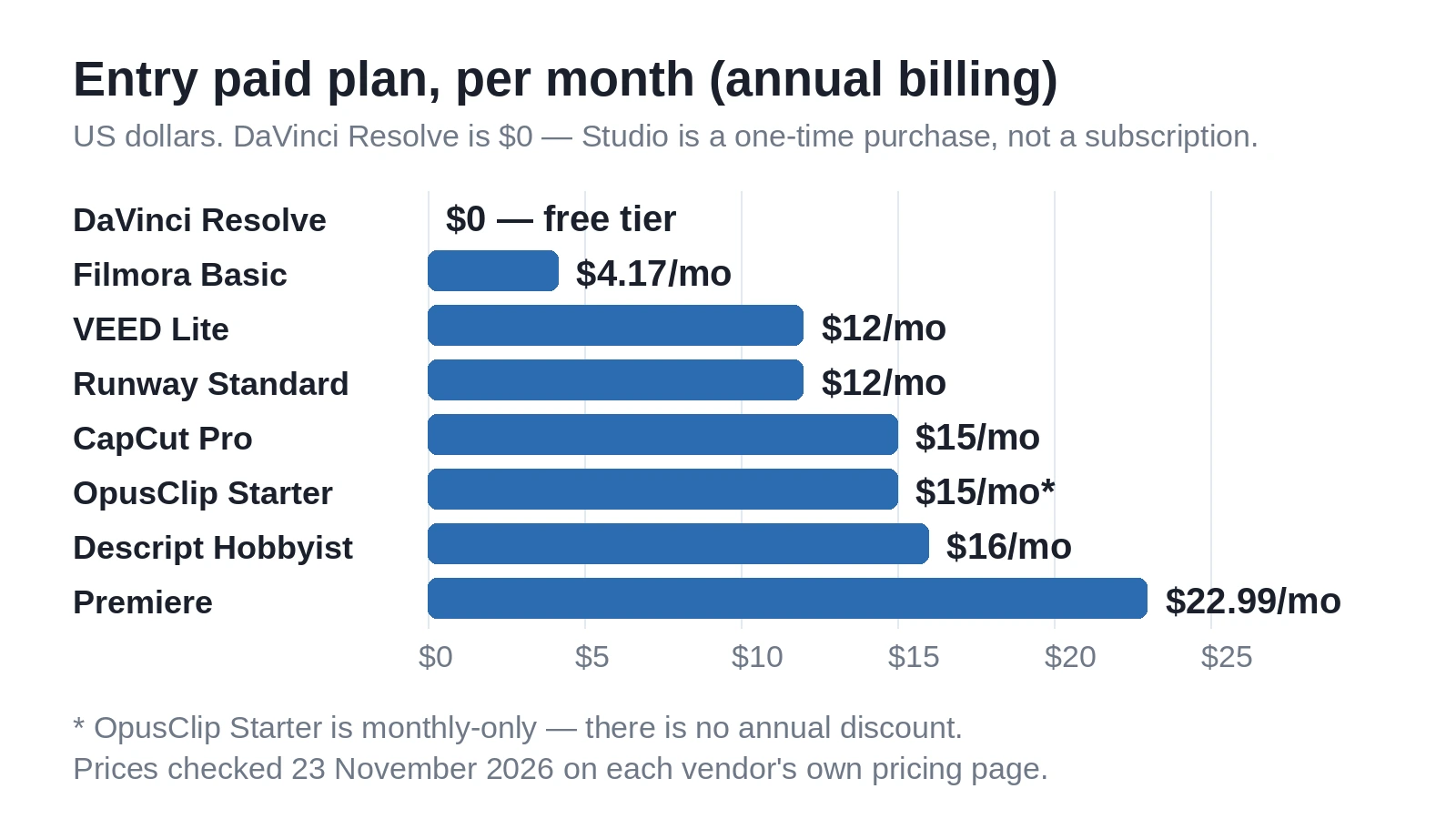
The meter matters more than the price. Descript’s Hobbyist gives you 10 media hours a month — enough for a weekly podcast, not for daily vlogging. OpusClip’s Starter gives you 150 source minutes — enough for two and a half hours of raw footage. Runway’s Standard gives you 625 credits — about 52 seconds of Gen-4.5 video. Before you buy an annual plan, map your actual monthly volume against the meter, not the headline: a plan that looks cheap and runs out on the 20th of the month is the most expensive plan you can buy.
Which AI video editor is best for YouTube?
Descript, for most YouTubers. Talking-head and tutorial channels live or die on how fast spoken footage becomes a clean cut, and transcript editing is the fastest way to do that — delete the ramble in the text and the video follows. Pair it with OpusClip to turn each long video into a week’s worth of Shorts, and you have a complete YouTube workflow for $31 a month (Descript Hobbyist at $16 plus OpusClip Starter at $15). If your channel is visual-first — travel, filmmaking, cinematics — skip the AI-first tools and take DaVinci Resolve’s free tier, which is a real professional editor that costs nothing until you want Studio’s AI features.
Which AI video editor has the best free plan?
DaVinci Resolve, by a distance — it is a full professional editor with no time limit, no watermark, and no subscription. The catch is that its best AI features (noise reduction, Magic Mask, text-based editing) need the $295 Studio license. If you want AI features without paying, CapCut’s free tier is the best of the AI-first tools: the full editor with auto captions, background removal, and silence removal, and desktop exports without a watermark. Descript’s free plan is the most limited — 1 media hour a month and watermarked 720p exports — but it is enough to learn whether transcript editing clicks for you. Our roundup of the best free video editing software with no watermark covers the no-cost options in more depth.
Can AI video editors replace a human editor?
Not yet — and that is the wrong question. AI editors replace the repetitive 80% of editing: cutting silences, removing filler words, adding captions, reframing for vertical, and pulling highlights from long recordings. The remaining 20% — story structure, pacing, which clip to keep and which to kill, the cut that lands the joke — is still a human decision, and every tool in this list works best when you review what it did. The right mental model is an assistant editor who works fast and never gets tired, not a replacement editor. Use the time it saves to shoot more, not to publish unchecked: watch every AI cut once before it goes live, because the tools are confident even when they are wrong — a mis-transcribed word in Descript can delete the wrong sentence, and an OpusClip Virality Score is a prediction, not a promise.
Do I still need a traditional editor if I use an AI video editor?
For short social video, probably not — CapCut or VEED covers the whole job from import to publish. For anything longer or more deliberate, keep one in your toolkit: Descript exports timelines to Premiere, Final Cut Pro, and DaVinci Resolve for a reason, and OpusClip’s Pro plan exports XML to Premiere and Resolve for finishing. The practical setup most creators land on is an AI tool for the rough cut and a traditional editor for the finish. If you record tutorials or gameplay, OBS Studio is the free recorder most creators pair with these editors, and if your raw files are too large to work with comfortably, our guide to compressing video files without losing quality keeps the quality intact. Podcasters should also look at our best podcast editing software for beginners roundup, and if your videos need voiceover, the best AI voice generators we tested cover that job. Microsoft’s own editor is covered in our Clipchamp guide if you want a no-install starting point on Windows.
Frequently asked questions
There is no single winner — it depends on the job. Descript is the best overall pick for talking-head video and podcasts, because editing by transcript is the fastest way to cut spoken footage. CapCut Pro is the best value for short social video. OpusClip is the best tool for turning long videos into Shorts and Reels. DaVinci Resolve is the best professional editor, and its free tier costs nothing. Pick by the job you do every week, not by the longest feature list.
DaVinci Resolve, by a distance — it is a complete professional editor with no time limit, no watermark, and no subscription, though its best AI features need the $295 Studio license. Among the AI-first tools, CapCut’s free tier is the strongest: the full editor with auto captions, background removal, and silence removal, and desktop exports without a watermark. Descript’s free plan is the most limited at 1 media hour a month with watermarked 720p exports.
Not yet. AI editors replace the repetitive part of editing — cutting silences, removing filler words, adding captions, reframing for vertical, and pulling highlights from long recordings. Story structure, pacing, and which clip to keep are still human decisions, and every tool here works best when you review what it did. Watch every AI cut once before it goes live: a mis-transcribed word can delete the wrong sentence, and a Virality Score is a prediction, not a promise.
Most creators land between $12 and $24 a month on annual billing: VEED Lite and Runway Standard at $12, CapCut Pro at about $15, OpusClip Starter at $15, and Descript Hobbyist at $16. Filmora Advanced is the cheapest paid AI editing at $59.99 a year, about $5 a month. Adobe Premiere is the most expensive at $22.99 a month on an annual plan. DaVinci Resolve Studio is a one-time $295 purchase, currently $236 on sale, with no monthly bill at all.
CapCut is made by ByteDance, and it was temporarily removed from US app stores in January 2025 under the law covering foreign-adversary-controlled apps; availability has varied since then. Check the current status in your app store before building a workflow on it, and keep your project files backed up outside the app so a store removal cannot lock you out of your own work.
It depends on the plan. The free tiers of Descript, VEED, and OpusClip all watermark exports, and Filmora’s free plan does too. CapCut’s free tier is the exception — desktop exports carry no watermark. Every paid plan in this roundup removes the watermark, starting from Filmora Basic at $49.99 a year. If watermark-free export matters to you, confirm it on the vendor’s pricing page before you pay, because free-tier terms change.